3
BASIC OPERATION
3-7
Setting the frequency (Continued)
D Entering a Band Edge
When “ON (User)” or “ON (User) & TX Limit” is
selected on the “Band Edge Beep” screen, you can
enter a total of 30 band edge frequencies.
L Initially, all band edges are entered. Therefore, you must
rst edit or delete them to enter a new band edge.
L You cannot enter an overlapped frequency or a frequency
that is out of the preset transmit frequency.
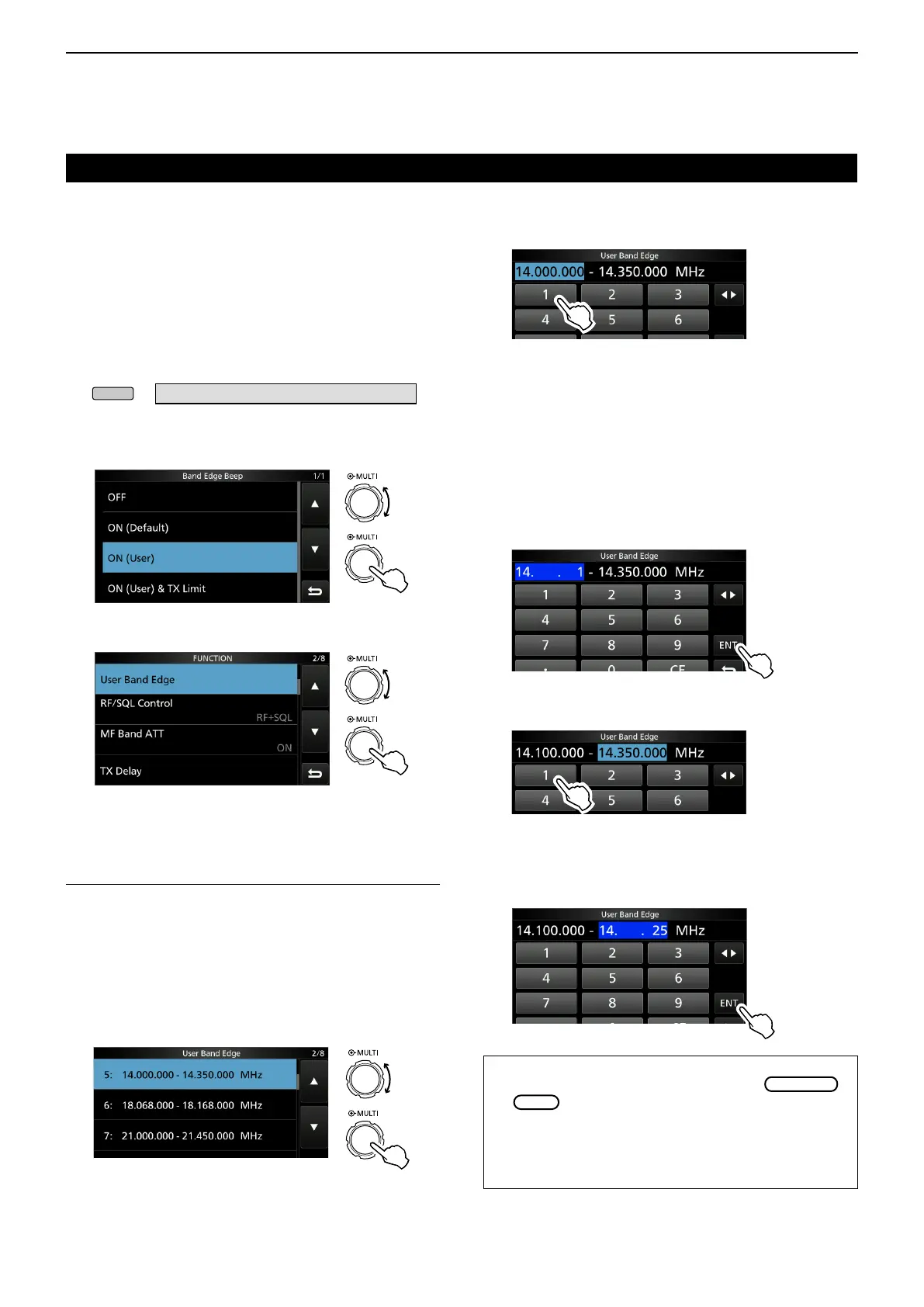
1. Open the “Band Edge Beep” screen.
» SET > Function > Band Edge Beep
2. Select “ON (User)” or “ON (User) & TX Limit.”
L If you select “ON (User) & TX Limit,” you can limit
transmission to within the entered frequency range.
3. Select “User Band Edge.”
“Band Edge Beep” screen
Rotate
Push
Rotate
Push
FUNCTION set screen
Editing a Band Edge
You can edit a band edge entered as a default or
when entering a new band edge.
1. On the FUNCTION set screen, select “User Band
Edge.”
2. Touch the band edge you want to edit for 1
second.
(Example: 5: 14.000.000 – 14.350.000 MHz)
Rotate
Push
3. Edit the lower band edge frequency.
(Example: 14.1)
4. Touch [ENT] to save the edited lower band edge
frequency.
5. Edit the upper band edge frequency.
(Example: 14.25)
6. Touch [ENT] to save the edited upper band edge
frequency.
L The edited band edge is saved and returns to the
previous screen.
TIP:
• You can also edit the frequency by rotating
or
.
• Each band edge must be higher in frequency than the
ones above it. If you try to enter a lower frequency than
the edges above, the lower frequency edge will be
cleared when you push [ENT].
“User Band Edge” screen
Entry examples
• 14.025 MHz: [1], [4], [•], [0], [2], [5], [ENT]
• 18.0725 MHz: [1], [8], [•], [0], [7], [2], [5], [ENT]
• 730 kHz: [0], [•], [7], [3], [ENT]
• 5.100 MHz: [5], [•], [1], [ENT]
• 7.000 MHz: [7], [ENT]
• Changing from 21.280 MHz to 21.245 MHz:
[•], [2], [4], [5], [ENT]
• Opens the “User Band Edge” screen.



 To Next Page