8
USING AN SD CARD
8-9
Backing up the data saved on the SD card onto a PC (Continued)
D Making a backup le on your PC
Windows 7 is used for these instructions.
1. Insert the SD card into the SD card drive or a
memory card reader* on your PC.
*User supplied.
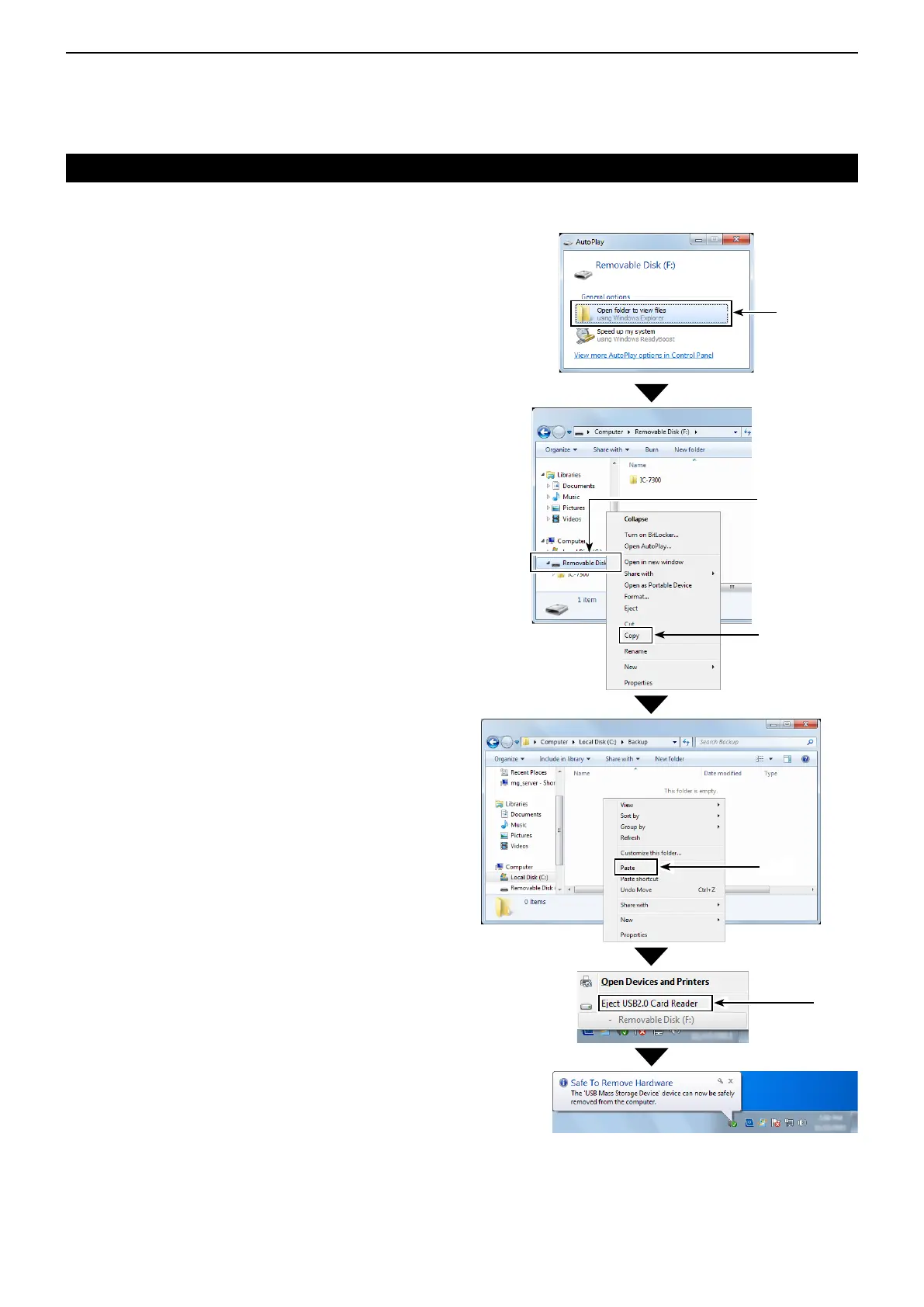
2. The “AutoPlay” screen is displayed, as shown to
the right.
Click “Open folder to view files.”
• Displays the IC-7300 folder.
3. Right-click “Removal Disk,” and then click “Copy.”
4. Open the desired folder to make a backup file,
and then, right-click on the folder.
Then, click “Paste.”
• Pastes the copied SD card data onto the hard disk.
(Example: Pasting into the “Backup” folder in the
C drive)
5. When removing the SD card from your PC, be
sure to safety remove it.
L The screen shot shows when a memory card reader
is inserted.
6. After “Safe To Remove Hardware” is displayed,
remove the SD card from your PC.
Click
Click
Click
Right-click
Click



 To Next Page