2
INSTALLATION AND CONNECTIONS
2-3
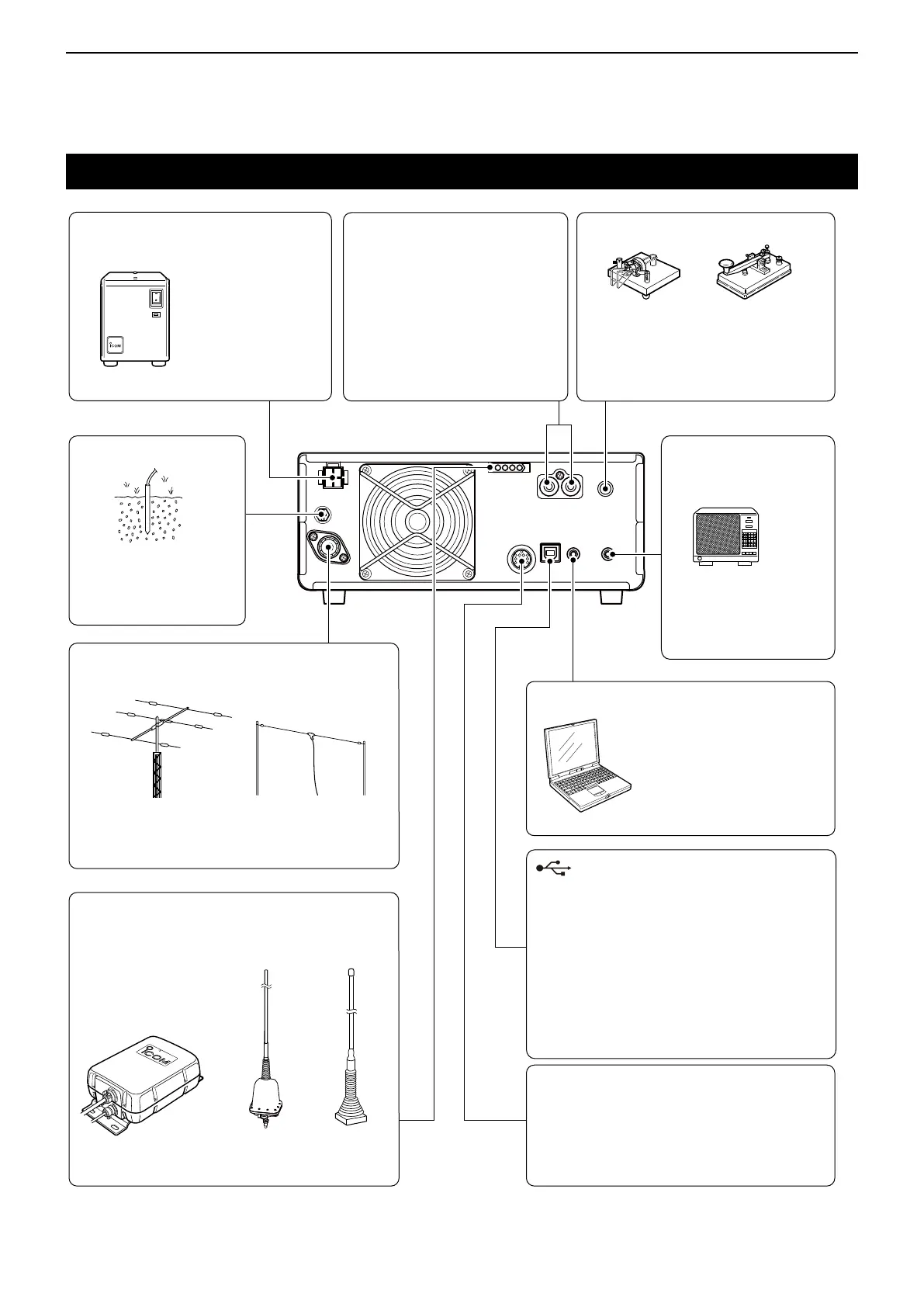
Rear panel connection
[DC 13.8 V] DC power supply
(p. 18-4)
Use the optional
PS-126 or a power
supply with 13.8 V DC
output and a current
capacity of at least
21 A.
[KEY] (CW key) jack (p. 18-4)
[GND] (Ground)
Grounding prevents
electrical shock, TVI
and other problems.
[ANT] (antenna) connector
Connect a 50 Ω antenna for the HF, 50/70 MHz
frequency bands.
[REMOTE] jack (p. 18-4)
(3.5 mm: 1/8 in (d))
Remotely controls the
transceiver, using the
optional RS-BA1, or
CI-V commands.
[TUNER] control socket (p. 2-4)
Connect the control cable
from an optional AH-4
automatic antenna tuner
or AH-740
automatic
tuning antenna. The AH-2b
is connected to the AH-4.
AH-4
(Option)
AH-2b
(Option)
[EXT-SP]
(External speaker) jack
(p. 18-4) (3.5 mm: 1/8 in (d))
SP-34
(Option)
Impedance: 4~8 Ω
Audio level: More than
2.5 W at 10% distortion
into an 8 Ω load
[ALC]/[SEND] jack
Connect with an RCA plug
[ALC] jack connects to the ALC
output jack of a non-Icom linear
amplier.
[SEND] jack is used to control
an external non-Icom linear
amplier.
[USB] port
• Remotely controls the transceiver using
CI-V commands.
• Sends the received audio to the PC
• Inputs modulation
• Sends the decoded RTTY outputs to the PC.
• Remote control operation using the optional
RS-BA1.
( Icom does not guarantee the performance of the
PC, network device or network settings)
[ACC] (accessory) socket (p. 18-2)
Connects control lines for external devices
such as a TNC or a PC.
Refer to the external device’s instruction
manual for connection.
Paddle Straight key
PS-126 (option)
AH-740
(Option)
(6.35 mm: 1/4 in (d))
To use the external electronic keyer,
select “Straight” in the “Keyer Type”
item on the CW-KEY SET screen while
in the CW mode.



 To Next Page