8
USING AN SD CARD
8-6
Loading the saved data les onto an SD card
You can load the Memory channels and transceiver’s
settings from the card to the transceiver.
This function is convenient when:
• Copying the saved data to another IC-7300 to
operate with the same data.
• Using one IC-7300 by two or more operators with
their own individual data.
L The transceiver has “ALL” and “Select” loading
options to choose from.
TIP: Saving the current data is recommended before
loading other data into the transceiver.
(Example: Loading the selected data)
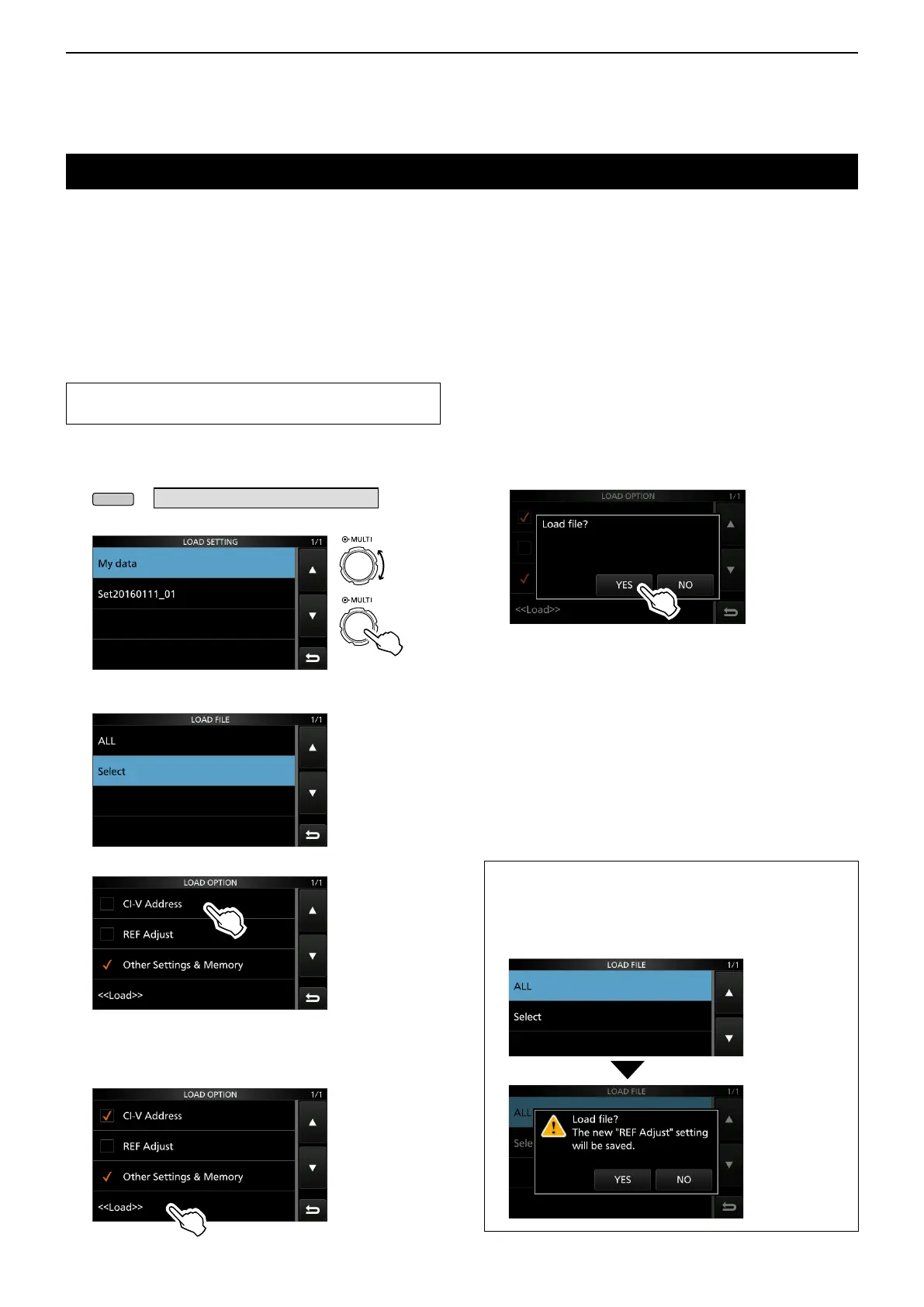
1. Open the LOAD SETTING screen.
» SET > SD Card > Load Setting
2. Select the desired file to be loaded.
Rotate
Push
LOAD SETTING screen
3. Select “Select.”
4. Touch the desired loading option.
• “✓” is displayed left side of the selected option.
L The Set mode settings and Memory channel contents
are always loaded.
5. Touch “<<Load>>.”
6. Touch [YES].
• Starts the le check.
L While checking the le, “Checking the le.” and a
progress bar are displayed.
L When you select “REF Adjust” in step 4, “The new
"REF Adjust" setting will be saved” is displayed.
7. After checking, the file loading starts.
• While loading, “LOADING” and a progress bar are
displayed.
8. After loading ends, “Restart the IC-7300” is
displayed.
Turn the transceiver power OFF, then ON again to
restart the transceiver.
TIP: When you select “ALL” in step 3, the following
contents are loaded.
• CI-V Address
• Setting of the “REF Adjust” item in the Set mode.
• Set mode settings and Memory channel contents



 To Next Page