4
RECEIVING AND TRANSMITTING
4-24
Operating RTTY (FSK) (Continued)
D Transmitting an RTTY memory content
You can transmit the preset characters on the RTTY
MEMORY screen.
L You can edit the characters by touching [EDIT] on the
RTTY MEMORY screen.
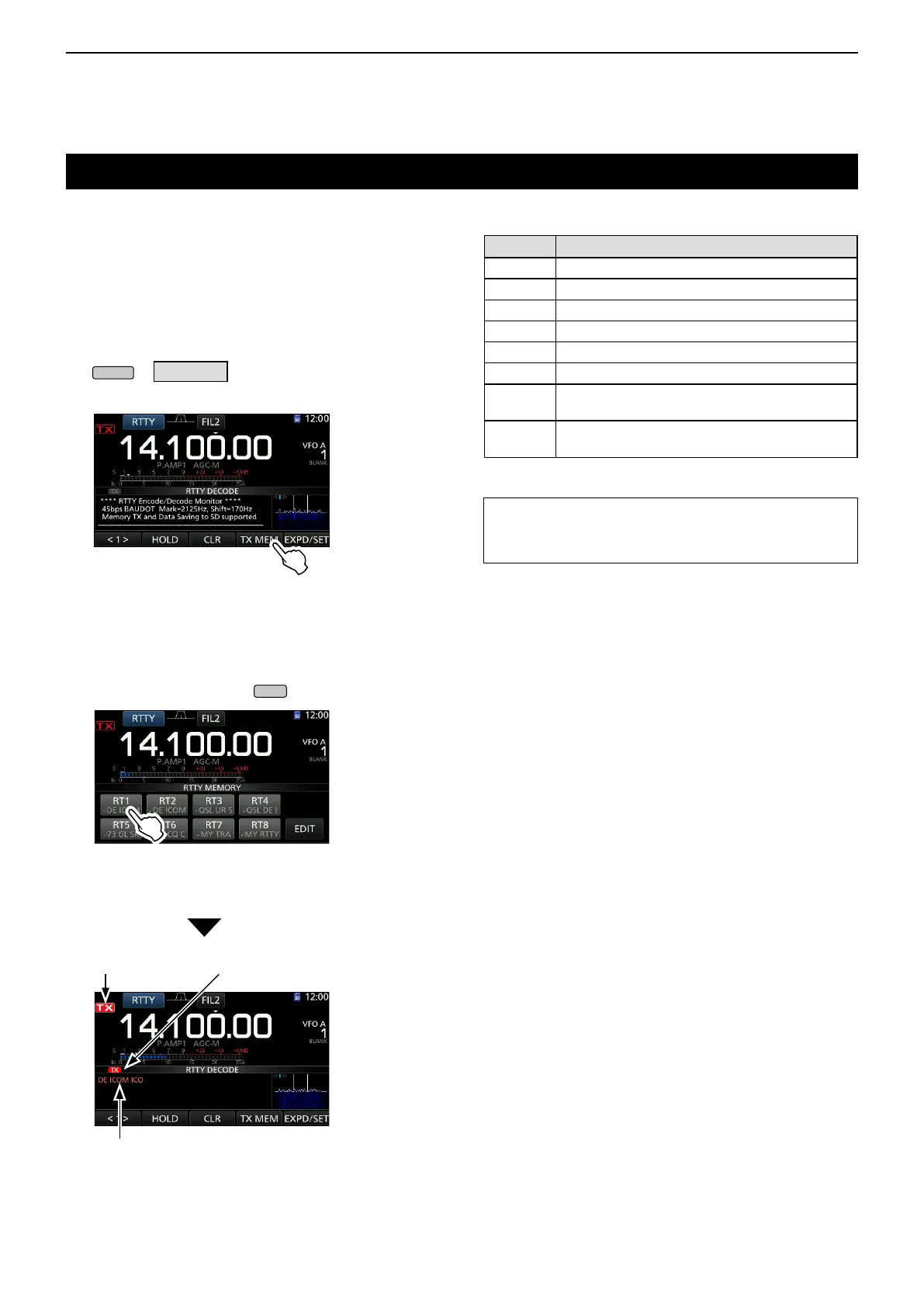
1. Open the RTTY DECODE screen in the RTTY
mode.
» DECODE
2. Touch [TX MEM].
RTTY DECODE screen
• Opens the RTTY MEMORY screen.
3. Touch the desired RTTY memory between [RT1]
and [RT8] to transmit.
(Example: RT1)
L To cancel the transmission and to return to the RTTY
DECODE screen, push
.
RTTY MEMORY screen
Transmitting contents are displayed.
(Example: RT1)
Lights red Lights red
Memory Preset characters by default
RT1
↵ DE ICOM ICOM K ↵
RT2
↵ DE ICOM ICOM ICOM K ↵
RT3
↵ QSL UR 599–599 BK ↵
RT4
↵ QSL DE ICOM ICOM UR 599–599 BK ↵
RT5
↵ 73 GL SK ↵
RT6
↵ CQ CQ CQ DE ICOM ICOM ICOM K ↵
RT7
↵ MY TRANSCEIVER IS IC–7300 & ANTENNA
IS A 3–ELEMENT TRIBAND YAGI. ↵
RT8
↵ MY RTTY EQUIPMENT IS INTERNAL FSK
UNIT & DEMODULATOR OF THE IC–7300. ↵
TIP: When an external keypad is connected to the [MIC]
jack, you can transmit the RTTY memories using the
external keypad. See page 18-3 for details.
• The TX status indicator lights red and the Po meter
swings.



 To Next Page