3
BASIC OPERATION
3-5
Setting the frequency (Continued)
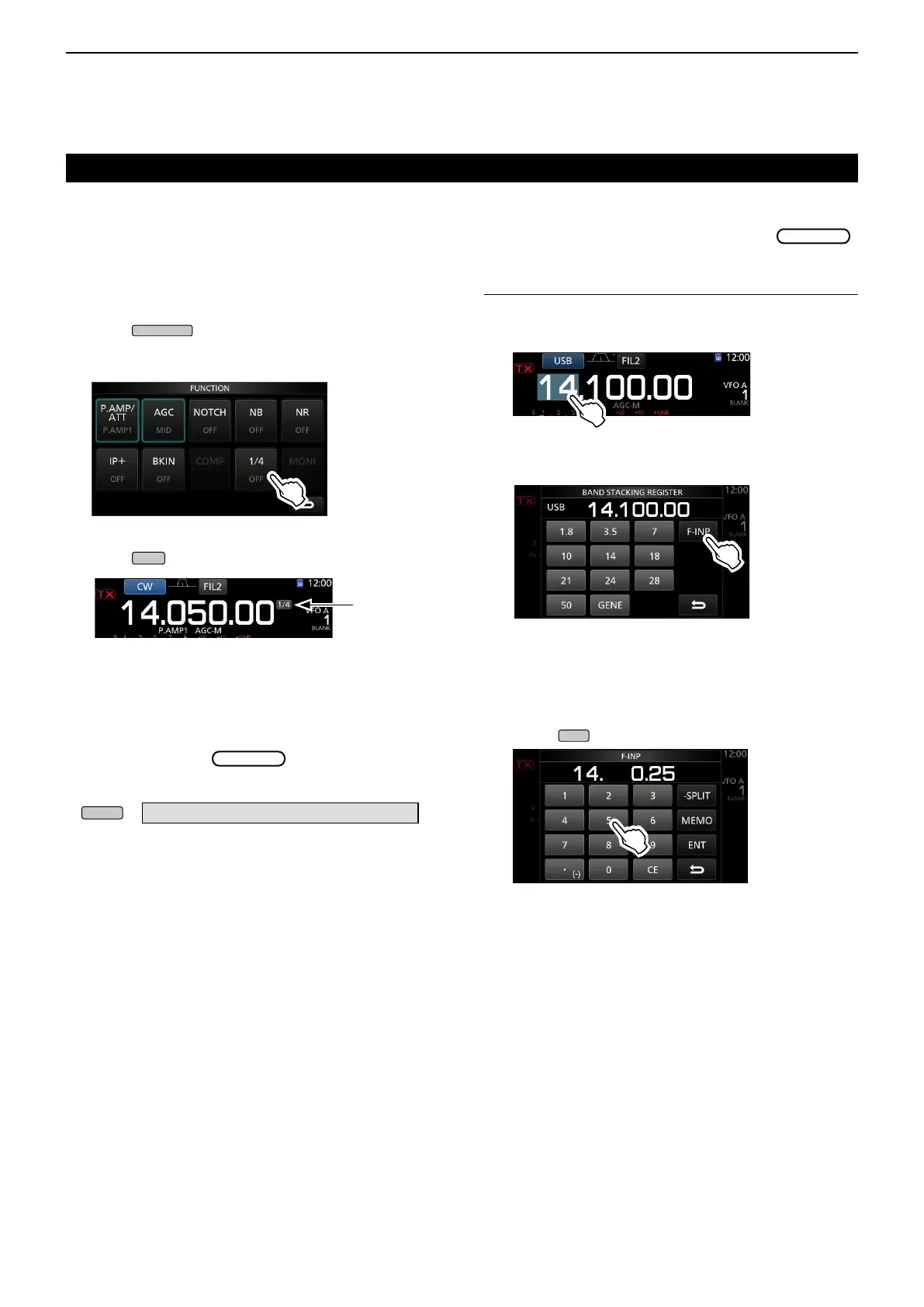
D About the 1/4 Tuning function
Mode: SSB-D/CW/RTTY
With the Tuning Function OFF, turn ON the 1⁄4 Tuning
function to reduce the tuning speed to 1⁄4 of the
normal speed, for ner tuning.
1. Push
.
• Opens the FUNCTION screen.
2. Touch [1/4].
1/4 Tuning
function
3. Push
.
D Directly entering a frequency
You can set the frequency without rotating
by directly entering it on the keypad.
Entering the operating frequency
1. Touch the MHz digits.
(Example: 14)
• Opens the F-INP screen.
3. Start entry with the MHz digits.
LTo clear the entry, touch [CE].
L To clear the entry and return to the previous screen,
push
.
• Opens the BAND STACKING REGISTER screen.
2. Touch [F-INP].
BAND STACKING REGISTER screen
F-INP screen (Example:14.025)
4. Touch [ENT] to set the entered frequency.
• Closes the F-INP screen.
L If you touch [ENT] when the digits under 100 kHz are
not entered, “0” will be automatically entered into the
digits that are blank.
Entry examples
• 14.025 MHz: [1], [4], [•(−)], [0], [2], [5], [ENT]
• 18.0725 MHz: [1], [8], [•(−)], [0], [7], [2], [5], [ENT]
• 730 kHz: [0], [•(−)], [7], [3], [ENT]
• 5.100 MHz: [5], [•(−)], [1], [ENT]
• 7.000 MHz: [7], [ENT]
• Changing from 21.280 MHz to 21.245 MHz:
[•(−)], [2], [4], [5], [ENT]
FUNCTION screen
D About the Auto Tuning Step function
The tuning step automatically changes, depending on
the rotation speed of
.
L You can change the Auto Tuning Step function settings in
the following menu. (p. 12-6)
» SET > Function > MAIN DIAL Auto TS



 To Next Page