3
BASIC OPERATION
3-4
Setting the frequency
D About the Tuning Step function
You can set the
’s tuning step for each
operating mode. The following steps are set as
default.
• SSB/CW/RTTY (TS OFF): 10 Hz
• AM (TS ON): 1 kHz
• FM (TS ON): 10 kHz
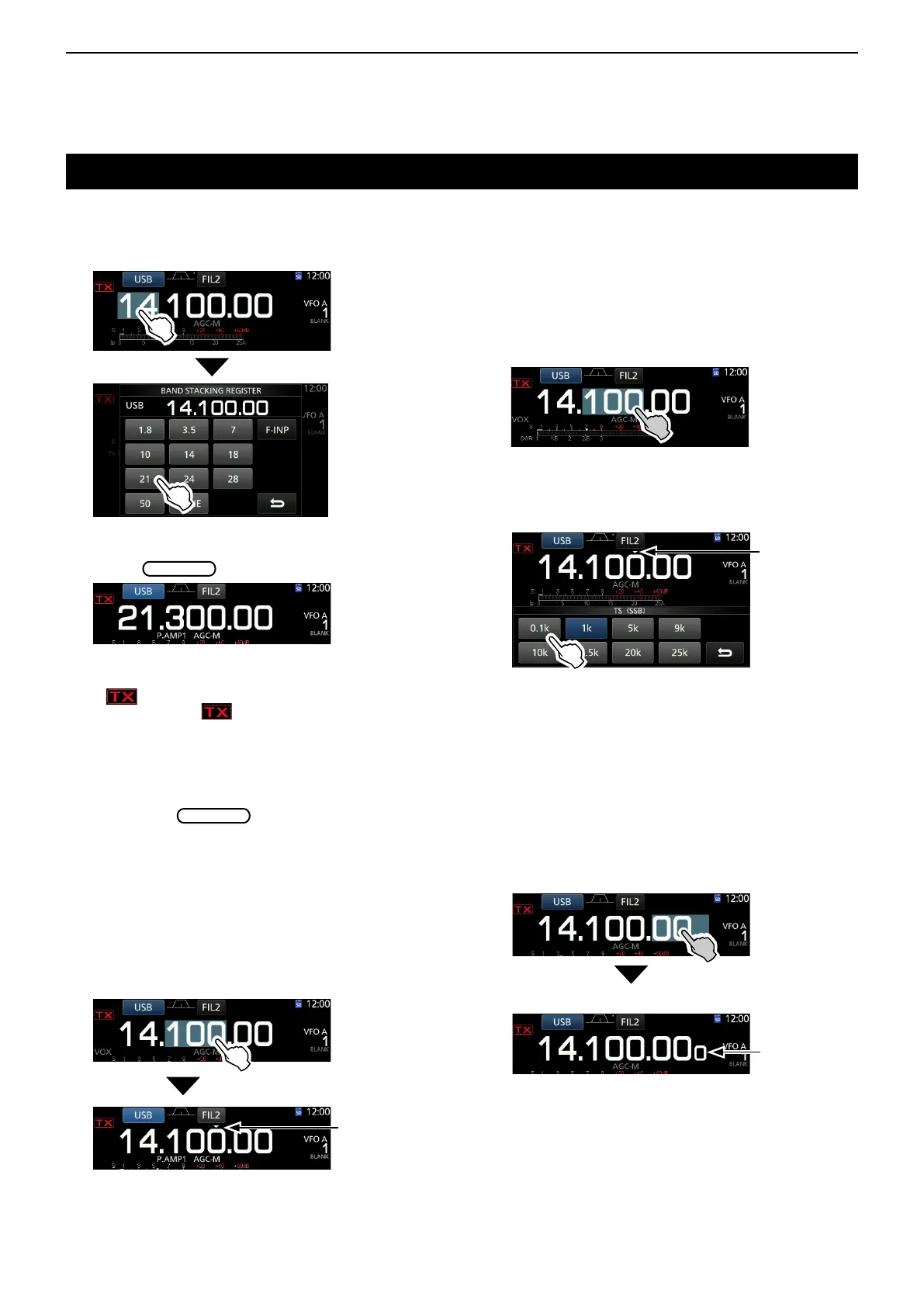
Touch the kHz digits to turn the Tuning Step function
ON or OFF.
L The Tuning Step function's icon “▼” is displayed above
the 1 kHz digit.
D About the 1 Hz step Fine Tuning
function
You can use the minimum tuning step of 1 Hz for ne
tuning in the SSB, CW and RTTY modes.
Touch the Hz digits for 1 second to turn the Fine
Tuning function ON or OFF.
D Changing the Tuning Step
When the Tuning Step function is ON, you can change
the tuning steps for each operating mode.
1. Select the desired operating mode. (p. 3-3)
(Example: USB)
2. Touch the kHz digit for 1 second.
• The TS (SSB) screen is displayed.
The Tuning Step
function is ON.
D Using the Main Dial
1. Select the desired operating band.
(Example: 21 MHz)
BAND STACKING REGISTER screen
2. Rotate
.
L If you cannot change the frequency, make sure the
Dial Lock function is turned OFF. (p. 3-10)
L
is displayed when you set an amateur radio
frequency, and
is displayed when you set a
frequency outside the Ham band, or outside your set
Band Edges.
3. Touch the desired tuning step.
(Example: 0.1 k)
• The tuning step is set and returns to the previous
screen.
TS (SSB) screen
The Tuning
Step function is
ON.
L When using the [UP]/[DN] keys on the microphone,
the frequency changes in 50 Hz steps with the Fine
Tuning function ON or OFF.
1Hz digit
• The 1 Hz digit is displayed.



 To Next Page