9
MEMORY OPERATION
9-4
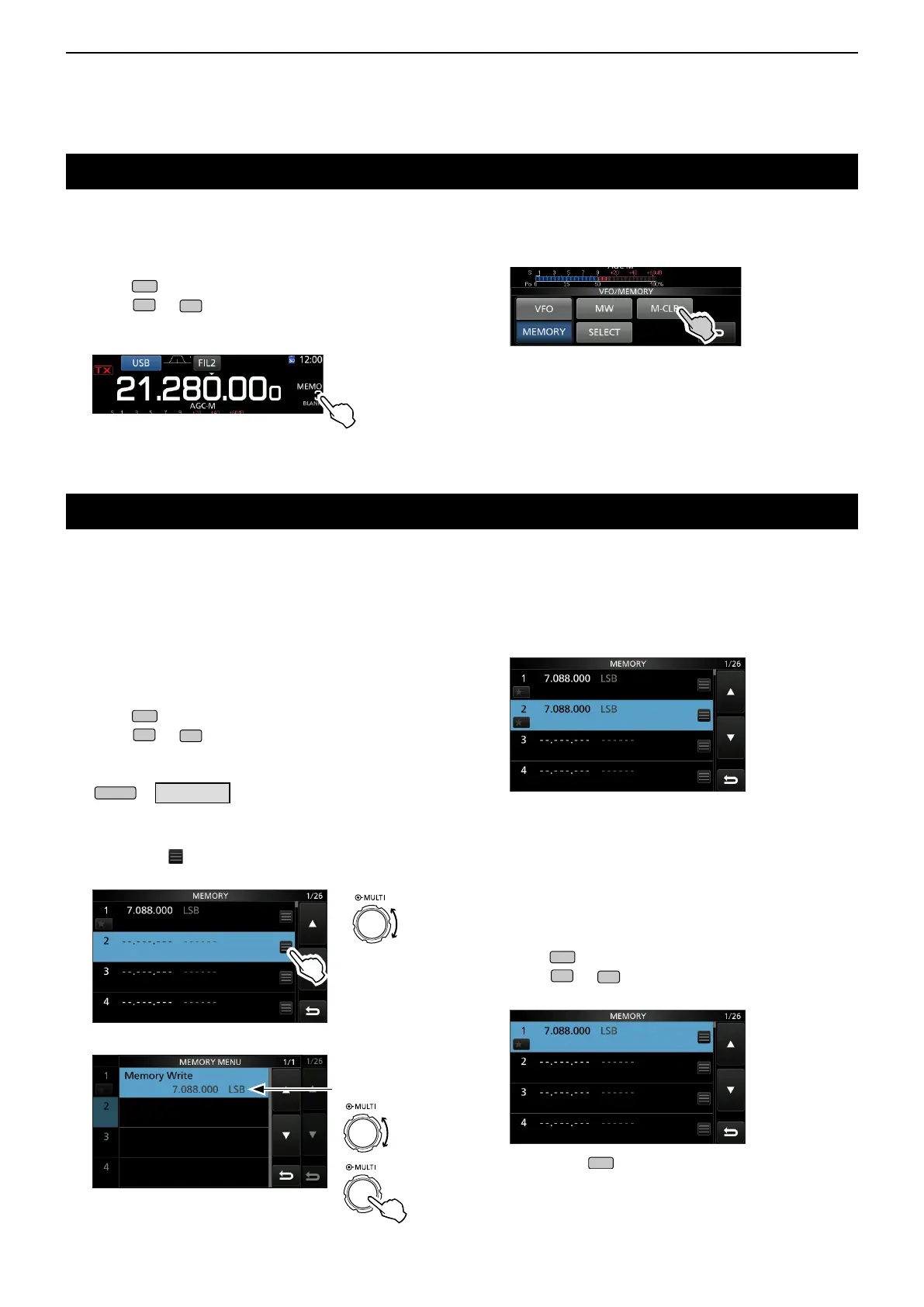
Clearing a memory channel
Copying the Memory channel contents
You can clear any no-longer-used memory channel
and set it as a blank channel.
[Example: Clearing Memory channel 3]
1. Push
to select the Memory mode.
2. Push
or
to select the channel to clear.
3. Touch the channel number.
• The VFO/MEMORY screen is displayed.
4. Touch [M-CLR] for 1 second to clear the memory
channel.
• “BLANK” is displayed.
D Copying to the other memory channel
You can copy the Memory contents to another
memory channel.
[Example: Copying the contents of Memory channel 1
to the Memory channel 2]
1. Push
to select the Memory mode.
2. Push
or
to select the channel to be
copied. (Example: memory channel 1)
3. Open the MEMORY screen.
»
MEMORY
4. Select the desired memory channel to be
overwritten (Example: memory channel 2), and
then
touch .
• The MEMORY MENU is displayed.
Rotate
5. Select “Memory Write.”
The contents of
Memory channel 1
6. Touch [ Yes].
• A beep sounds and the selected memory contents are
copied.
• Returns to the MEMORY screen.
D Copying to the VFO
You can copy the Memory contents to the VFO.
[Example: Copying the contents of Memory channel 1
to the VFO]
1. Push
to select the Memory mode.
2. Push
or
to select the channel to be
copied. (Example: memory channel 1)
3. Hold down
for 1 second.
• A beep sounds and the selected memory contents are
copied to the VFO.
You can copy a Memory channel contents to the VFO or another memory channel.
Rotate
Push



 To Next Page