3
BASIC OPERATION
3-6
Setting the frequency (Continued)
Entering the Split Frequency Offset
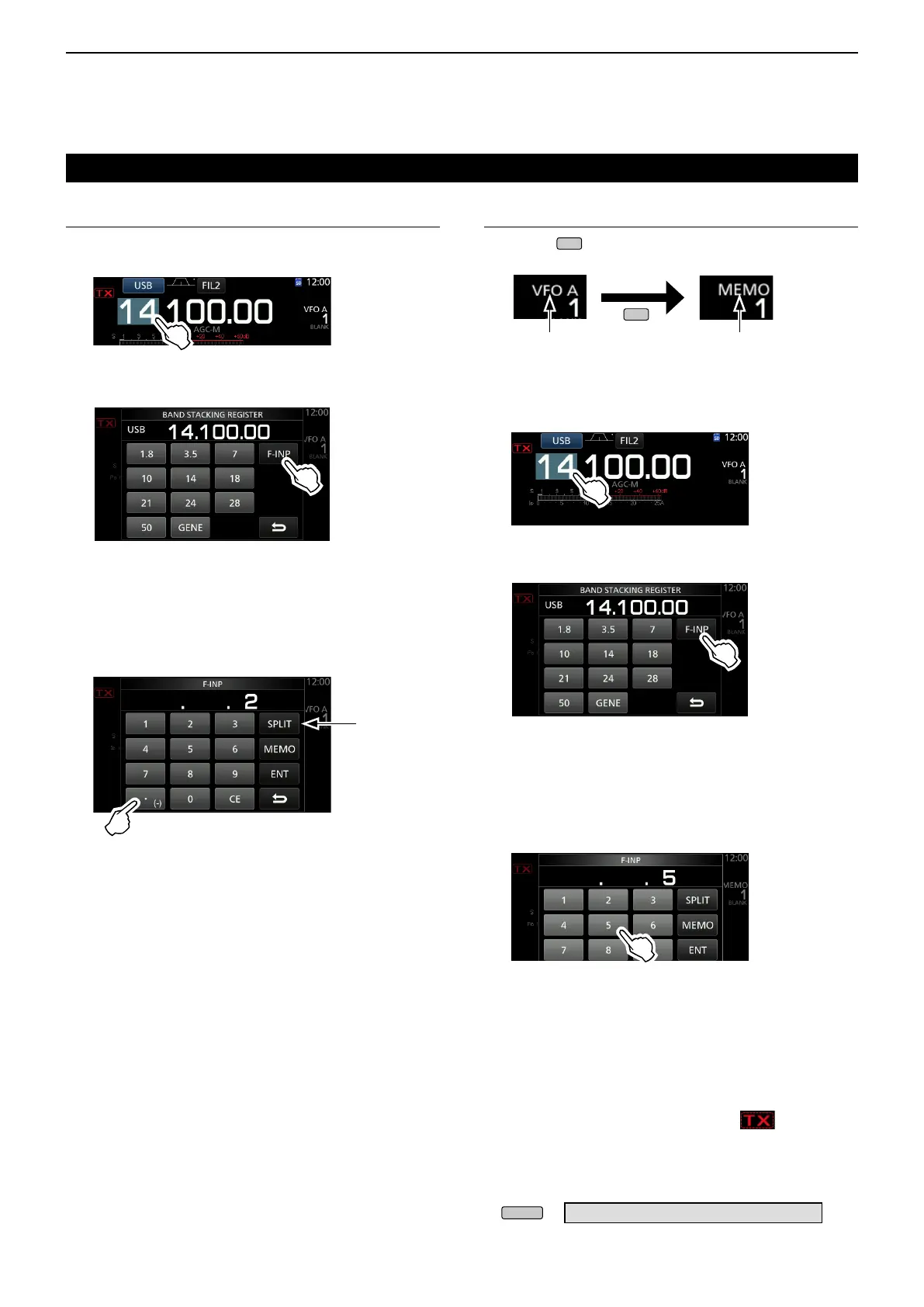
1. Touch the MHz digits.
(Example: 14)
Entering a Memory channel
1. Touch
to select the Memory mode.
VFO mode
(Example: VFO A)
Memory mode
(Example: Memory channel 1)
• Opens the BAND STACKING REGISTER screen.
2. Touch [F-INP].
BAND STACKING REGISTER screen
• Opens the F-INP screen.
3. Enter the Split Frequency Offset.
LIf you want the minus shift direction, touch [•(−)].
L Enter the offset between −9.999 MHz and +9.999
MHz (1 kHz steps).
4. To save the entry, touch [SPLIT] or [−SPLIT].
• Closes the F-INP screen.
Entry examples
• 10 kHz: [1], [0], [SPLIT]
• −1.025 MHz: [•(−)], [1], [0], [2], [5], [−SPLIT]
L After entering, the Split function is automatically turned
ON.
2. Touch the MHz digits.
(Example: 14)
• Opens the BAND STACKING REGISTER screen.
3. Touch [F-INP].
• Opens the F-INP screen.
4. Enter a Memory channel number between 1 and
99. (Memory channel 5)
L If you want to set the Program Channel number (P1
or P2), enter “100” for P1, and “101” for P2.
BAND STACKING REGISTER screen
5. Touch [MEMO] to select the entered channel.
• Closes the F-INP screen.
D Band Edge Beep
You will hear a Band Edge Beep and will be
displayed when you tune into or out of an amateur
band’s frequency range.
L You can change the Band Edge Beep settings in the
following menu.
» SET > Function > Band Edge Beep
[SPLIT] or
[-SPLIT] is
displayed
Touch for -Split
F-INP screen
F-INP screen



 To Next Page