96
1
2
3
4
5
6
7
8
9
10
11
14
15
16
18
19
20
21
MAINTENANCE
17
13
12
13
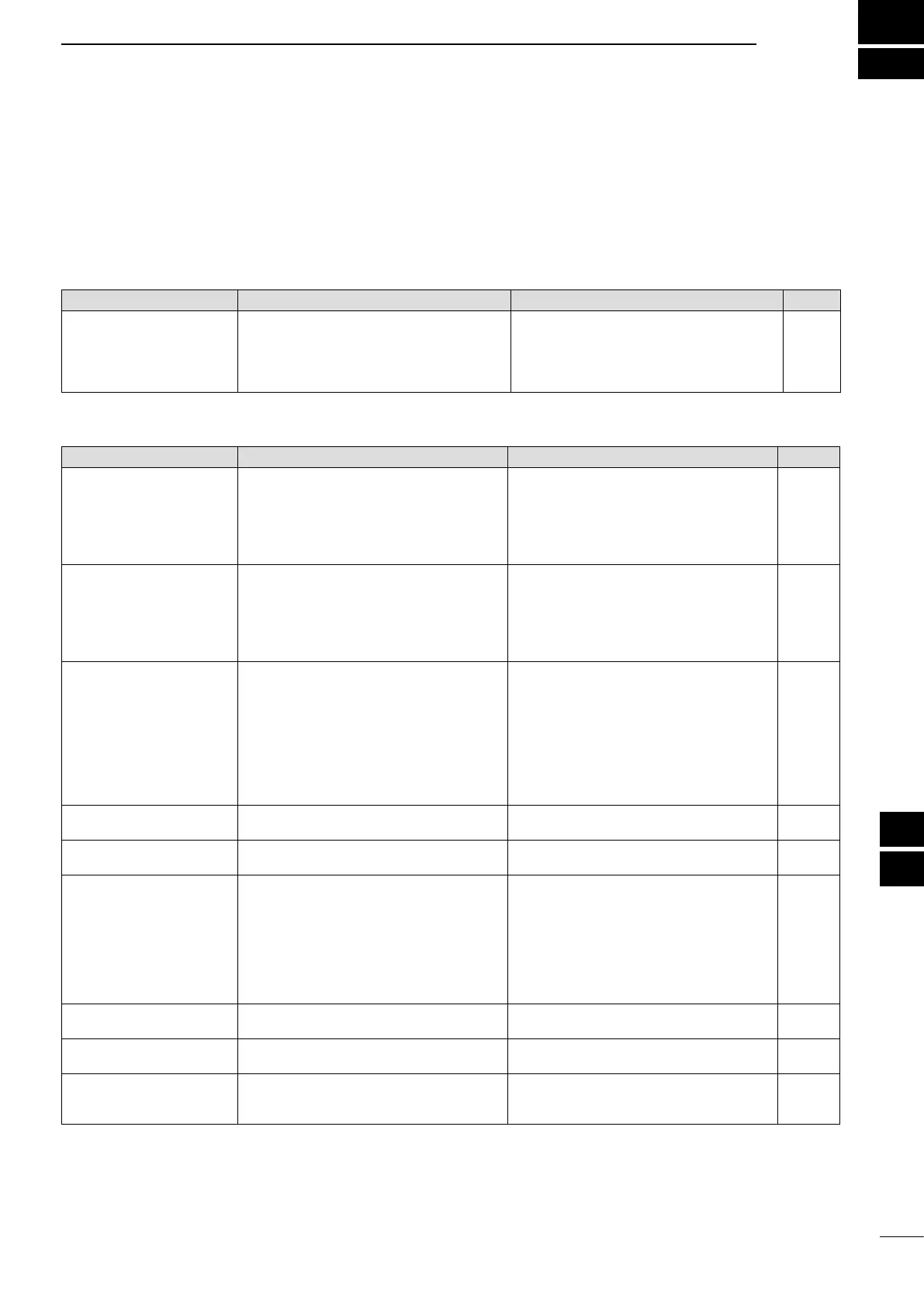
D Transceiver power
PROBLEM POSSIBLE CAUSE SOLUTION REF.
Power does not turn ON
when the [POWER] switch is
pushed.
•Thepowercableisimproperlyconnected.
•Afuseisblown.
•Re-connecttheDCpowercablecorrectly.
•Correctthecause, then replacethefusewith
an equivalent fuse.
( Fuses are installed in the DC power cable
and in the internal PA unit.)
p. 19
p. 99
D Transmit and receive
PROBLEM POSSIBLE CAUSE SOLUTION REF.
No sound from the speaker. •Theaudiovolumelevelistoolow.
•Thesquelchisclosed.
•Thetransceiverisintransmit.
•Rotate the [AF] control clockwise to obtain a
suitable listening level.
•Rotatethe[RF/SQL]controlto11o’clockpo-
sition to open the squelch.
•Push [TRANSMIT] to receive or check the
SEND line of an external unit, if connected.
p. 31
p. 32
p. 34
Sensitivity is too low, and only
strong signals are audible.
•Theantennaisnotconnectedproperly.
•Theantennaforanotherbandisselected.
•Theantennaisnotproperlytuned.
•TheattenuatoristurnedON.
•Re-connecttotheantennaconnector.
•Select an antenna suitable for the operating
frequency.
•Holddown[TUNER]for1secondtomanually
tune the antenna.
•Push[P.AMP/ATT]toturnOFFtheattenuator.
—
p. 82
p. 83
p. 55
Received audio is unclear or
distorted.
•Theoperatingmodeisnotmatched.
•ThePassbandTuningfunctionisturnedON.
•TheNoiseBlankerfunctionisturnedONwhen
receiving a strong signal.
•PreamplieristurnedON.
•The Noise Reduction function is turned ON
and the [NR] control is too far clockwise.
•Selectasuitableoperatingmode.
•Hold down [PBT-CLR] for 1 second to reset
the function.
•Push[NB]toturnOFFthefunction.
•Push[P.AMP/ATT]onceortwicetoturn OFF
the function.
•Setthe[NR]controlformaximumreadability.
p. 31
p. 59
p. 60
p. 55
p. 61
[ANT•METER] does not func-
tion
•TheAntennaSwitchfunctionissetto“OFF.” •Set the Antenna Switch function to “Auto” or
“Manual” in the Set mode.
p. 87
Transmitting is impossible. •The operating frequency is outside the se-
lected ham band.
•Set the frequency to be within the selected
ham band.
p. 26
Output power is too low. •The [RF PWR] control is set too far counter-
clockwise.
•The [MIC] control is set too farcounterclock-
wise.
•Theantennaforanotherbandisselected.
•Theantennaisnotproperlytuned.
•Rotatethe[RFPWR]controlclockwise.
•Setthe[MIC]controltoasuitableposition.
•Select an antenna suitable for the operating
frequency.
•Holddown[TUNER]for1secondtomanually
tune the antenna.
p. 34
p. 34
p. 82
p. 83
No contact can be made with
another station.
•TheRITor∂TX function is turned ON.
•TheSplitfunctionisturnedON.
•Push[RIT]or[∂TX] to turn OFF the function.
•Push[SPLIT]toturnOFFthefunction.
pp. 53, 65
p. 66
Transmit signal is unclear or
distorted.
•The[MIC]controlissettoofarclockwise. •Setthe[MIC]controltoasuitableposition. p. 34
Repeater cannot be accessed. •TheSplitfunctionisnotturnedON.
•The programmed subaudible tone frequency
is wrong.
•Push[SPLIT]toturnONthefunction.
•ResetthefrequencyusingtheSetmode.
p. 66
p. 52
■ Troubleshooting
The following chart is designed to help you correct
problems which are not equipment malfunctions.
If you are unable to locate the cause of a problem,
or solve it through the use of this chart, contact your
nearest Icom Dealer or Service Center.


 To Next Page