61
Delivering a Bolus of Insulin 55 Delivering a Bolus of Insulin
3. To deliver the entire bolus immediately, tap CONFIRM and skip to step 5.
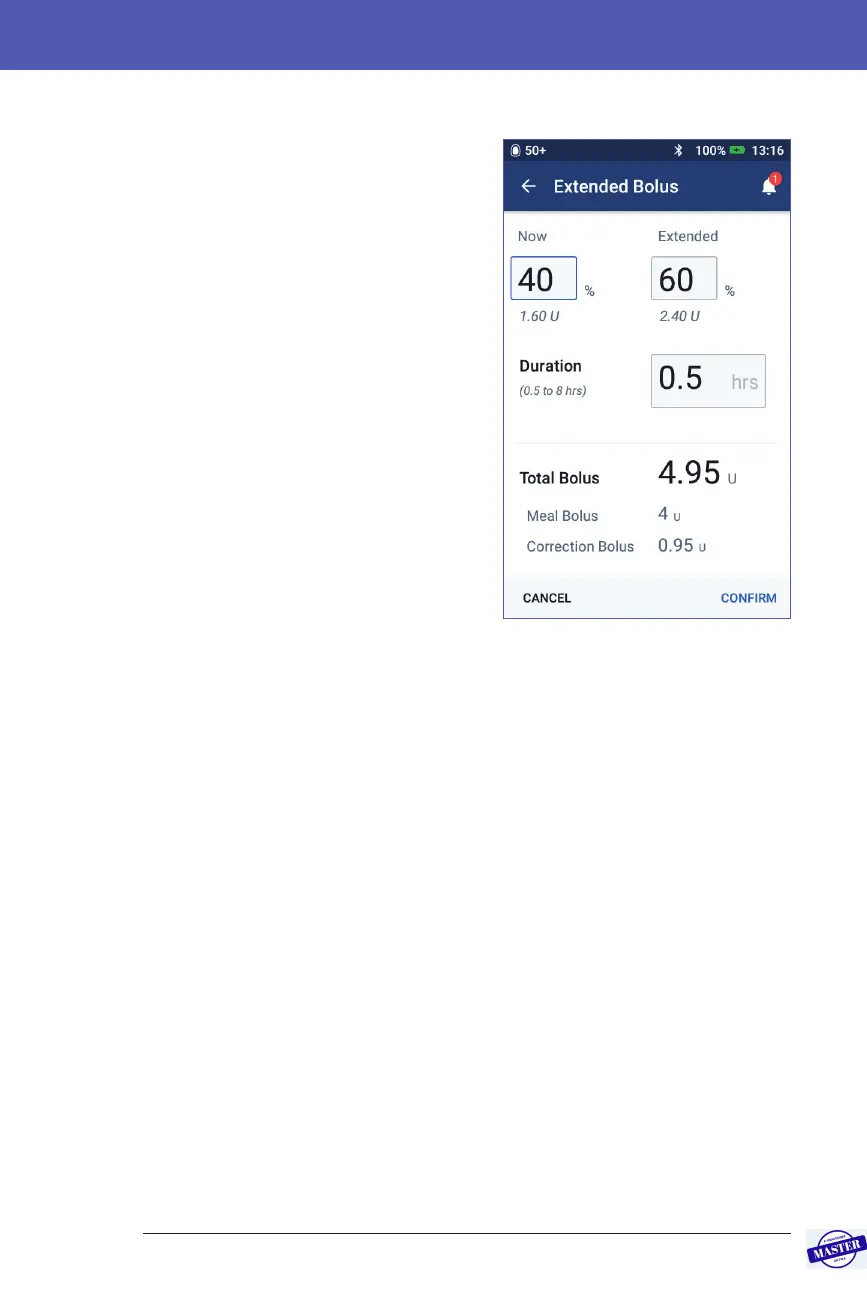
4. To extend some or all of a meal bolus:
a. Tap EXTEND BOLUS.
Note: e EXTEND BOLUS option
is available when there is a meal
bolus and the extended bolus
setting is enabled.
b. Tap the Now eld and type in the
percentage of the bolus to be
delivered immediately.
Alternatively, tap the Extended
eld and enter the percentage to be
extended.
e number of units to be
delivered now and over the
extended period appear below the
percentage (%).
Note: You can only extend the
meal portion of the bolus. A
correction portion of the bolus, if any, is always delivered immediately.
c. Tap the Duration eld and enter the duration for the extended portion of
the bolus.
d. Tap CONFIRM.
Effective Date: 27SEP2019, ECO-000240



 To Next Page