Chapter 5 PROGRAMING MODE
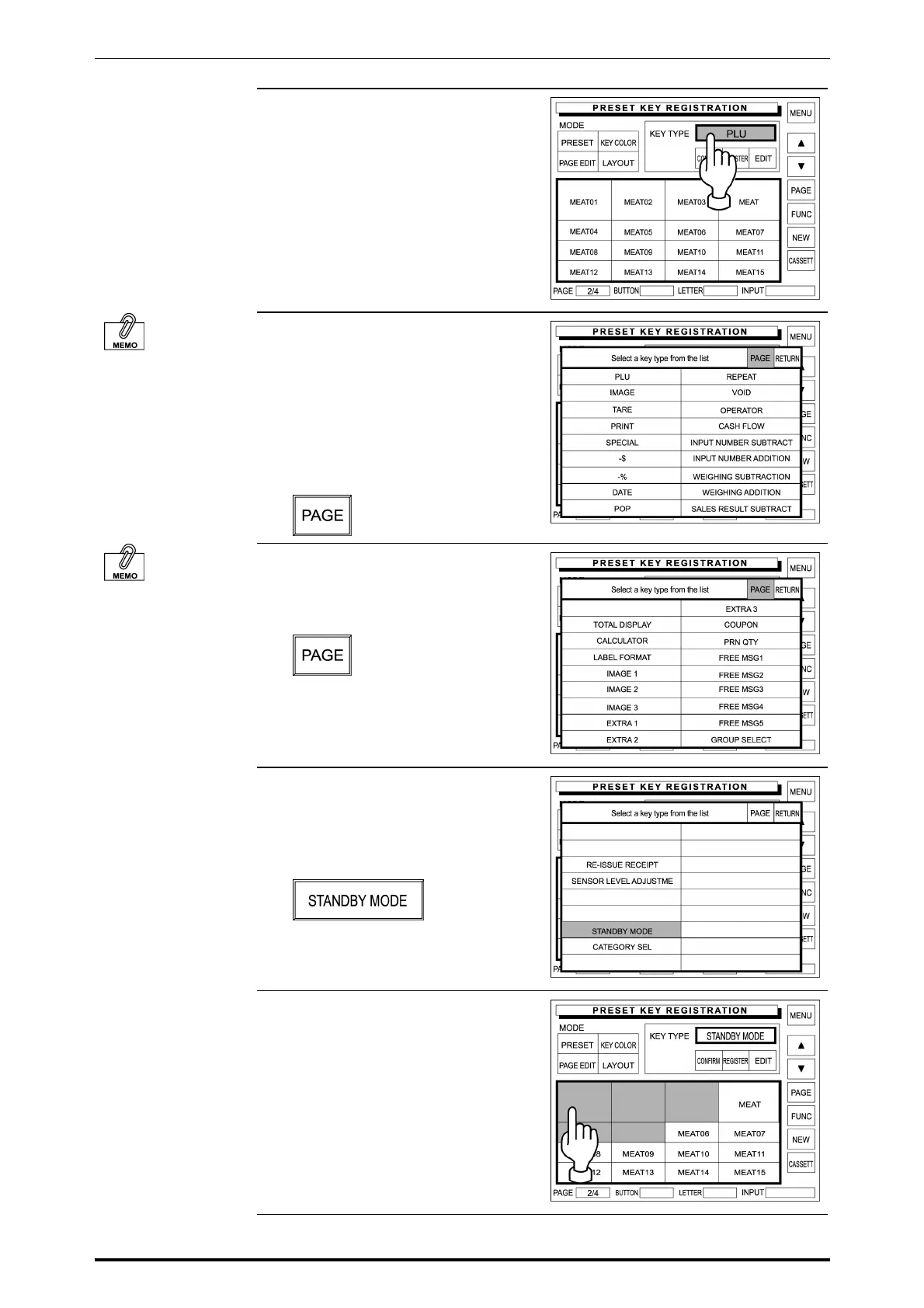
5. Touch the Key Type dada field on
the screen.
Overwriting a data to
an existing PLU preset
key is not possible.
In this case, delete the
preset key first. Then,
register a new preset
key.
6. The first page of preset key list
appears on the display.
When a data exists on the desired
preset key, the data must be
deleted first in order to register a
new PLU data.
Touch [PAGE] on the screen.
Repeatedly touch
[PAGE] on the screen
to turn pages until the
desired function is
found in the list.
7. The second page of preset key list
appears on the display.
Then, touch [PAGE] on the screen.
8. The third page of preset key list
appears on the display.
Then, touch [STANDBY MODE] to
select.
9. Touch the existing PLU preset key
to delete.
Repeatedly touch other preset
keys to delete if any.
5-26 SR-2000α User’s Manual (No. 0000A)



 To Next Page