
 Need help?
Do you have a question about the Johnson Controls FMS-2000C and is the answer not in the manual?
Warnings regarding electric shock hazards during installation and operation.
Cautions for personal injury or property damage in controlled environments.
Critical installation guidelines related to electrical ratings, temperature, and ESD.
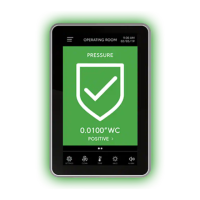
Overview of the FMS-2000C controller's purpose and features.
Explanation of the controller's display layout and associated icons.
Guide through the initial setup wizard for language, units, orientation, and isolation mode.
Definitions for positive, negative, and neutral isolation modes.
Configure system-wide settings like units, language, and device orientation.
Adjust 360° Safety Halo brightness and screen brightness.
Configure nightly auto dim and dimmed period for the 360° Safety Halo.
Define capabilities for admin/restricted users and requirements for user names and passwords.
Steps to create an administrator user account and password.
Steps to create a restricted user account and PIN password.
Procedures for deleting users, changing names, and modifying access levels.
Procedures for recovering forgotten passwords or PINs for users.
Configure BACnet MS/TP parameters: device ID offset, MaxMaster, baud rate, and MAC address.
Set the network address for Metasys N2 network connections.
Configure isolation mode for the primary monitored space.
Configure isolation mode for the secondary monitored space.
Set the clean duration for the primary monitored space.
Adjust the comfort range for the primary monitored space.
Adjust the comfort range for the secondary monitored space.
Visual guide to controller wiring and mapping parameters to I/O resources.
Configure parameter type and sensor type for pressure inputs.
Specify the maximum and minimum pressure input values for sensors.
Specify the K-Factor and location for the pressure sensor.
Set positive, negative, and neutral isolation setpoints for pressure.
Configure the signal range for analog pressure inputs.
Set the sensor range and adjust the deadband for pressure inputs.
Perform zero calibration by creating or resetting zero offsets for pressure.
Configure alarms for pressure inputs, including enabling and setting limits.
Assign custom names to pressure analog inputs for display.
Configure output operating mode, signal range, action mode, and input channel mapping.
Set minimum and maximum limits for analog pressure outputs.
Configure thermistor inputs, including NTC type, setpoints, offset, and comfort range.
Set up alarms and assign names for thermistor inputs.
Configure analog inputs for external thermostats, including type, comfort range, and naming.
Configure precision temperature inputs, including type, max/min, K-factor, and range.
Adjust setpoint and configure alarms for precision temperature inputs.
Assign custom names to precision temperature analog inputs.
Specify minimum temperature input and K-Factor for precision temperature.
Configure operating mode, signal range, action mode, input channel, and limits for temperature outputs.
Configure humidity input type, K-factor, setpoint, alarms, and naming.
Configure operating mode, signal range, action mode, input channel, and limits for humidity outputs.
Configure air flow input type, sensor type, max/min input, duct area, and K-factor.
Configure ACPH calculation, room volume, output range, and deadband for air flow.
Configure air flow alarms and assign custom names to air flow inputs.
Configure inputs for volumetric offset control of air flows.
Configure CO₂ input type, maximum/minimum input, K-factor, alarms, and naming.
Configure operating mode, signal range, action mode, input channel, and limits for CO₂ outputs.
Configure digital input for door switch, including switch type and delay settings.
Configure digital inputs for override, occupancy, and flow switch modes with type and delay.
Configure relay trigger modes and select input channels for relay activation.
Set relay action modes, delays, and high/low setpoints for activation.
Configure relays based on isolation mode and occupancy status.
Adjust proportional, integral, and derivative gains for PID control loops.
Adjust 360° Safety Halo, screen brightness, and device name.
Configure single, double, triple, or quad screen viewing modes for parameter display.
Set up and adjust alarms for analog inputs, including setpoints and warning limits.
View controller details, real-time status of inputs, outputs, alarms, and network variables.
Modify setpoints, deadbands, and PID loops directly from the real-time view.
Manually control, lock, and unlock analog outputs for verification.
Set actuators to auto-stroke and override relay outputs.
Save, restore, or reset controller configuration and settings.
Adjust time, date, alarm mode, audible alarm delay, and snooze for restricted users.
Modify space isolation, occupancy, temperature, and screen brightness via user menu.
Utilize quick links for cleaning, temperature, Halo, alarm, and isolation mode access.
Steps and considerations for upgrading an FMS-1655 display to an FMS-2000C controller.
Detailed technical specifications for the FMS-2000C controller, including performance and compliance.
Instructions for cleaning the controller's touch display surface.
Information on emissions compliance, warranty, software terms, and contact information.
 General
| Brand | Johnson Controls |
|---|---|
| Model | FMS-2000C |
| Category | Controller |
| Language | English |









 To Next Page
