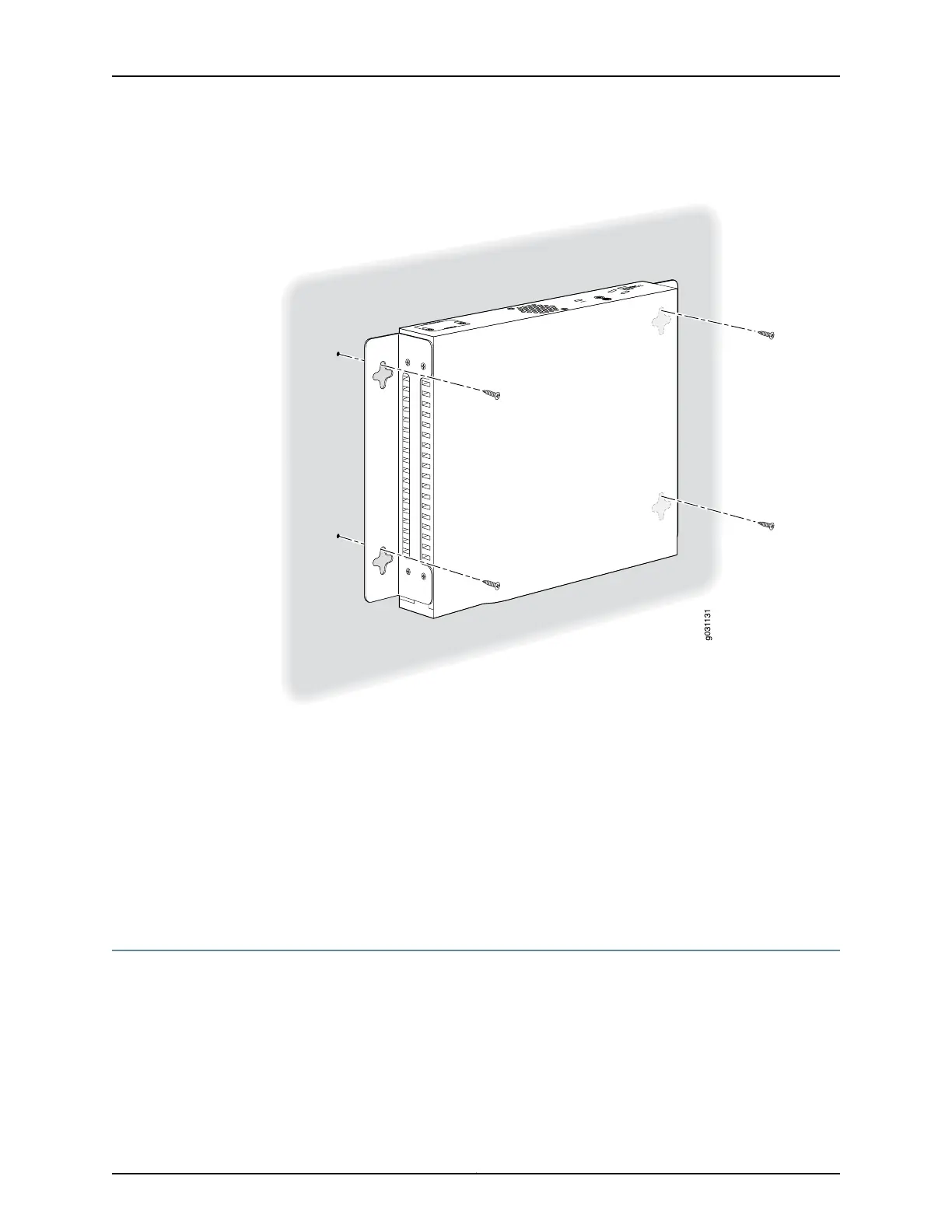
Figure 23: SRX210 Services Gateway Wall Installation — Hanging the
Services Gateway on a Wall
Related
Documentation
SRX210 Services Gateway General Safety Guidelines and Warnings on page 47•
• Required Tools and Parts for Installing and Maintaining the SRX210 Services Gateway
on page 78
• Preparing the SRX210 Services Gateway for Rack-Mount Installation on page 85
• Adjusting the Power Supply Adapter Tray for the SRX210 Services Gateway for
Rack-Mount Installation on page 87
• Installing the SRX210 Services Gateway on a Desk on page 99
Replacing or Installing Mini-Physical Interface Modules in the SRX210 Services Gateway
Mini-Physical Interface Modules (Mini-PIMs) are circuit boards that you can install in a
device for enhanced functionality based on your requirements. They enable you to easily
add or change physical interfaces on a device.
The Mini-Physical Interface Module (Mini-PIM) slot is covered with a blank faceplate to
maintain proper airflow through the services gateway. Before installing the Mini-PIM, you
must remove the faceplate.
Copyright © 2012, Juniper Networks, Inc.102
SRX210 Services Gateway Hardware


 To Next Page