ENGLISH
Chapter 6: Mobile Device Access
DVR User’s Manual
105
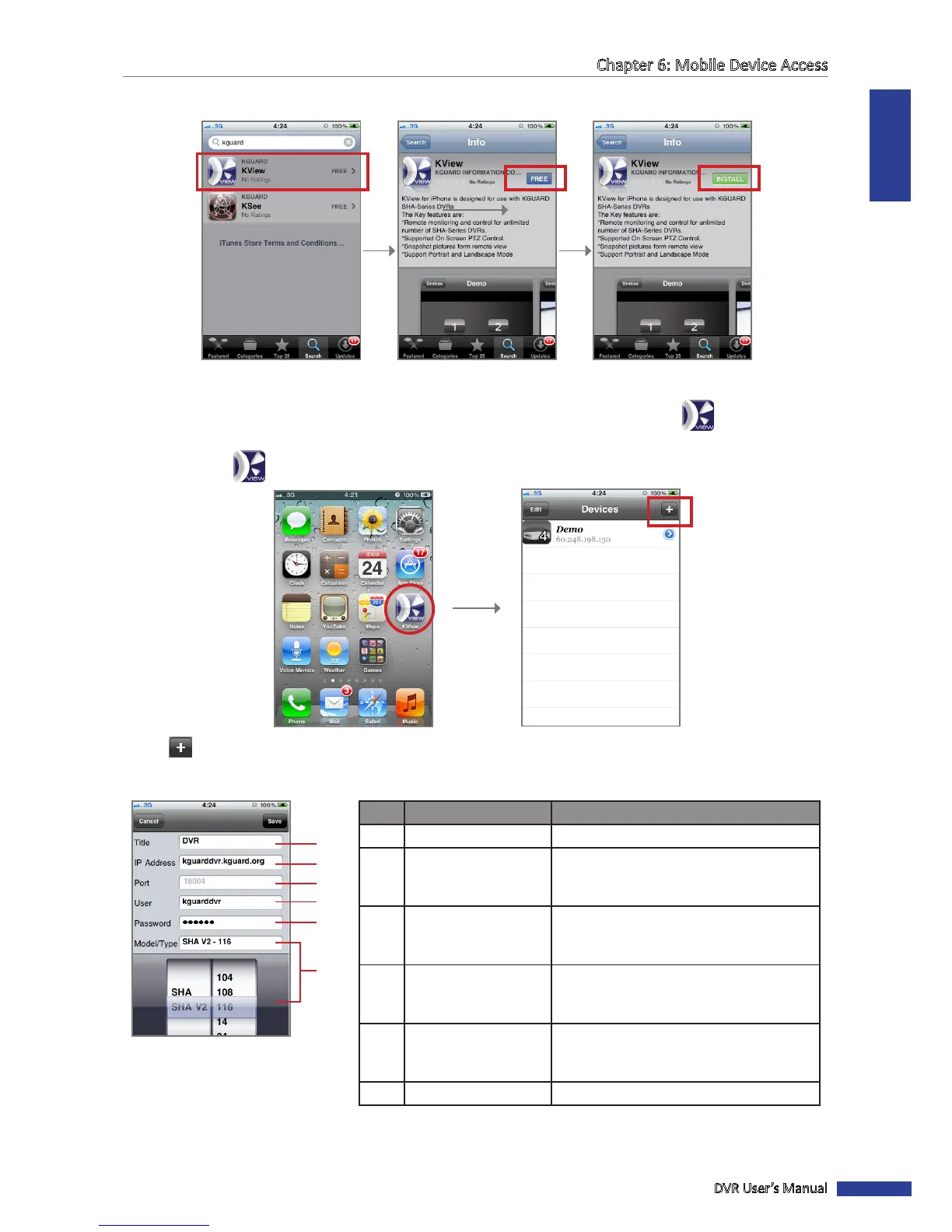
4 Select and download KView.
Select the “KView” applicaon. Click FREE. Click INSTALL.
You may be asked to login with your iTunes account to connue. Aer download, the KView icon is displayed
on the applicaon screen.
5 Click the KView icon to open the applicaon.
6 Click to add a device.
7 Enter the required sengs.
No. Item Descripon
1 Title Enter the desired DVR name.
2 IP Address
Enter the IP address assigned to the DVR.
Consult your network administrator or ISP
to obtain this informaon.
3 Port
Enter the server port number that you
congured in the DVR menu. See “4.4.4
Seng Up Mobile Devices” on page 55.
4 User
Enter the user name that you congured
in the DVR menu. See “4.4.4 Seng Up
Mobile Devices” on page 55.
5 Password
Enter the password that you congured
in the DVR menu. See “4.4.4 Seng Up
Mobile Devices” on page 55.
6 Model/Type Scroll to select the DVR model and type.
1
2
3
4
5
6
8 Click Save to save your sengs.



 To Next Page