ENGLISH
Chapter 4: Using the DVR
40
DVR User’s Manual
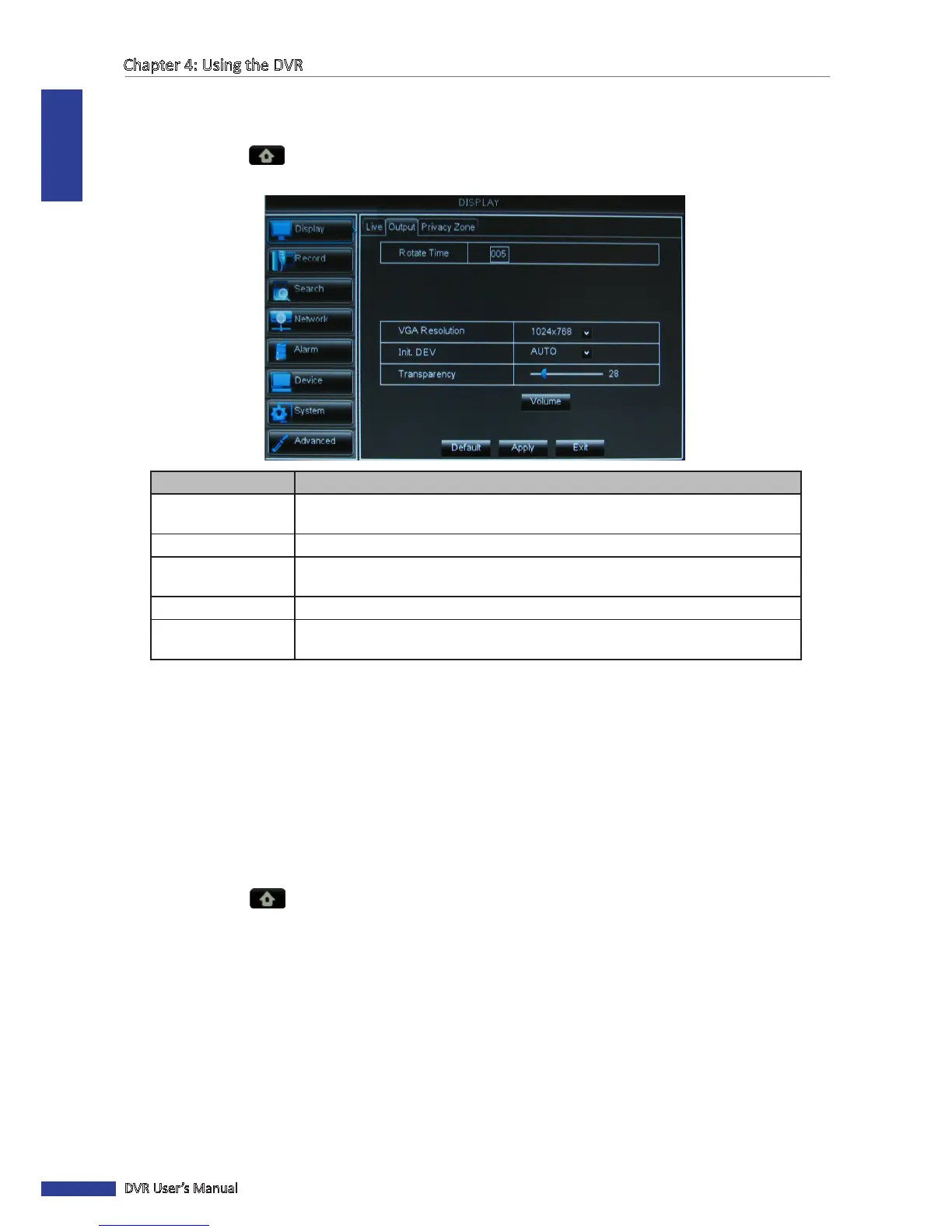
4.1.2 Output Sengs (4-Channel/8-Channel)
1 In the preview mode, right-click on the mouse to display the Pop-up menu.
2 Select Main Menu > DISPLAY, then select the Output tab.
3 Modify the necessary sengs:
Menu item Descripon
Rotate Time Set the interval me (in seconds) when changing screen display in Rotate mode.
See “3.4.4 Rotate View” on page 35.
VGA Resoluon Select the output resoluon.
Init. DEV
(Inial Device)
Select where you want to display the OSD menu when mulple monitors are
connected to the DVR (Video Out, VGA, or Auto).
Transparency Hide or display the recording me while recording.
Volume Click Volume, then drag the slider bar to adjust the output volume or select MUTE
to mute the audio.
4 Aer all sengs are complete, click Apply.
5 When data saving is complete, click OK.
4.1.3 Output Sengs (16-Channel)
Seng LIVE-OUT or SPOT-OUT
This LIVE-OUT and SPOT-OUT funcons allow you to set the number of channels displayed in split mode and order the
display sequence of channels.
1 In preview mode, right-click on the mouse to display the Pop-up menu.
2 Select Main Menu > DISPLAY, then select the Output tab.
3 Modify the necessary sengs:



 To Next Page