ENGLISH
Chapter 3: Geng Started
DVR User’s Manual
31
5 Click OK.
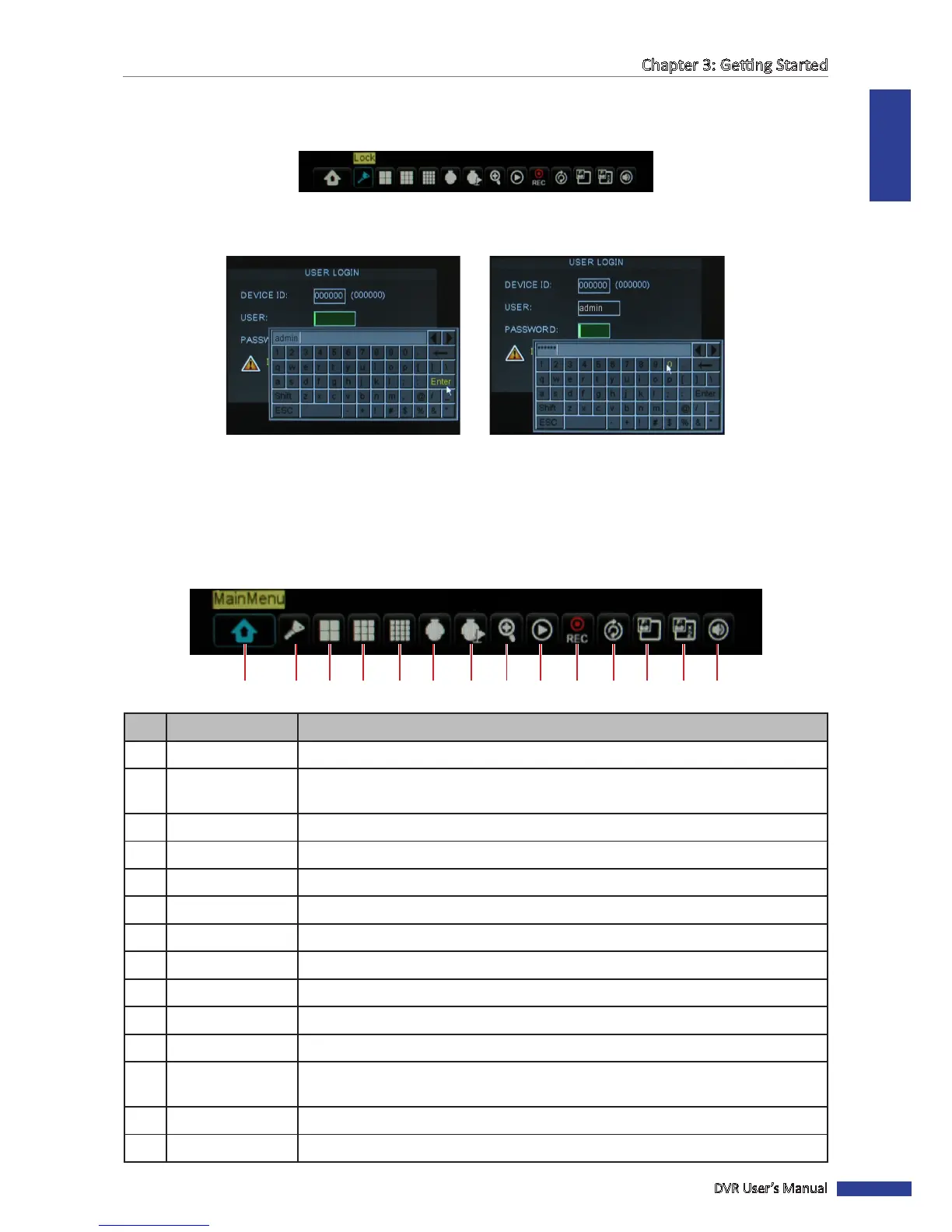
6 To lock the screen, right-click to display the Pop-up menu and select Lock.
7 Once the lock funcon is acvated, you need to enter the user name and password before entering the OSD menu.
A virtual keyboard automacally appears on the screen.
Enter User Name
3.3.4 Pop-up Menu
With the Pop-up menu, you can access to the main menu and other common features. To bring up the Pop-up Menu,
click on the right mouse buon or press the MENU buon on the remote control. The available Pop-up menu items
vary depending on the current seng or operaon.
1 2 3 4 5 6 7 8 9 10 11 12 13 14
No. Connector Descripon
1 Main Menu Access the OSD menu and adjust the DVR sengs.
2
Lock Lock access to enter the OSD menu. You need to type the user name and password
before entering the OSD menu. See page 30.
3 View 4 Switch to a 4-window display. See page 34.
4 View 9 Switch to a 9-window display.
5 View 16 Switch to a 16-window display.
6 PTZ Use the PTZ control. See page 36.
7 Start / Stop Cruise Start/stop cruise of the PTZ camera. See page 37.
8 Zoom Enable zoom. See page 37.
9 Record Search Search for recorded videos to play back. See page 46.
10 Start / Stop Record Start/stop manual recording. See page 38.
11 Start / Stop Rotate Start/stop rotaon of channel display. See page 35.
12
PIP 1x1 View one channel in full screen with another channel enclosed in a small window. See
page 34.
13 PIP 1x2 View one channel in full screen with two other channels enclosed in small windows.
14 Volume Adjust the volume or mute the audio. See page 38.



 To Next Page