ENGLISH
Chapter 4: Using the DVR
56
DVR User’s Manual
4.5 Seng Alarms
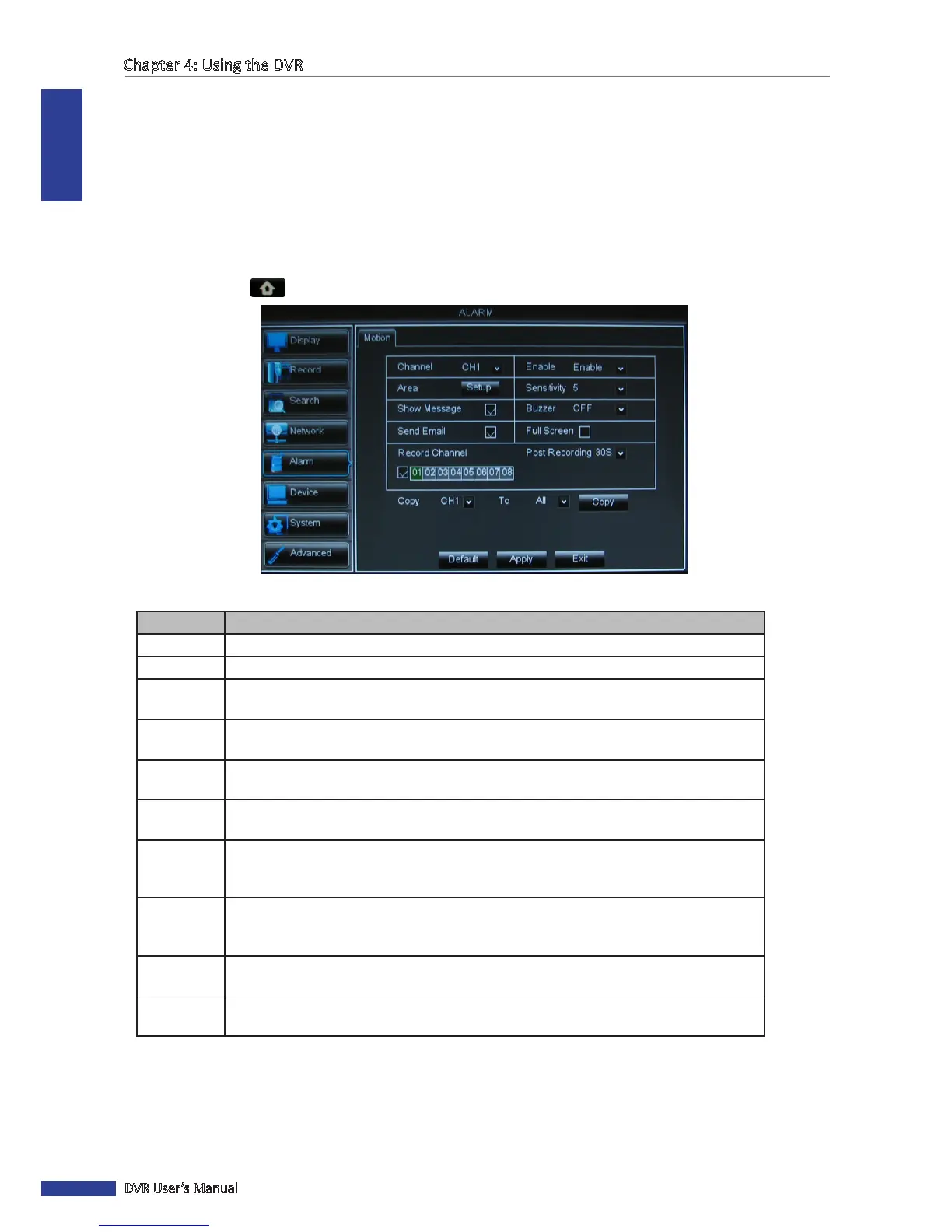
On the alarm menu, you can congure the moon detecon and the alarm nocaon sengs.
4.5.1 Moon Detecon Alarm Sengs
For added security, enable the moon detecon feature. When moon is detected on a selected area, the DVR issues
an alarm nocaon. To set the moon detecon alarm, do the following:
1 In preview mode, right-click on the mouse to display the Pop-up menu.
2 Select Main Menu > ALARM.
3 Modify the necessary sengs:
Menu item Descripon
Channel
Select the channel to set moon detecon.
Enable
Select Enable to enable moon detecon alarm for the channel.
Area
Click Setup to select the area for moon detecon alarm. See “Set Moon Detecon
Area” on page 57.
Sensivity Select the moon detecon sensivity rate. Opons are : 1~8, wherein “8” is the most
sensive and “1” is the least sensive.
Show
Message
Check the box to display a message on screen when the alarm is triggered.
Buzzer Set the buzzer duraon when moon is detected
(O/10 S/20 S/40 S/60 S).
To disable buzzer, select O.
Send Email Check to enable email alarm nocaon. If the funcon is enabled, the system will send
the alarm images to the specied email address. See “4.4.4 Email Sengs” on page
54.
Full Screen Check the box to enable this funcon. If this funcon is enabled and the alarm is
triggered, the corresponding channel will be displayed in full screen. Select the screen
display duraon (1 S/3 S/5 S/7 S/10 S)
Record
Channel
Check the box to enable recording and then select the channels to record when the alarm
is triggered.
Post
Recording
Select the post-recording duraon.
4 Click Apply.
5 When data saving is complete, click OK.
« TIP »
• To copy the current sengs to other channels, select the channel, then click Copy.
• To revert to the default alarm sengs, click Default.



 To Next Page