ENGLISH
Chapter 4: Using the DVR
44
DVR User’s Manual
4.2.2 Schedule Recording
1 In preview mode, right-click on the mouse to display the Pop-up menu.
2 Select Main Menu > RECORD, then select the Schedule tab.
3 On Channel, select the channel you want to set the schedule.
4 On Week, select the days of the week to implement the schedule.
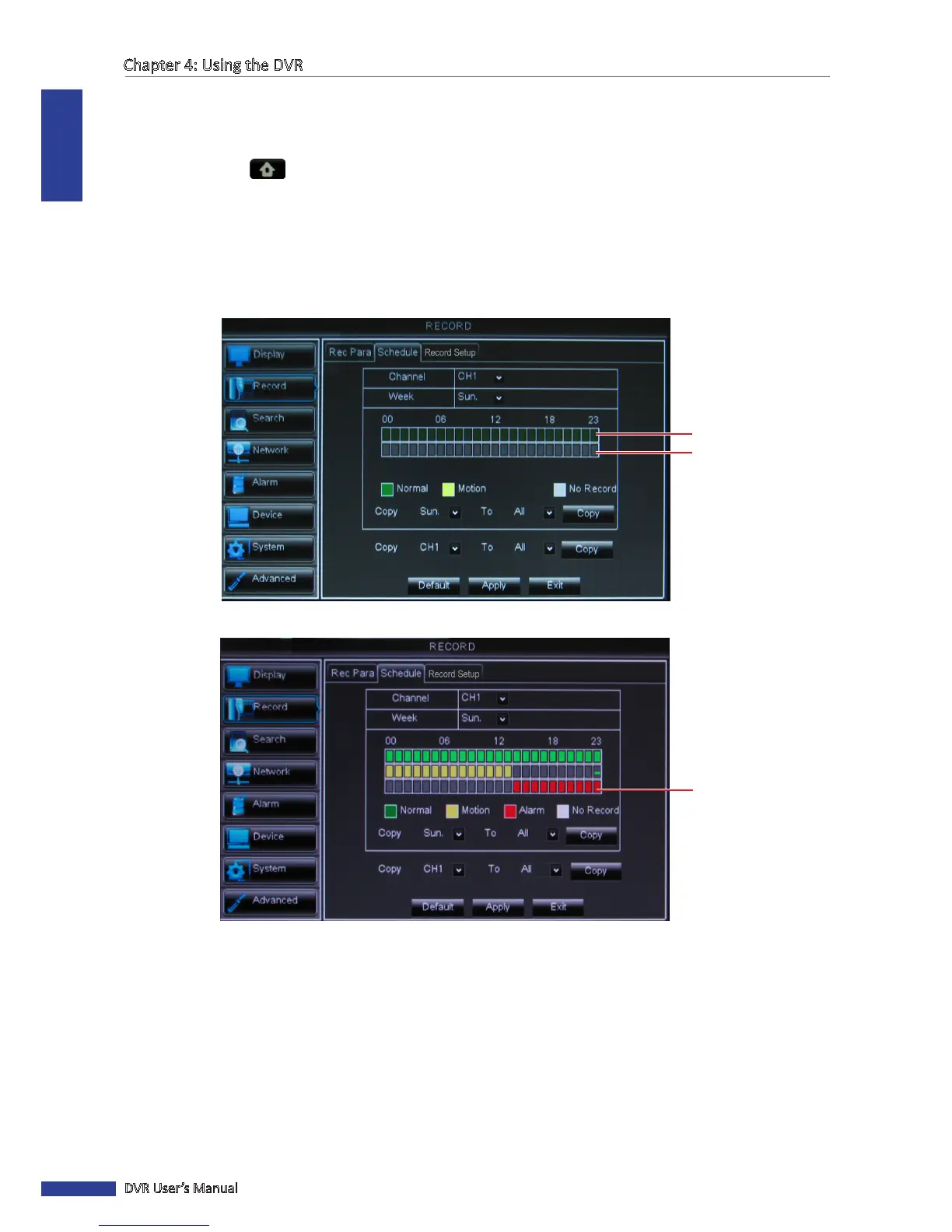
5 The number labels on top of the grid indicates the me of the day. Click a box to mark the schedule.
(4-Channel/8-Channel Schedule)
Slot for Normal recording
Slot for Moon recording
(16-Channel Schedule)
Slot for Alarm recording
• Normal Recording: When the me slot is marked green, the channel performs normal recording for that me
slot.
• Moon Recording: When the me slot is marked yellow, the channel records only when moon is detected
during that me slot.
• Alarm Recording (for 16-channel only): When the me slot is marked red, the channel records only when the
alarm is triggered during that me slot.
• No Record: A me slot marked gray has no recording schedule.
6 To remove a marked schedule, click the box again. The box turns gray.



 To Next Page