EasyManua.ls Logo

KGuard Security NS401 - To Install in the Removable HDD Compartment

KGuard Security NS401
114 pages
Print Icon
To Next Page IconTo Next Page
To Previous Page IconTo Previous Page
Loading...
ENGLISH
Chapter 2: Installaon
DVR Users Manual
19
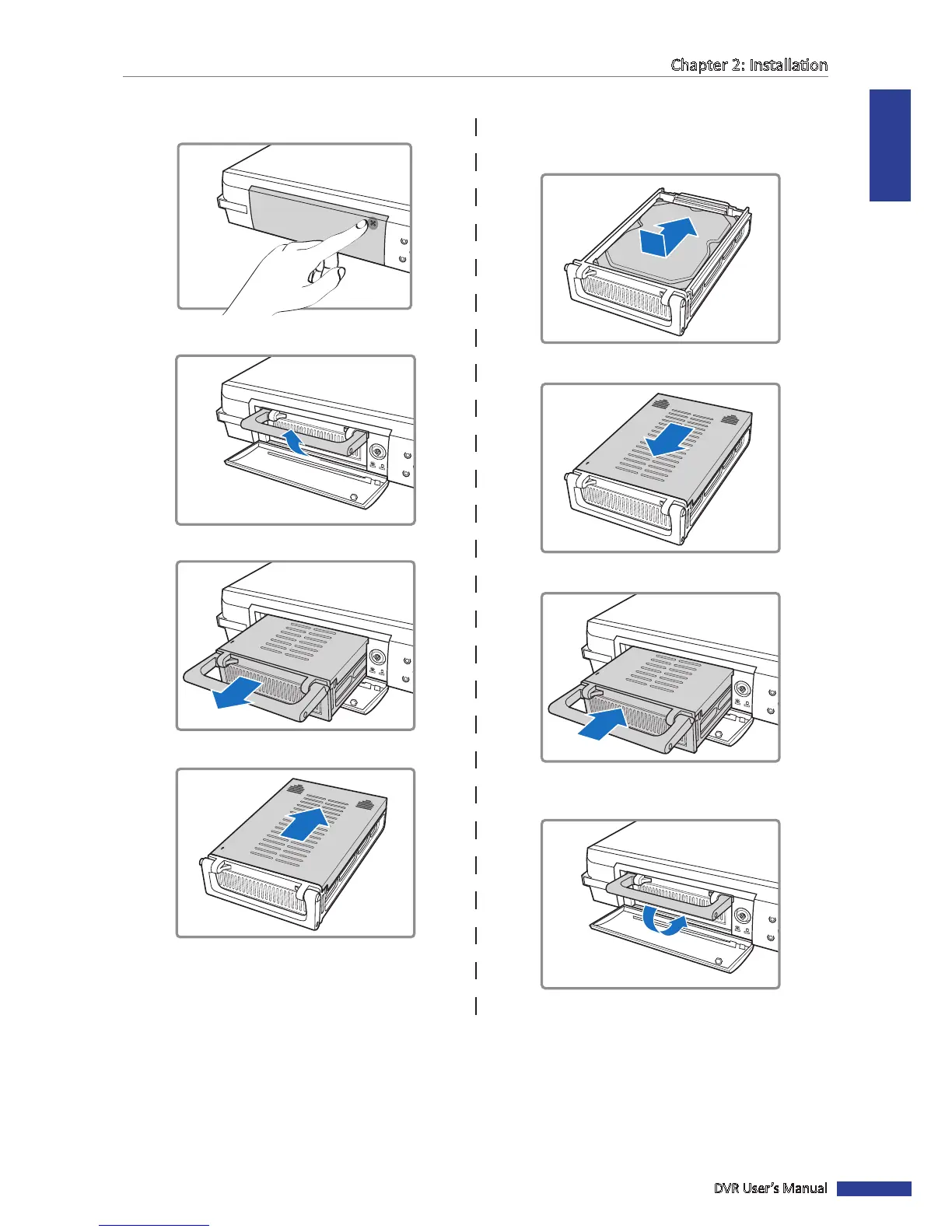
To Install in the Removable HDD Compartment
1 Push to open the HDD compartment.
K
GUARD
SECURITY
16CH Digital
Video Recorder
4
1
2 Li the handle to unlock the HDD compartment.
K
GUARD
SECURITY
4
1
3 Pull the handle to remove the HDD compartment.
K
GUARD
SECURITY
4
1
OPEN
4 Slide the compartment cover to open it.
OPEN
5 Install the HDD inside the compartment and then
push to connect the HDD connector to the connector
inside the compartment.
6 Slide to close the compartment cover.
OPEN
7 Slide the HDD compartment into the DVR.
K
GUARD
SECURITY
4
1
OPEN
8 Press down the handle to lock the HDD compartment
in place.
K
GUARD
SECURITY
4
1

Table of Contents

Related product manuals