ENGLISH
Chapter 5: KGUARD Web Client
98
DVR User’s Manual
« TIP »
To cancel any modicaons and retain the exisng sengs, click Refresh.
User Account Setup
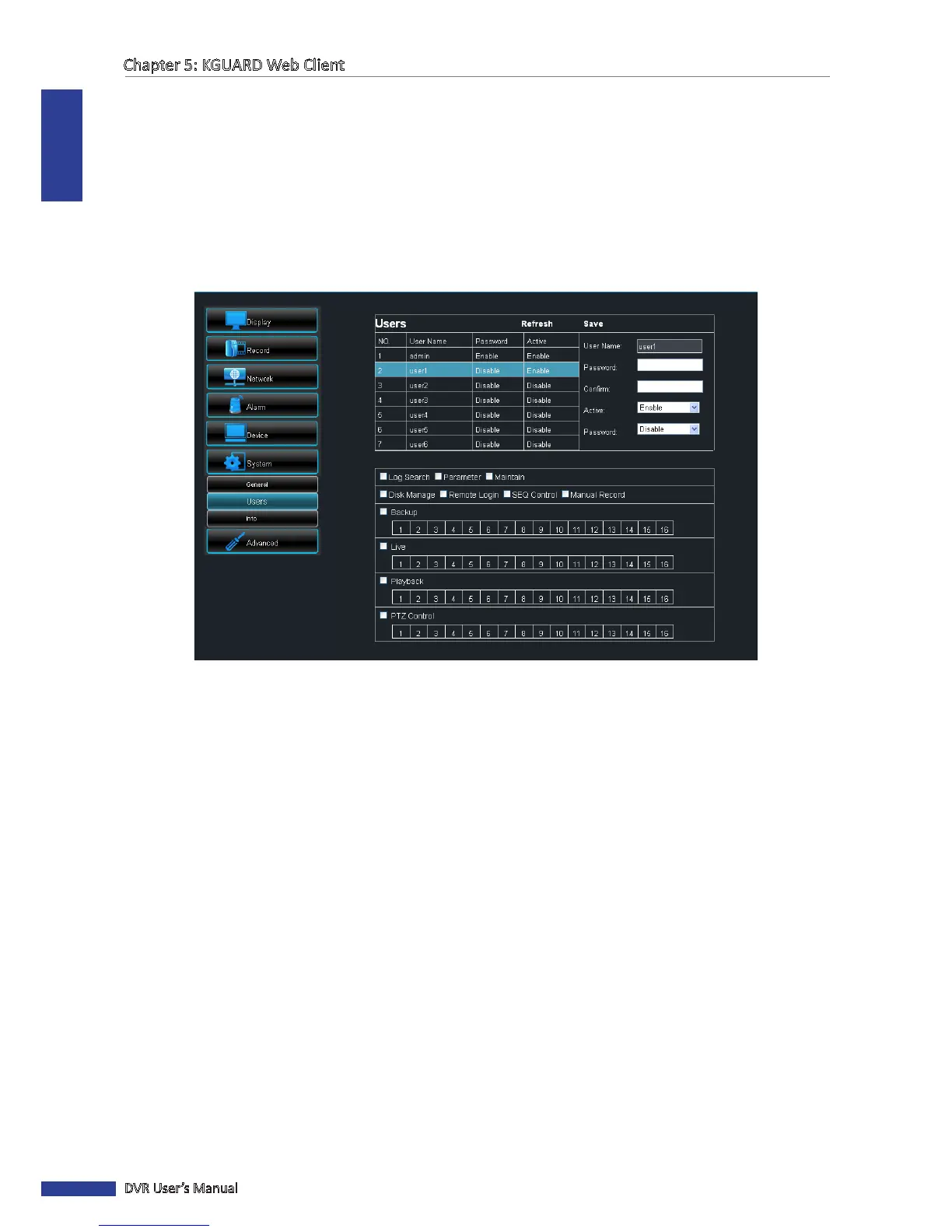
To authorize user accounts, you must login with an administrator account and then do the following:
1 On the Main Menu, click Remote Seng.
2 On the le panel, click System > User. The Users screen appears.
3 Select the user account from the table.
4 On User Name, enter the desired user name.
5 Enter the desired password on the Password and Conrm elds.
6 On Acve, select Enable. The access rights table appears below.
7 Enable Password.
8 Check the sengs that the user is allowed to access on the access rights table.
9 When all sengs are complete, click Save.
System Informaon
Use the Informaon menu to view the device and rmware informaon.
1 On the Main Menu, click Remote Seng.
2 On the le panel, click System > Info. The Informaon screen appears.



 To Next Page