ENGLISH
Chapter 4: Using the DVR
DVR User’s Manual
43
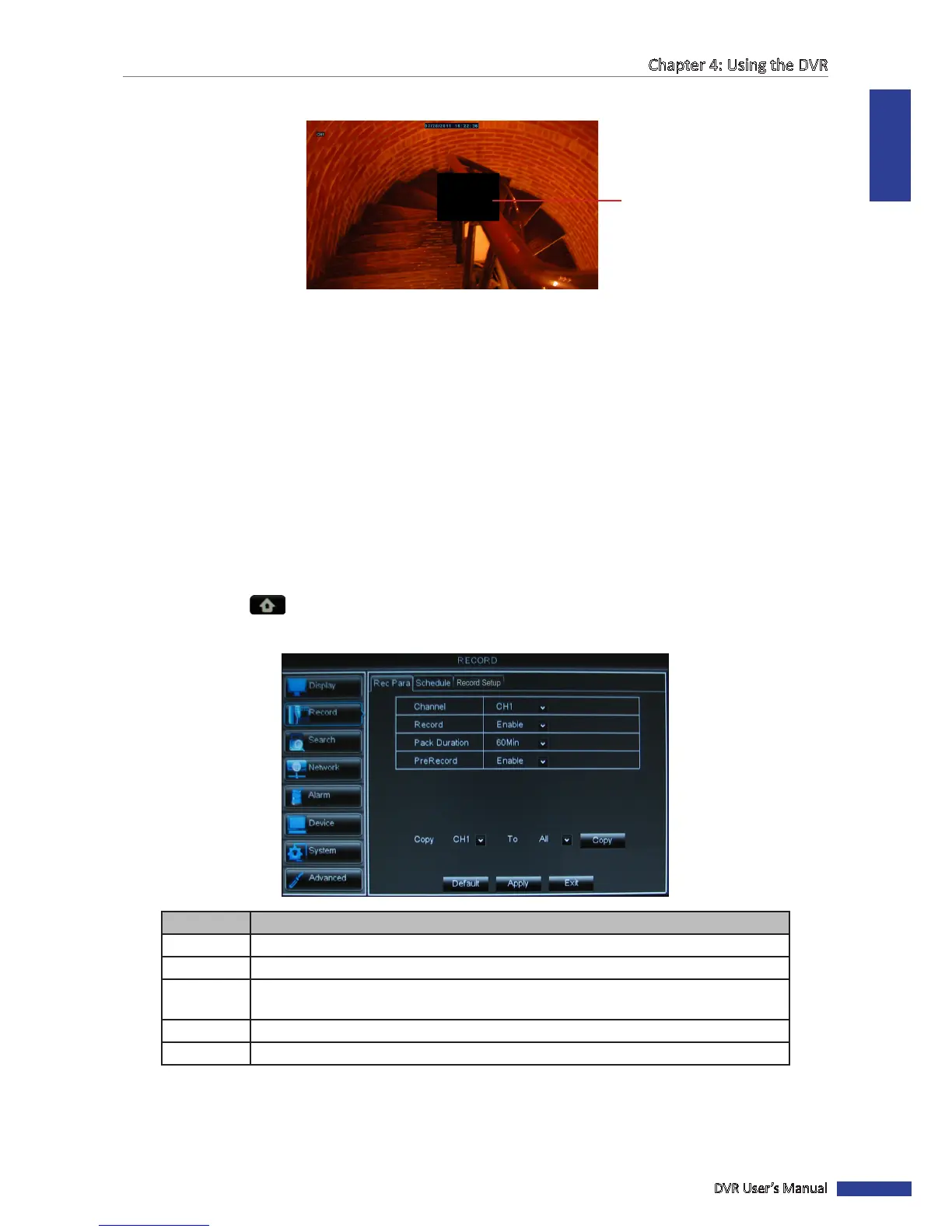
8 Click the right mouse buon to close the Select Mask screen.
Masked area
9 Aer all sengs are complete, click Apply.
10 When data saving is complete, click OK.
« TIP »
To copy the privacy zone seng to other channels, select the channel(s) in Copy To, then click Copy.
4.2 Record Setup
With RECORD menu, you can customize the recording sengs, set the recording schedule and framerate.
4.2.1 Record Parameter
1 In preview mode, right-click on the mouse to display the Pop-up menu.
2 Select Main Menu > RECORD.
3 Modify the necessary sengs.
Menu item Descripon
Channel Select the channel that you want to congure.
Record Enable/Disable record mode.
Pack
Duraon
Set the elapsed me per recording (15 Min/30 Min/45 Min/60 Min).
PreRecord Enable/Disable recording prior to moon detecon recording is triggered.
Copy To Copy the current sengs to all channels or one specic channel.
4 Aer all sengs are complete, click Apply.
5 When data saving is complete, click OK.



 To Next Page