ENGLISH
Chapter 5: KGUARD Web Client
92
DVR User’s Manual
5.5.4 Seng the Alarm
Use the Alarm menu to select when to trigger the alarm and choose the alarm nocaon, such as buzzer sound,
email, or full screen nocaon.
Seng Moon Detecon
1 On the Main Menu, click Remote Seng.
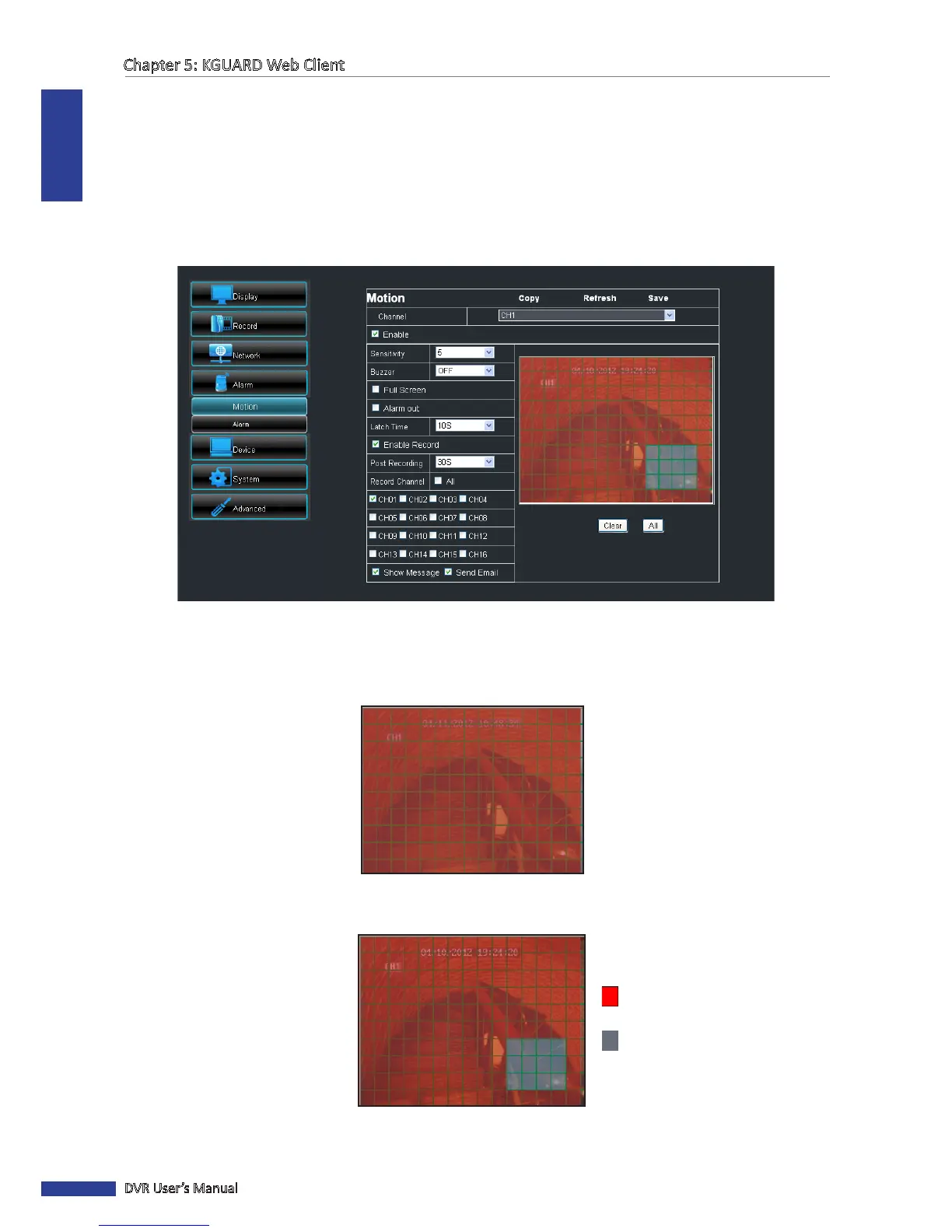
2 On the le panel, click Alarm > Moon. The Moon screen appears.
3 On Channel, select the channel where you want to setup moon detecon.
4 Check the Enable box to enable moon detecon.
5 By default, the whole screen is marked for moon detecon (red block).
6 To disable moon detecon on an area, click a block and then drag the mouse to highlight the scope that you want
to unmark (gray block). Or, click Clear to unmark all areas and then select a new area to mark for moon detecon.
Area is marked for moon
detecon
Area is unmarked for moon
detecon



 To Next Page