ENGLISH
Chapter 5: KGUARD Web Client
DVR User’s Manual
87
Seng Up with PPPoE
If your network uses the Point-to-Point Protocol over Ethernet (PPPoE), do the following:
1 On the Main Menu, click Remote Seng.
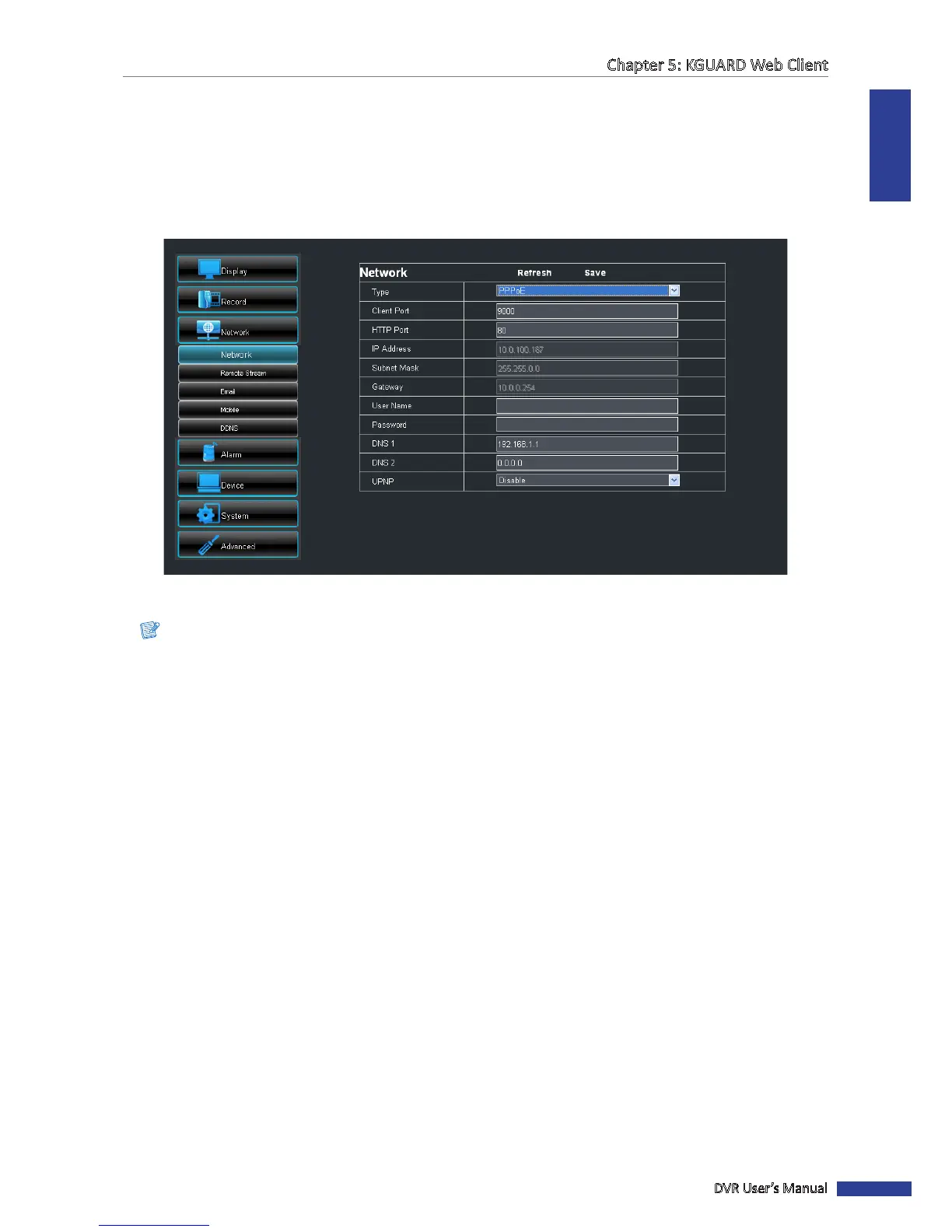
2 On the le panel, click Network > Network. The Network screen appears.
3 On Type, select PPPoE.
4 Specify the Client Port and HTTP Port.
Note:
• Obtain these informaon from your network administrator or your Internet Service Provider (ISP).
• If you cannot use the either of the two default ports, 80 or 9000, the specied port may be occupied by other
programs or it is being blocked by your service provider. Enter other port number. In this case, you need to
add the port number aer the IP address. For example, if you set the HTTP Port as 85, you need to enter the
IP address as “192.168.3.103:85”.
5 Enter the User Name and Password.
6 If necessary, specify DNS 1 and DNS 2.
7 Enable UPnP if you are using Universal Plug and Play (UPnP) devices.
8 Aer all sengs are complete, click Save.
« TIP »
To cancel any modicaons and retain the exisng sengs, click Refresh.



 To Next Page