ENGLISH
Chapter 4: Using the DVR
DVR User’s Manual
53
4.4.2 Remote Stream Setup
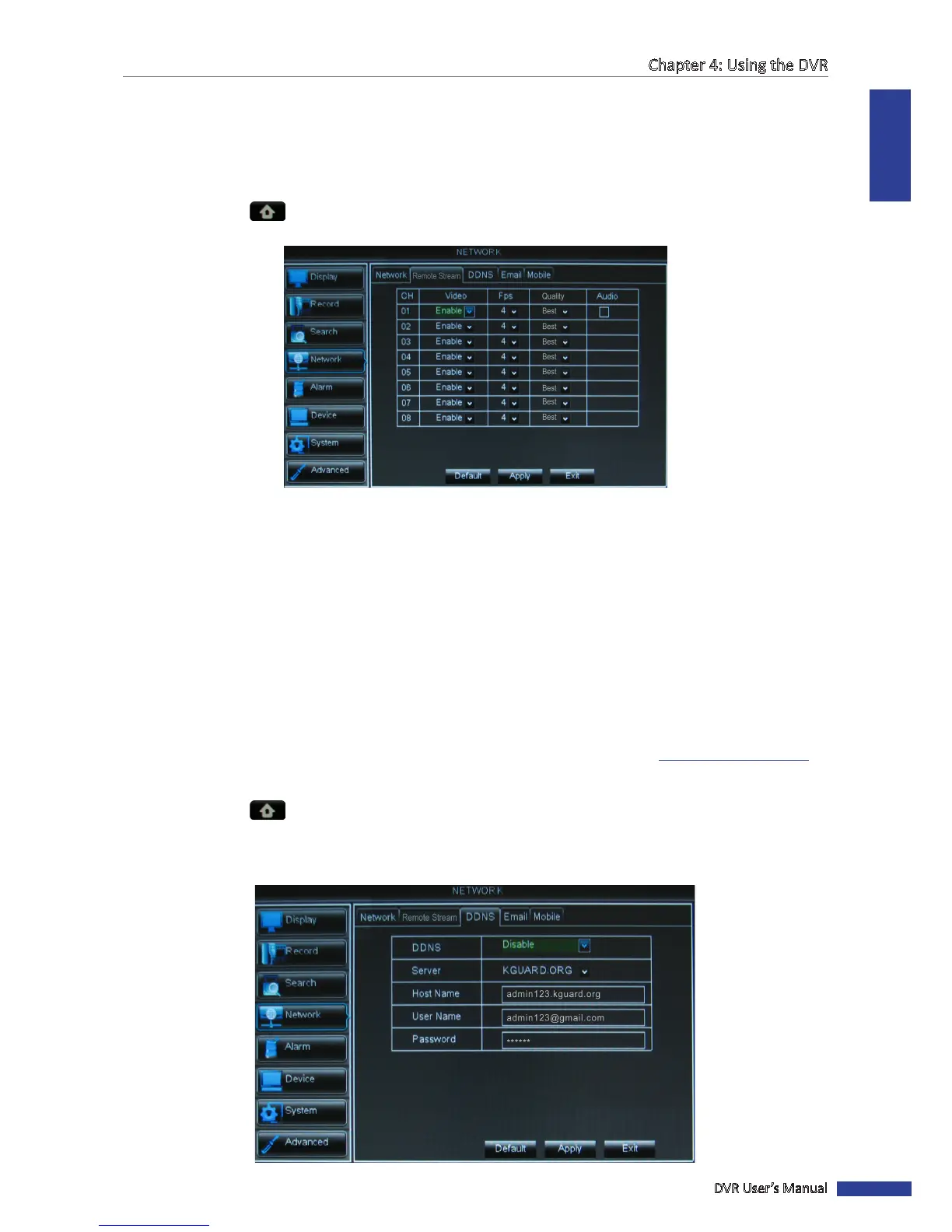
The Remote Stream page allows you to enable or disable video output of a parcular channel if the channel is being
viewed via remote access.
1 In preview mode, right-click on the mouse to display the Pop-up menu.
2 Select Main Menu > NETWORK, select the Remote Stream tab. The remote stream framerate sengs are
displayed on a table.
3 Select the channel and adjust the corresponding sengs such as Video, FPS, and Quality.
4 Check the Audio box to enable audio.
5 Aer all sengs are complete, click Apply.
6 When data saving is complete, click OK.
4.4.3 DDNS Sengs
DDNS (Dynamic DNS) is a service that registers a domain name and the oang IP address with a DDNS server so that
the domain name can be routed to the IP address even if the IP is changed in a dynamic IP system.
To use this feature, you must have a DDNS account. Consult with your Internet Service Provider for this service or
create a DDNS account with KGUARD.org server, see the “SUPPORT” page on our website (www.kguardsecurity.com).
1 In preview mode, right-click on the mouse to display the Pop-up menu.
2 Select Main Menu > NETWORK, select the DDNS tab.
3 Set DDNS to Enable.
4 Select the Server, and enter the host name, user name, and password.



 To Next Page