ENGLISH
Chapter 2: Installaon
DVR User’s Manual
17
Chapter 2: Installaon
2.1 Installing the Hard Disk Drive
Depending on the package you have purchased, the hard disk drive may be included in the full package. If it is not
pre-installed, follow the installaon instrucons on this user manual.
DO NOT install or remove the hard disk drive while the device power is turned on.
2.1.1 Installing HDD on 4-Channel / 8-Channel DVR
The 4-channel / 8-channel DVR supports one 3.5” SATA hard disk drive. To install the HDD, follow the steps below.
Note:
The illustraons below show an 8-channel DVR, same procedures apply to a 4-channel DVR.
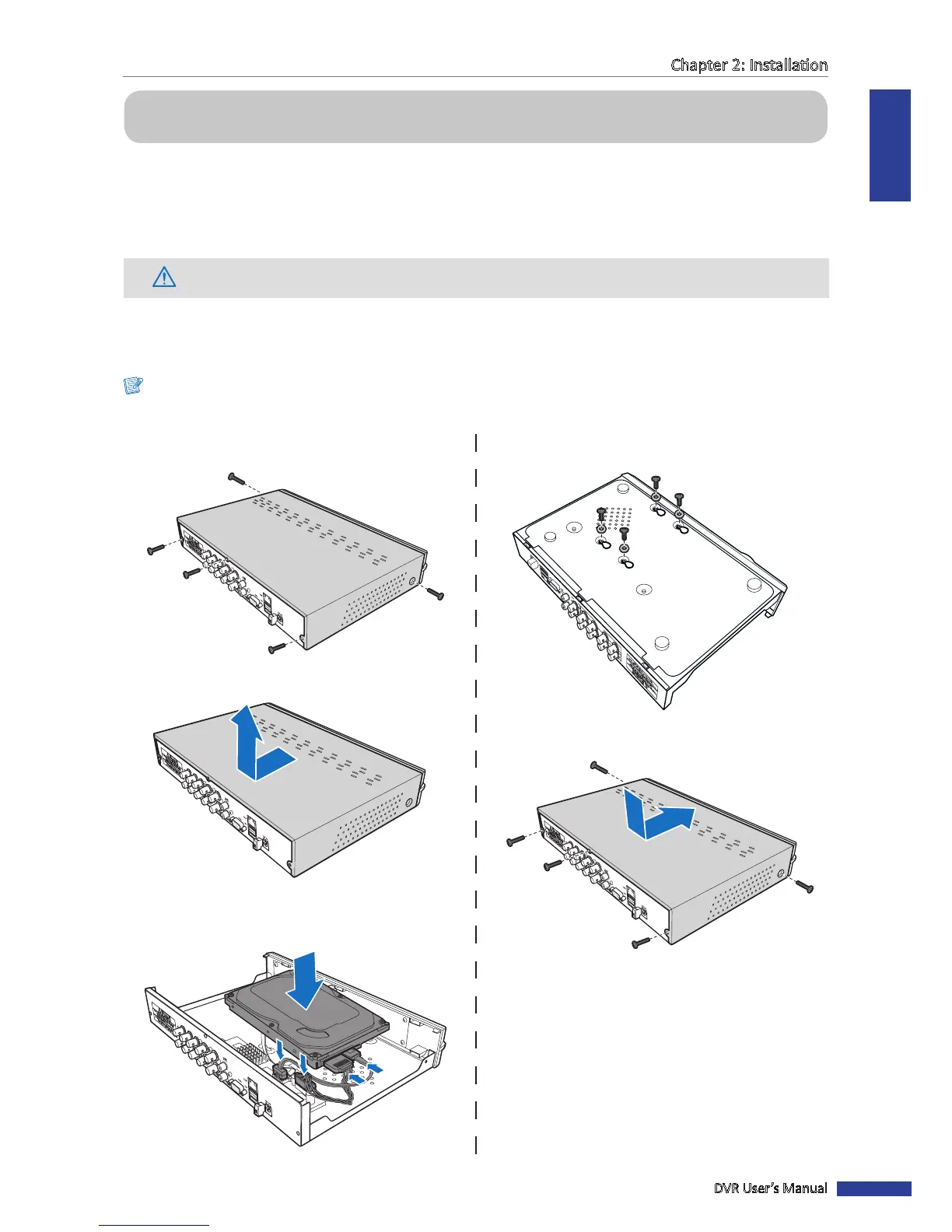
1 Loosen the screws in the le, right, and rear sides as
shown.
2 Push back then li up the cover to remove it.
3 Connect the data and power cables to the hard disk
drive (HDD) and place the HDD on the DVR case.
4 Align the HDD to the holes on the DVR case and
secure the HDD using the four (4) supplied screws.
4
1
2
2
V
ID
E
O
O
U
T
P
U
T
8
6
V
ID
E
O
IN
P
U
T
A
U
D
IO
IN
P
U
T
V
G
A
5 Aach the cover and the screws back in place.



 To Next Page