ENGLISH
Chapter 3: Geng Started
28
DVR User’s Manual
Chapter 3: Geng Started
3.1 Starng Up
Connect the power adapter to the DVR. See “2.2 Connecng the Power” on page 20 for further details.
3.2 Shung Down
To properly turn o the DVR power, do the following:
1 In the preview mode, right-click on the mouse to display the pop-up menu on the boom of the screen.
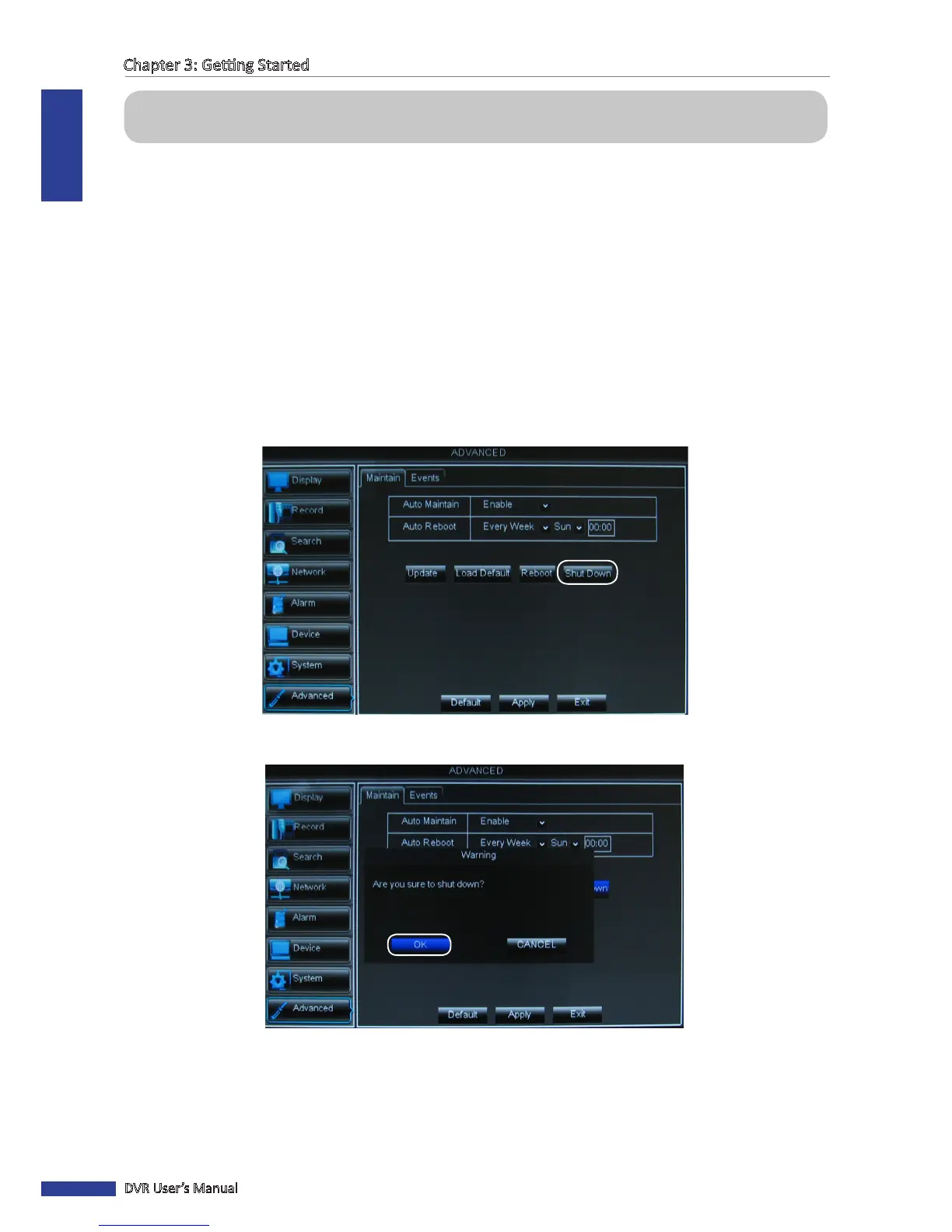
2 Select Main Menu > Advanced, and then click Shut Down.
You can also access the main menu by pressing the MENU buon on the remote control or the Menu key on the
front panel.
3 A warning message appears on the screen, select OK to turn o the power.
4 Wait unl the “Now you can power o!” message appears on the screen.
5 Turn o the power switch on the back panel of the DVR (for 16-channel DVR only) and then unplug the power cord
from the power outlet.



 To Next Page