Arpeggiator function
92
4. “ArpeggiatorSelect”willautomaticallybesettoA
whenyounavigatetothispagefromProgram
mode.
5. In“Pattern,”selectthearpeggiopatternthatyou
wishtoedit.
Forthisexample,selectanemptyuserarpeggio
pattern.
Ifablankpatternisselected,playingthekeyboard
willnotstartanarpeggio.Althoughpreset
arpeggiopatternsP0–P4canbeselected,they
cannotbeedited.
Wh
enyoueditauserarpeggiopattern,the
changeswillhaveaneffectanytimethatthis
patternisusedinProgram,Combination,orSong.
6. In“Length,”specifythelengthofthepattern.
Afterthepatternhasplayedforthelengthspecified,it
willreturntothebeginning.Thissettingcanalsobe
changedduringorafterediting.Forthisexample,setit
to08.
Setknob4(STEP)tothecenterposition(12
o’clock)sothatthevaluesofthe“Length”and
“Resolution”parameters(GlobalP6:Arpeggio
Pattern‐Setuppage)willbeused.
Note: ForthepreloadarpeggiopatternsU0000(INT)–
U0899(INT),simplychangingthe“Length”can
significantlychang
ethecharacterofthepattern.Try
changingthelengthandlisteningtotheresult.(See
“Length(PatternLength)”onpage 211ofthe
ParameterGuide.)
7. Makesettingsforthe“ (Tempo),”“Resolution,”
“Octave,”“Sort,”“Latch,”“KeySync.,”and
“Keyboard”parameters.
Theseareprogramparameters,buttheycanbeset
fromhereaswell.
IfafteraccessingthispagefromProgrammode,
youmodi
fytheseparametersandwishtokeep
yourchanges,returntoProgrammodeandwrite
theprogram.Theseparametersarenotsavedby
“WriteArpeggioPattern.”
Forthisexample,makethesettingsshowndisplaystep
3.
8. InArpeggioPatternSetup,specifyhowthe
arpeggiowill
bedeveloped.
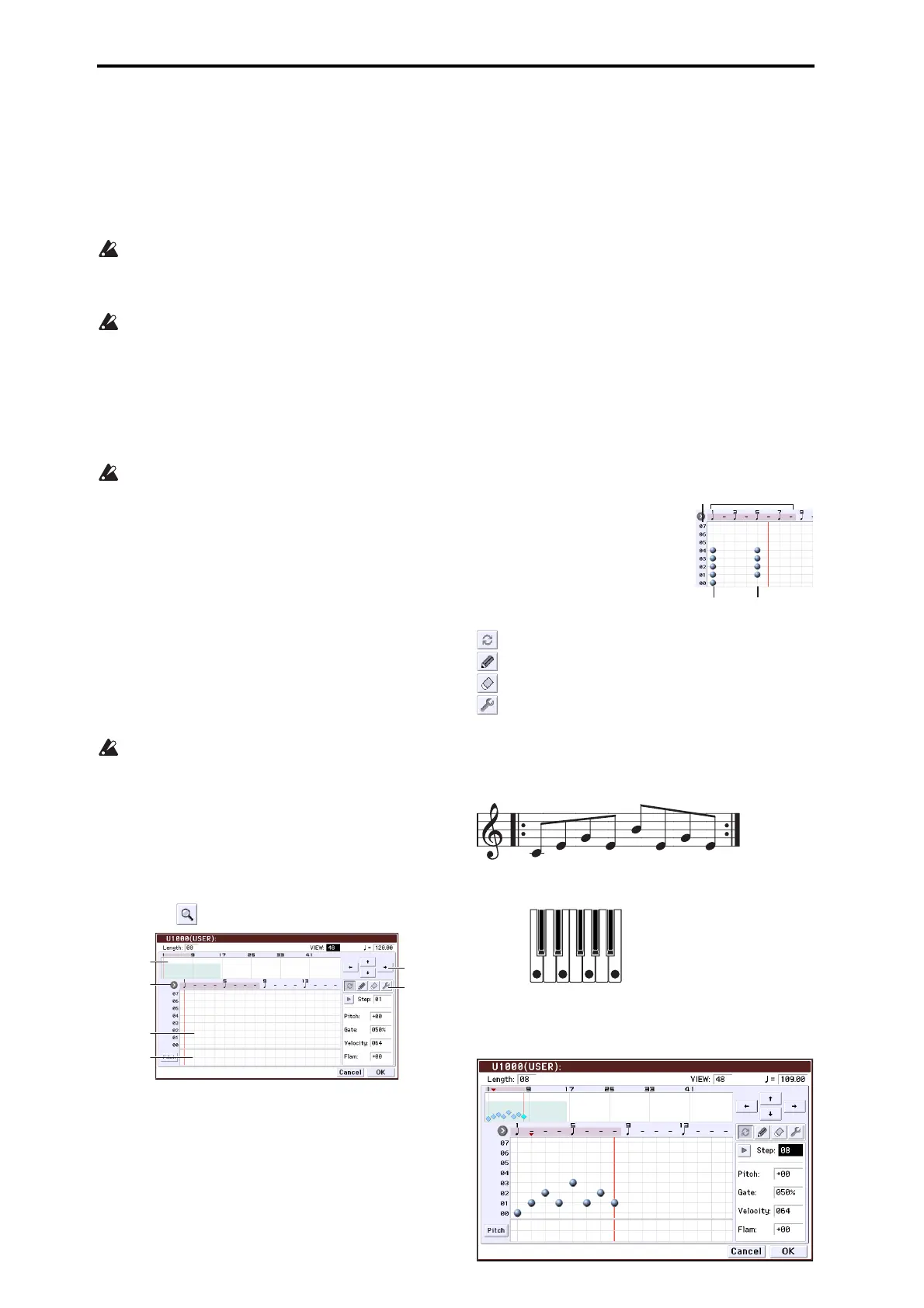
9. PressthebuttontoselectEditdialog.
ApatternconsistsofStepsandTones.
• Step:Eachuserarpeggiopatternhasupto48steps.
Startingwiththefirststep,thearpeggiatorwillplay
notesatint
ervalsofthenotevaluespecifiedby
Resolution.Theverticalli
nesofthegridindicate
thesteps.
UseSteptoselectthestep;thenspecifyPitchOff‐
set,Gate,VelocityandFlamforeachstep.
YoucanalsoselectthestepbypressingtheStepline
intheparameterviewatthebottom.Youcanalso
editbydraggingintheparameterview.
Pressthebut
tontotheleftoftheparameterviewto
switchbetweenPitch(PitchOffset)→Gate(Gate)
→Vel.(Velocity)→Flam(Flam).
• Tone:Eachstepcansoundachordofupto12tones
(ToneNo.00–11).Bytouchinganddraggingthe
overviewontherightpartofthescreenorbyusing
thezoomscrollbuttonsaboveit,selectthelocation
forenteringtonesinthezoomviewbelow.Press
thetouchgridtoentertones.
WhenStepisselected,youcanalsoentertonesby
usingthenumerickeys0–9andth
e“–”and“.”but‐
tons.
Note: TheToneNo.correspondstothenumerickeys
0–9andthe“–”and“.”buttonsasshownbelow.Each
timeyoupressanumerickey0–9ora“–”or“.”button,
thecorrespondingtonewillturnonoroff.The
horizontallinesofthegridinthecenterofthedispla
y
correspondtotones.
Tone00–09:0–9buttons
Tone10:–button
Tone11:.button
Entering tones
Alternate:Setorresetthetone.
Pen(setonly):Setthetone.
Erase(resetonly):Resetthetone.
Tool:Opensthetooltablet.Thetooltabletletsyou
usevariouscommandsinaregionyou’vespecifiedin
theoverview,ortocopyandpaste(see“ToolTablet”
onpage 214oftheParameterGuide).
Creating an example pattern
1. Pressthealternatebutton.
2. Entertonesinthetouchgridasshowninthe
illustrationbelow.
Overview
Resolution
Tone Input
Touch Grid
Parameter
View
Zoom Scroll
one No.
01
Step No.
Length: 8
05



 To Next Page