Using the arpeggiator while you play Creating a user arpeggio pattern
93
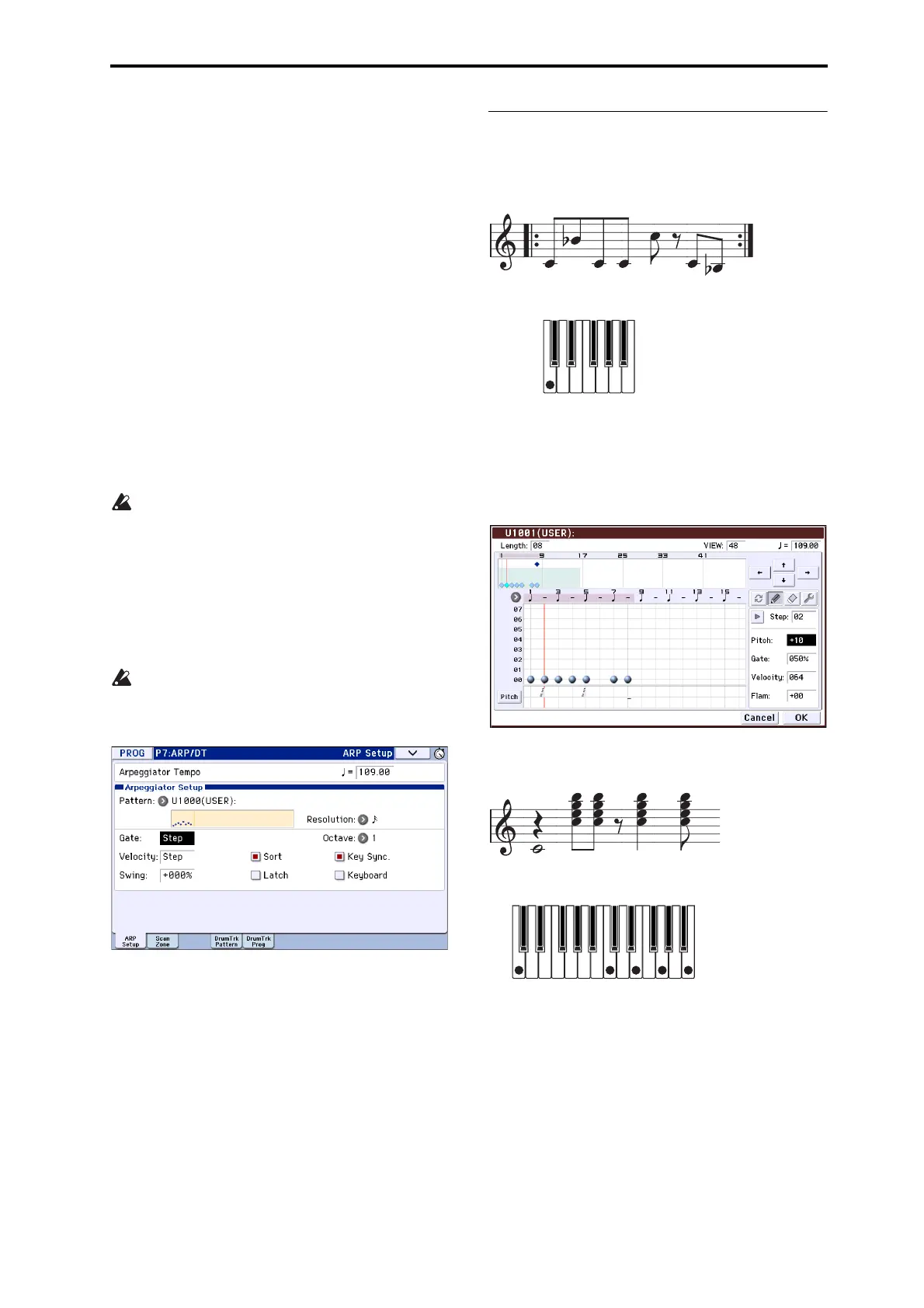
3. Whenyouplaythekeyboardasshowninthe
illustration,thearpeggiatorwillbeginplaying.
Tone0correspondstothepitchofthelowestkeyof
chordyouplayonthekeyboard.(IfSortisunchecked,
itwillcorrespondtothepitchofthefirstnoteyou
play.)
4. Forsteps01–08,makesettingsfor“PitchOffset,”
“Gate,”“Velocity,”and“Flam.”
PitchOffset:Thisoffsetsthepitchofthearpeggionote
insemitonesupordown.Youcaninputthesametone
foreachstep,andchangethePitchOffsetvaluefor
eachtocreateamelodyusingasingletone.(See
“Melodypattern”)
Gate:Specifiesthelengthofthearpeggionoteforea
ch
step.WithasettingofLegato,thenotewillcontinue
soundingeitheruntilthenextnoteofthesametoneor
untiltheendofthepattern.WithasettingofOff,the
notewillnotsound.
Velocity:Thisspecifiesthestrengthofthenote.Witha
settingofKey,thenotewillsoundatthestrengthof
howitwasactuallyplayed.
TheGateandVelocitysettingsyouselectherewill
bevalidiftheGateandVel oci typarameters
(ProgramP7:ARP/DT–ARPSetuppage)ofthe
programselectedinProgrammodearesettoStep.
IftheseparametershaveasettingotherthanStep,
theGatean
dVelocitythatwerespecifiedforeach
individualstepwillbeignored,andallnotesofthe
arpeggiowillsoundaccordingtothesettingsin
ProgramP7:ARP/DT–ARPSetuppage.Besureto
ve
rifythesettingsoftheprogram.
WheneditingGate,V
elocity,andSwing,usethe
SELECTbuttontoselectARP,andsetknob1
(GATE)andknob2(VELOCITY)tothecenter
position(12o’clock).
5. Tochangetheuserarpeggiopatternname,usethe
“RenameArpeggioPattern”menucommand.(See
page 221oftheParameterGuide)
6.
Ifyouwishtosavetheediteduserarpeggio
patterntointernalmemory,besuretoWritethe
userar
peggiopattern.(Seepage 221ofthe
ParameterGuide)
Ifyouturnoffthepowerwithoutwriting,theedited
contentswillbelost.
7. Ifyouwishtosavethestateoftheprogramatthe
sametime,returntoProgrammodeandwritethe
program.(Seepage
115)
Other examples of creating a user
arpeggio pattern
Melody pattern
1. Pressthealternatebutton.
2. Inthetouchgrid,settone0for“Step”01,02,03,04,
05,07,and08(i.e.,allbut06).
3. Specifythepitch.Setthe“Step”02“Pitch”to+10,
“Step”05“Pitch”to+12,andthe“Step”08“Pitch”
to–2.
4. Playasinglekey;thearpeggiowillbeginplaying.
Chordal pattern
1. Pressthealternatebutton.
2. Inthetouchgrid,settone00of“Step”01.
3. In“Step”03,04,06,and07,settones00–04.
4. Select“Step”01,andset“Gate”toLegato.
5. Select“Step”06,andset“Gate”toLegato.
Note: Tosimulatethetimingnuancesofastrummed
guitarchord,selectFlam.InProgr
ammode,selectan
acousticguitarprogram,andchoosetheuserarpeggio
patternthatyoucreatedhere.IntheArpeg.Program
P7:ARP/DT–ARPSetuppage,setGatetoStep.



 To Next Page