3. Opening the rear window
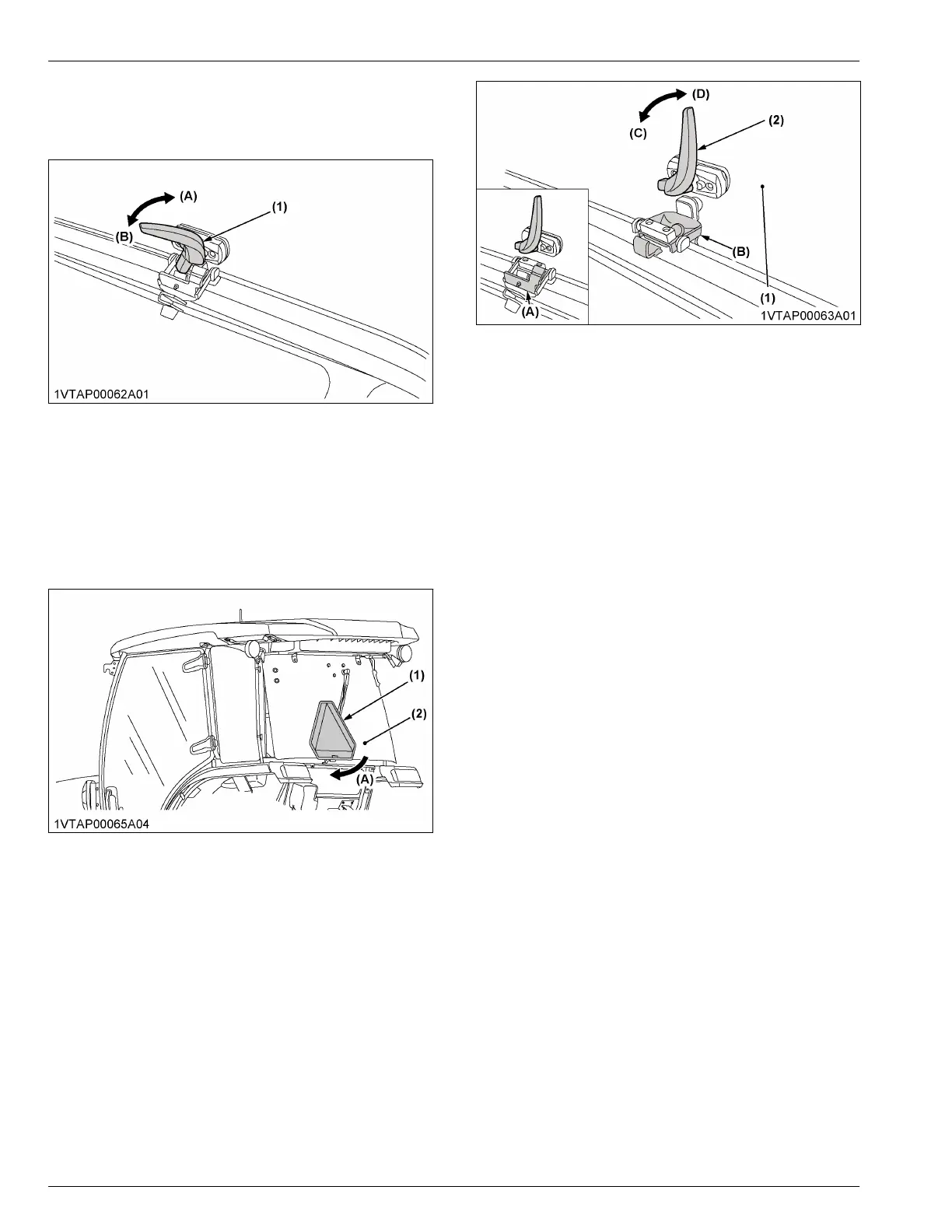
1. Turn the rear-window-handle clockwise to the
vertical position and push the rear-window-handle.
(1) Rear window handle (A) Open
(B) Close
The rear window is opened by the gas-spring-
cylinder.
IMPORTANT :
• To maintain the visibility of the SMV
emblem, close the rear window when driving
on the road.
(1) SMV emblem
(2) Rear window
(A) Close
4. How to use the rear window half-
lock
IMPORTANT :
• Be careful not to travel the machine in the half-
lock mode on rough roads.
1. Grip the rear-window-handle, and slightly open the
rear window.
2. Adjust the half-lock bracket to the set position.
3. Move back the rear window a little, and get the rear-
window-handle locked.
(1) Rear window
(2) Rear window handle
(A) Half-lock bracket (storage
position)
(B) Half-lock bracket (set posi-
tion)
(C) Lock
(D) Unlock
IMPORTANT :
• When handling the half-lock mechanism,
hold up the window just before being
positioned and then slowly get it in position.
5. How to use the emergency exit
IMPORTANT :
• Open the right door of the cab if the left door is
blocked, and the opposite is also true in an
emergency situation.
• Exit through the rear window if the CAB doors
are blocked in an emergency situation.
1. Turn the handle-lock fully clockwise (if equipped).
CAB OPERATION DOOR AND WINDOW



 To Next Page