3.1 Operating procedure for Auto Regeneration mode
3.1.1 Regeneration operating procedure for Auto Regeneration mode
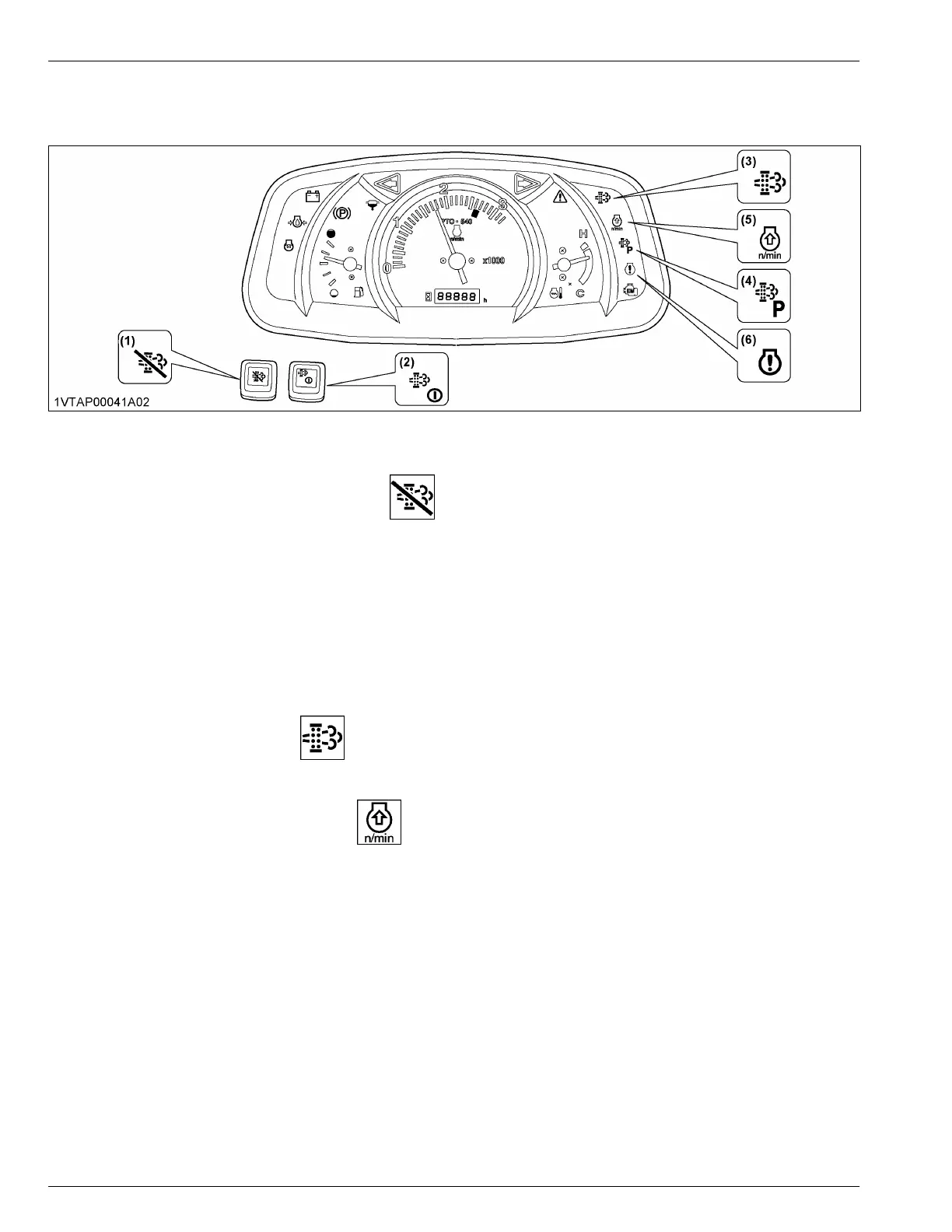
(1) DPF INHIBIT switch
(2) Parked regeneration switch
(3) Regeneration indicator
(4) Parked regeneration indicator
(5) Engine rpm increase indicator
(6) Engine warning indicator
1. Start the engine.
Make sure that the DPF-INHIBIT-switch-lamp is “OFF”.
DPF INHIBIT switch lamp is off
“Auto Regeneration” mode is activated.
DPF INHIBIT switch lamp is on
“Regeneration Inhibit” mode is activated.
NOTE :
• When the engine is started, the “Auto Regeneration” mode is automatically activated.
• “Regeneration Inhibit” mode is activated when the DPF-INHIBIT-switch is pushed after the engine is
started.
2. When the regeneration indicator starts flashing, a specific amount of PM has built up in the DPF.
Continue to operate the tractor. The regeneration process will begin automatically. Make sure that the working
place is in a safe area because DPF and exhaust temperature will rise.
3. When the engine-rpm-increase-indicator starts flashing, keep on working and increase the engine rpm until
the engine-rpm-increase-indicator turns “OFF”.
NOTE :
• Even if the “Auto Regeneration” mod is selected, DPF regeneration may not begin because system
requirements have not been satisfied.
• The engine-rpm-increase-indicator is used as a guide to satisfy the regeneration conditions. If the engine
load is too heavy, the engine-rpm-increase-indicator may continue to flash, even though regeneration
system conditions are satisfied and regeneration may begin automatically.
(See Tips on diesel particulate filter (DPF) regeneration on page 57)
OPERATING THE ENGINE EXHAUST AFTERTREATMENT DEVICES



 To Next Page