• To indicate a left turn with the hazard lights already
flashing, turn the turn-signal-light-switch
counterclockwise.
When the left or right turn signal is activated in
combination with the hazard lights, the indicated turning
light will flash and the other will stay on.
Turn signal without hazard light
• To indicate a right turn without hazard lights (hazard
off), turn the turn-signal-light-switch clockwise.
• To indicate a left turn without hazard lights, turn the
turn-signal-light-switch counterclockwise.
When the left or right turn signal is activated without the
hazard lights, the indicated turning light will flash and
the other will be on.
NOTE :
• Be sure to return the turn-signal-light-switch to
center position after turning.
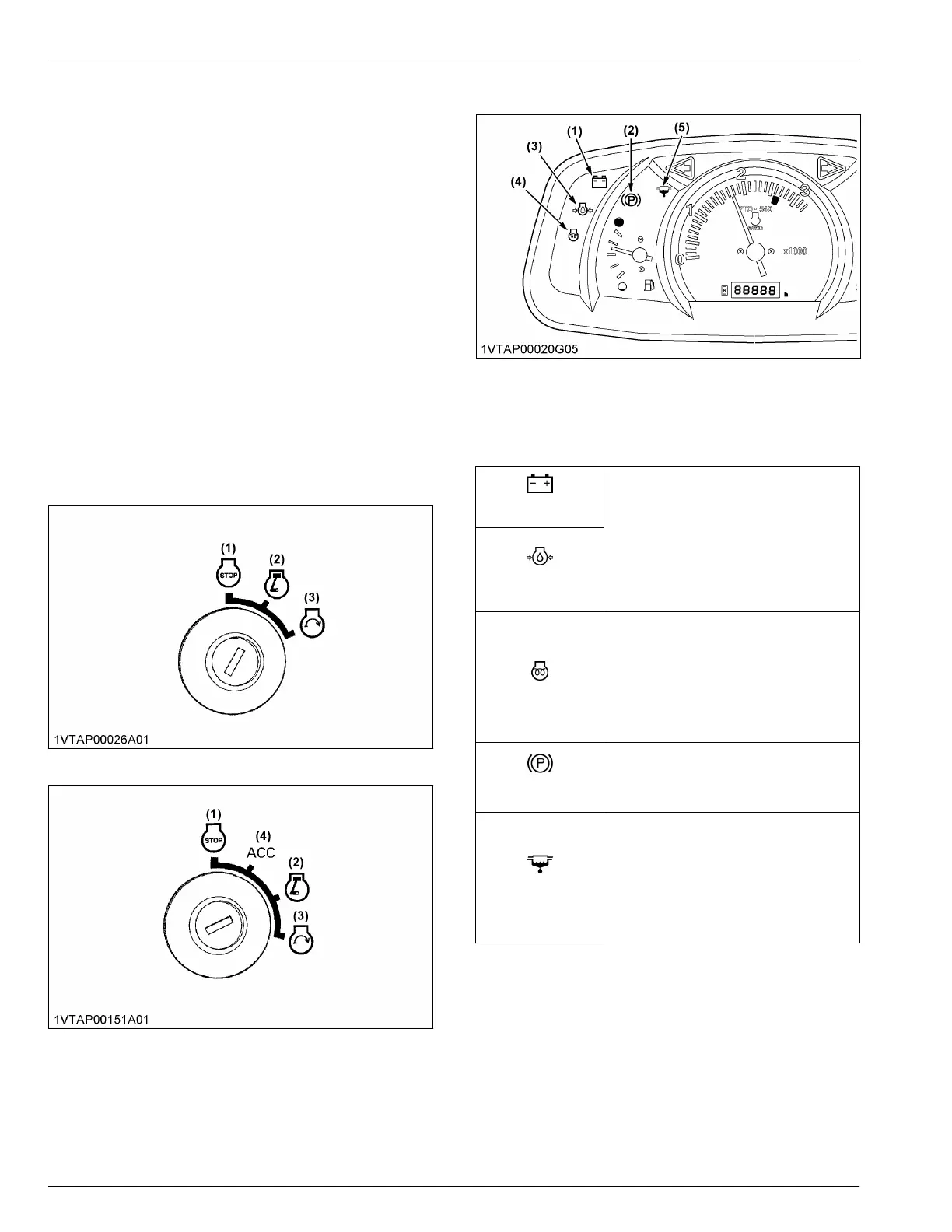
3. Key switch
[ROPS type]
[CAB type]
(1) Off
(2) On
(3) Start
(4) ACC
NOTE :
• [ACC]
All the accessories can be used while the
engine is stopped.
4. Easy Checker
™
lamps
(1) Electrical charge warning in-
dicator
(2) Parking brake warning indi-
cator
(3) Engine oil pressure warning
indicator
(4) Glow plug indicator
(5) Water separator filter indica-
tor
Electrical charge
warning indicator
When the key switch is turned “ON”, the
electrical-charge-warning-indicator (1) and
the engine-oil-pressure-warning-indicator
(3) should come on. If trouble should occur
at any location while the engine is running,
the warning-indicator-lamp corresponding
to the trouble comes on.
For further details, see Easy Checker
™
on
page 77.
Engine oil pressure
warning indicator
Glow plug indicator
Suppose that the engine-coolant-tempera-
ture is not high enough yet. Glow-plug-indi-
cator(4) also comes on when the key
switch is turned “ON” to preheat the engine
and goes off automatically when preheat is
completed. Illumination time of indicator
varies according to the temperature of
coolant.
Parking brake warn-
ing indicator
The parking-brake-warning-indicator (2)
comes on while the parking brake is ap-
plied and goes off when the parking brake
is released.
Water separator in-
dicator
If water or impurities collect in the water
separator, the indicator will light up and the
buzzer will sound.
If this should happen during operation,
drain the water from the water separator as
soon as possible.
(See Checking the water separator on
page 125)
IMPORTANT :
• Daily checks with the Easy Checker
™
only, are
not sufficient. Never fail to conduct daily checks
carefully according to DAILY CHECK on page
123.
INSTRUMENT PANEL AND CONTROLS
INSTRUMENT PANEL, SWITCHES, AND HAND CONTROLS



 To Next Page