• Tractor engine will not start if the PTO-clutch-
control-switch is in the “ON” position.
2. How to use the stationary PTO
To park the tractor and use the PTO system for chipper
or pump, for example, start the PTO system in the
procedure in this section.
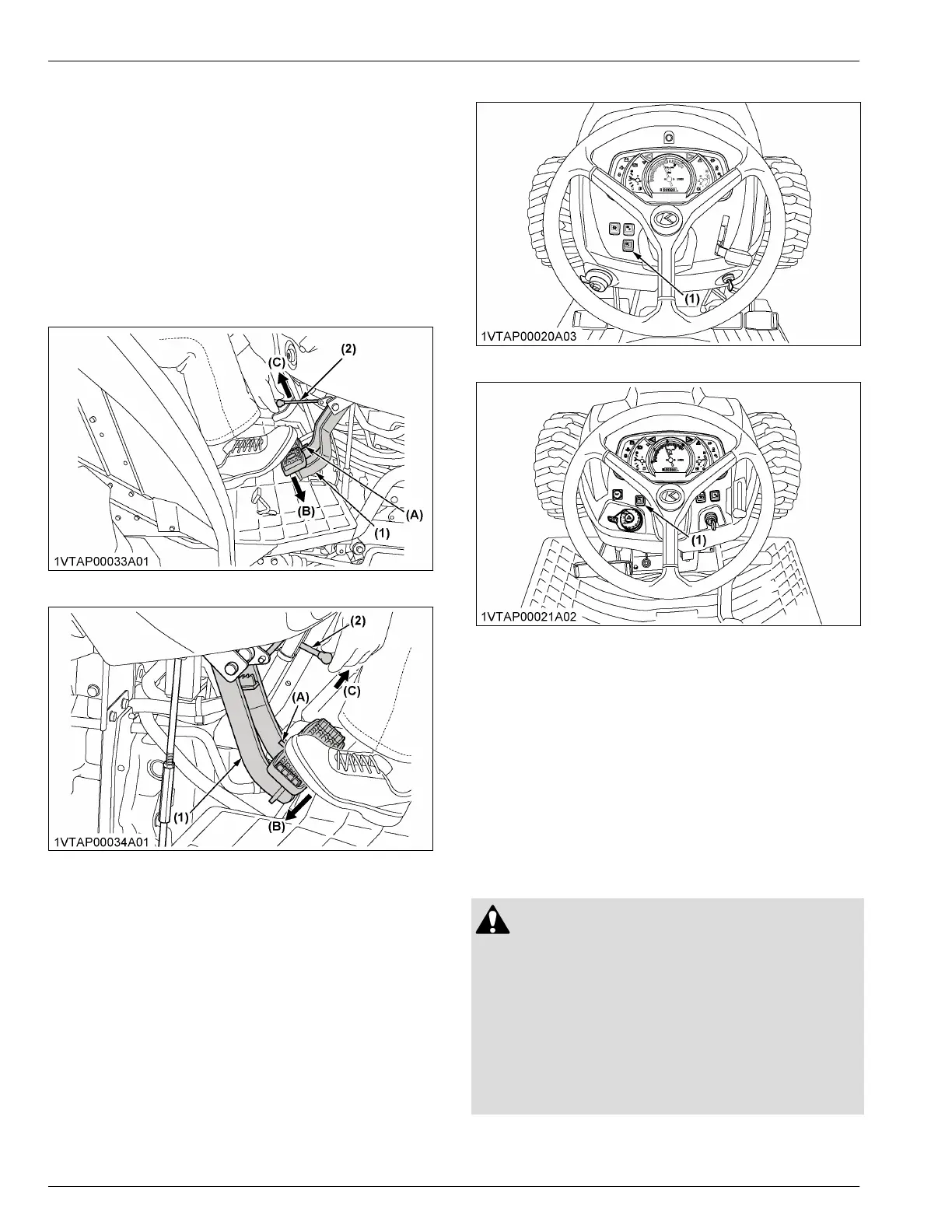
1. Apply the parking brake and place blocks at the
tires.
(See To set the parking brake on page 44)
[Manual transmission type]
[HST type]
(1) Brake pedal
(2) Parking brake lever
(A) Interlock the brake pedals
(B) Depress
(C) Pull
2. Make sure that all shift levers are in their
“NEUTRAL” positions.
3. Start the engine.
• [Manual transmission type]
See STARTING THE ENGINE [MANUAL
TRANSMISSION TYPE] on page 57.
• [HST type]
See STARTING THE ENGINE [HST TYPE] on
page 60.
4. Push the stationary-PTO-switch for 3 seconds to
turn on the switch lamp.
5. Set the PTO-clutch-control-switch to engage “ON”.
[ROPS type]
[CAB type]
(1) Stationary PTO switch
6.
Set the engine speed to provide recommended rear
PTO speed.
NOTE :
• If the PTO system is engaged and you stand
up from the operator's seat or the operator's
seat is not tilted forward, the engine stops
automatically after standing up.
3. PTO shaft cover and PTO shaft
cap
WARNING
To avoid personal injury or death:
• Keep the PTO-shaft-cover in place at all times.
• Replace the PTO-shaft-cap when the PTO shaft
is not in use.
• Before connecting or disconnecting a drive
shaft to PTO shaft, be sure that the engine is off
and raise up the PTO-shaft-cover. Afterward be
sure to return the PTO-shaft-cover to the
“NORMAL” position.
POWER TAKE-OFF (PTO) PTO OPERATION



 To Next Page