Home
LevelOne
Network Router
WGR-8031
Page 208 (Changing LAN IP and Subnet Mask)
LevelOne WGR-8031 - Changing LAN IP and Subnet Mask
331 pages
Manual
Save Page as PDF
To Next Page
To Next Page
To Previous Page
To Previous Page
Loading...
208
C
h
a
n
g
i
n
g
t
h
e
L
A
N
IP
a
d
d
r
e
s
s
a
n
d
s
u
b
n
et
m
a
s
k
To
c
he
ck
t
he
co
nf
igu
ra
ti
on
o
f L
AN
I
nt
erf
ac
e:
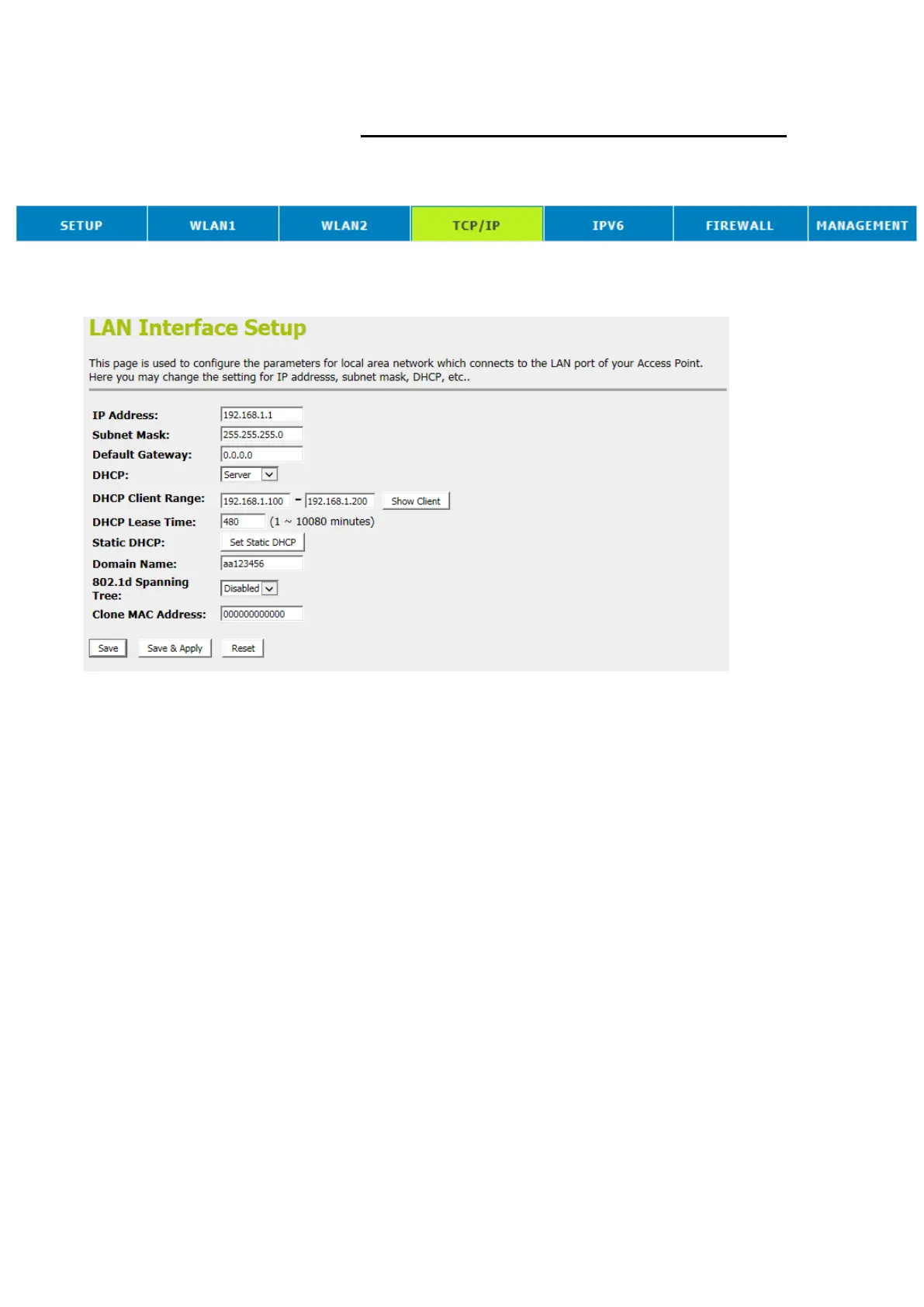
1.
Fro
m
th
e
hea
d
men
u,
c
li
ck
on
TCP
/IP
.
2.
Fro
m
th
e
le
ft
-ha
nd
me
nu
,
cli
ck
o
n
L
AN
Se
tt
ing
.
Th
e
fo
ll
ow
in
g
pag
e
is
di
sp
lay
ed:
207
209
Table of Contents
Main Page
Default Chapter
1
User Manual
1
Table of Contents
2
1 Introduction
9
Features
9
Device Requirements
9
Using this Document
10
Notational Conventions
10
Typographical Conventions
10
Special Messages
10
Getting Support
10
2 Getting to Know the Device
11
Computer / System Requirements
11
Package Contents
11
LED Meanings & Activations
12
Front Panel
12
Rear and Right Panel and Bottom Side
12
Computer Configurations under Different OS, to Obtain IP Address Automatically
14
For Windows 98SE / ME / 2000 / XP
14
For Windows Vista-32/64
18
For Windows 7-32/64
23
For Windows 8/8.1-32/64
28
For Windows 10-32/64
34
4 Connecting Your Device
38
Connecting the Hardware
38
5 Utility CD Execution
40
Connecting the Hardware
40
WAN Interface Setup
41
Wireless Configuration - 5Ghz
45
Wireless Configuration - 2.4Ghz
46
Wireless Connection
47
6 What the Internet/Wan Access of Your Own Network Now Is
49
Internet/Wan Access Is the DHCP Client
51
Internet/Wan Access Is the Static IP
52
Internet/Wan Access Is the Pppoe Client
54
7 Getting Started with the Web Pages
55
Accessing the Web Pages
55
Testing Your Setup
58
Default Device Settings
58
8 Quick Setup
60
Operation Mode Setup
61
Gateway
61
Bridge
62
Wireless ISP
63
WAN Interface Setup
64
Static IP
64
DHCP Client
65
Pppoe
65
Pptp
66
L2Tp
67
Wireless 5Ghz Basic Settings
68
AP (Access Point)
68
Client
69
WDS (Wireless Distribution System)
70
WDS (Wireless Distribution System) Only
72
AP (Access Point) + WDS (Wireless Distribution System)
72
Wireless 5Ghz Security Setup
73
Configuring WEP 64Bit ASCII (5 Characters) Security
75
Configuring WEP 64Bit Hex (10 Characters) Security
75
Configuring WEP 128Bit ASCII (13 Characters) Security
76
Configuring WEP 128Bit Hex (26 Characters) Security
76
Configuring WPA2 (AES) HEX (64 Characters) Security
77
Wireless 2.4Ghz Basic Settings
78
AP (Access Point)
78
Client
79
WDS (Wireless Distribution System)
80
WDS (Wireless Distribution System) Only
82
AP (Access Point) + WDS (Wireless Distribution System)
82
Wireless 2.4Ghz Security Setup
83
Configuring WEP 64Bit ASCII (5 Characters) Security
85
Configuring WEP 64Bit Hex (10 Characters) Security
85
Configuring WEP 128Bit ASCII (13 Characters) Security
86
Configuring WEP 128Bit Hex (26 Characters) Security
87
Configuring WPA2 (AES) HEX (64 Characters) Security
89
9 Operation Mode
90
Setting Operation Mode
90
10 Wireless Network - Wlan1(5Ghz)
91
Basic Settings
91
Advanced Settings
93
Security
94
WEP + Encryption Key
96
WEP + Use 802.1X Authentication
97
WPA2/WPA Mixed + Personal (Pre-Shared Key)
98
WPA2/WPA Mixed + Enterprise (RADIUS)
99
Access Control
101
Allow Listed
102
Deny Listed
103
WDS Settings
104
Configure WDS (Wireless Distribution System) Only
105
Configure AP (Access Point) + WDS (Wireless Distribution System)
109
Site Survey
114
Configure Wireless ISP + Wireless Client + Site Survey
115
Wps
120
Introduction of WPS
121
Supported WPS Features
121
AP Mode
122
AP as Enrollee
122
AP as Registrar
122
AP as Proxy
122
Infrastructure-Client Mode
123
Instructions of Ap's and Client's Operations
123
Wireless Basic Settings - Wlan1 Page
124
Operations of AP - AP Being an Enrollee
125
Operations of AP - AP Being a Registrar
138
AP Mode
138
Push Button Method
142
Wireless Schedule
146
11 Wireless Network - Wlan2(2.4Ghz)
147
Basic Settings
147
Advanced Settings
150
Security
151
WEP + Encryption Key
153
WEP + Use 802.1X Authentication
154
WPA2/WPA Mixed + Personal (Pre-Shared Key)
155
WPA2/WPA Mixed + Enterprise (RADIUS)
156
Access Control
157
Allow Listed
158
Deny Listed
159
WDS Settings
160
Configure WDS (Wireless Distribution System) Only
161
Configure AP (Access Point) + WDS (Wireless Distribution System)
167
Site Survey
172
Configure Wireless ISP + Wireless Client + Site Survey
173
Wps
178
Introduction of WPS
179
Supported WPS Features
179
AP Mode
180
AP as Enrollee
180
AP as Registrar
180
AP as Proxy
180
Infrastructure-Client Mode
181
Instructions of Ap's and Client's Operations
181
Wireless Basic Settings - Wlan1 Page
182
Operations of AP - AP Being an Enrollee
183
Operations of AP - AP Being a Registrar
196
AP Mode
196
Push Button Method
201
Wireless Schedule
205
12 LAN Interface
206
LAN Interface Setup
206
Changing the LAN IP Address and Subnet Mask
208
Show Client
211
13 WAN Interface
212
Configuring Static IP Connection
216
Configuring DHCP Client Connection
218
Configuring Pppoe Connection
220
Configuring PPTP Connection
222
Configuring L2TP Connection
226
Clone MAC Address
229
14 Ipv6
232
Ipv6 Wan Setting
232
Ipv6 Lan Setting
233
Radvd
234
Tunnel (6 over 4)
236
15 Port Filtering
237
Port Filtering for TCP Port 80
238
Port Filtering for UDP Port 53
240
16 IP Filtering
242
IP Filtering for TCP with Specified IP
243
IP Filtering for UDP with Specified IP
245
IP Filtering for both TCP and UDP with Specified IP
246
17 MAC Filtering
249
MAC Filtering for Specified MAC Address
250
18 Port Forwarding
252
Port Forwarding for TCP with Specified IP
254
Port Forwarding for UDP with Specified IP
255
19 URL Filtering
257
URL Filtering for Specified URL Address
258
20 Dmz
260
DMZ Host IP Address
260
802.1Q Vlan
262
21 802.1Q Vlan
264
22 Route Setup
264
23 Qos
265
24 Status
266
25 Statistics
268
26 Dynamic DNS
269
Configure Dyndns
271
Configure TZO
273
27 Time Zone Setting
275
SNTP Server and SNTP Client Configuration Settings
275
28 Denial-Of-Service
276
29 Tr-069 Config
279
30 Log
280
System Log
280
31 Firmware Update
283
About Firmware Versions
283
Manually Updating Firmware
283
32 Save/Reload Settings
285
Save Settings to File
285
Load Settings from File
287
Resetting to Defaults
289
33 Password
291
Setting Your Username and Password
291
Configuring Your Computers
293
Configuring Ethernet Pcs
293
Before You Begin
293
Windows® XP Pcs
293
Windows 2000 Pcs
293
Windows Me Pcs
295
Windows 95, 98 Pcs
295
Windows NT 4.0 Workstations
296
Assigning Static Internet Information to Your Pcs
297
IP Addresses, Network Masks, and Subnets
299
IP Addresses
299
Structure of an IP Address
299
Network Classes
299
Subnet Masks
300
Upnp Control Point Software on Windows ME/XP
302
Upnp Control Point Software on Windows ME
302
Upnp Control Point Software on Windows XP with Firewall
303
SSDP Requirements
303
Troubleshooting
306
Troubleshooting Suggestions
306
Diagnosing Problem Using IP Utilities
308
Ping
308
Nslookup
308
License Statement / Gpl Code Statement
310
Other manuals for LevelOne WGR-8031
Quick Installation Guide
28 pages
Related product manuals
LevelOne WBR-6802
40 pages
LevelOne WBR-6013
252 pages
LevelOne WAC-2000
34 pages
LevelOne WAC-2003
21 pages
LevelOne WBR-3405TX
56 pages
LevelOne FSW-0511
6 pages
LevelOne GEU-0822
9 pages
LevelOne POI-3000
8 pages
LevelOne GSW-0507
8 pages
LevelOne GSW-0807
2 pages
LevelOne GBR-4001
191 pages
LevelOne FSW-0508TX
3 pages















 To Next Page