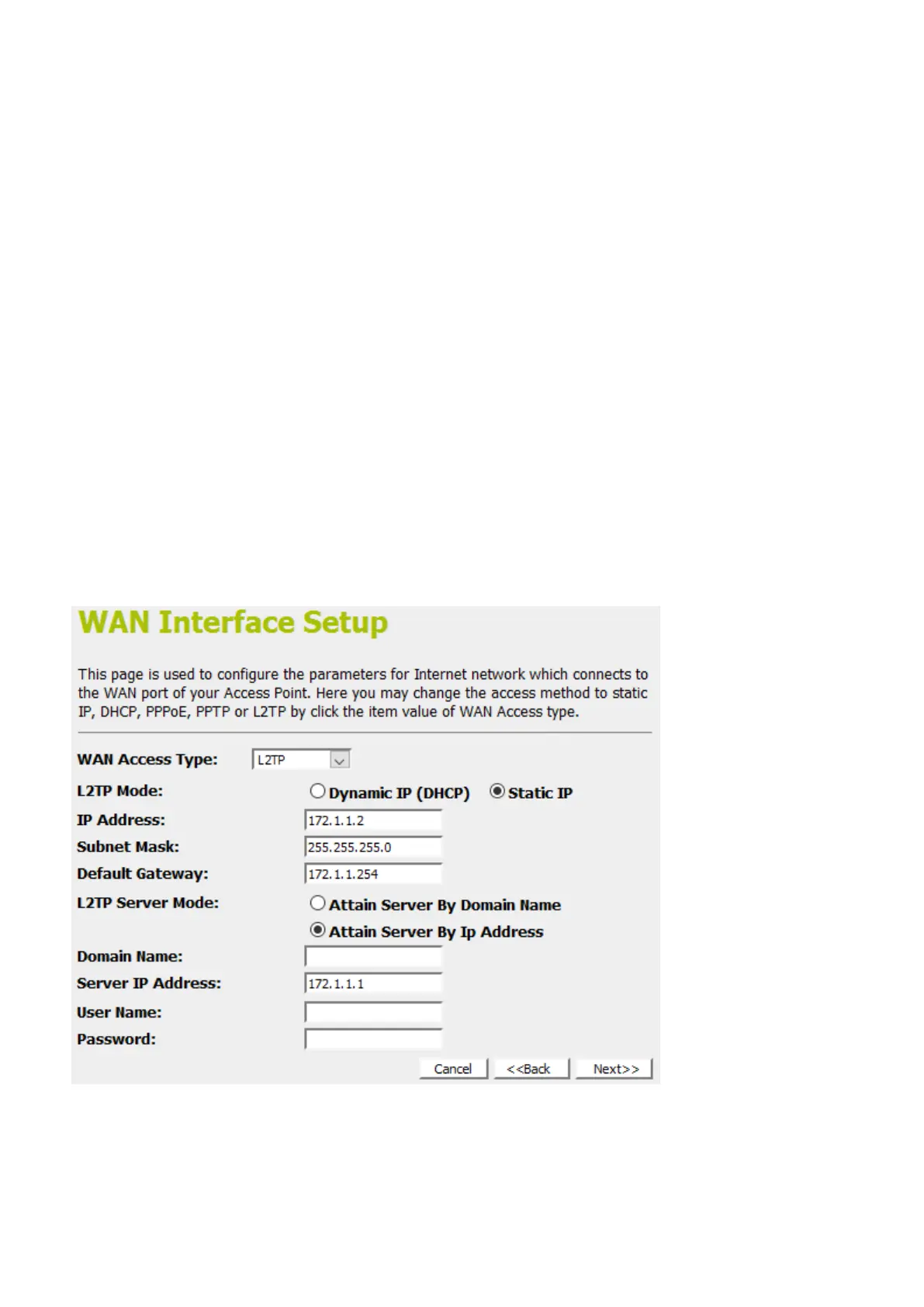
L2TP
In this mode, the device is supposed to connect to internet via
ADSL/Cable Modem. The NAT is enabled and PCs in four LAN
ports share the same IP to ISP through WAN port. The
connection type can be setup in WAN page by using L2TP.
1. From the WAN Access Type drop-down list, select L2TP
setting provided by your Network Administrator or ISP.
2. Click on the ratio of Dynamic IP (DHCP) or Static IP.
3. Enter IP Address for example 172.1.1.1 provided by your
Network Administrator or ISP. (for Static IP only)
4. Enter Subnet Mask for example 255.255.0.0 provided by
your Network Administrator or ISP. (for Static IP only)
5. Enter Default Gateway for example 172.1.1.254 provided
by your Network Administrator or ISP. (for Static IP only)
6. Select L2TP Server Mode by Attain Server By Domain
Name or Attain Server By Ip Address
7. Enter Server Domain Address for example
222.222.222.222 or www.example.com provided by your
Network Administrator or ISP.
8. Enter User Name for example 1234 provided by your
Network Administrator or ISP.
9. Enter Password for example 1234 provided by your
Network Administrator or ISP.
10. Click Next>>.















 To Next Page