Operation 4
Special equipment
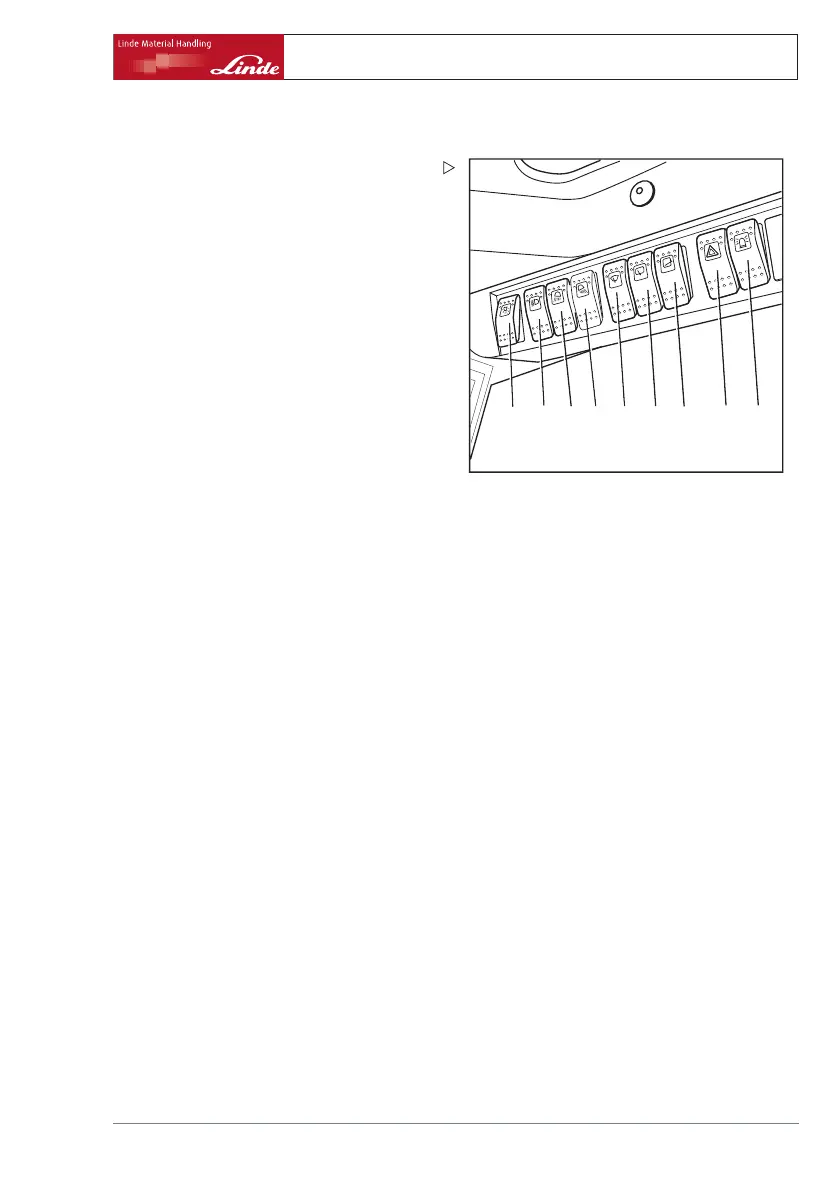
Switch on interior lighting
d3921516
1
2345 67 8
9
¾ Press toggle switch (1).
Switch on lighting
¾ Move toggle switch (2) to centre
position.
Side lights and licence plate
light are
switched on.
¾ Switch toggle switch (2) as far as it will go.
Dipped beam, side lights and licence plate
lights are switched on.
Switch on working headlights
¾ Press toggle switch (3) or (4) (depending on
the version) .
Switch on hazard warning lights
¾ Press toggle switch (8).
Switch on rotating flashing lig
ht
Depending on the equipment there are two
different versions.
Version 1 (single stage switch):
¾ Press toggle switch (9).
The rotating flashing light is always switched
on.
Version2(twostageswitch):
¾ Move toggle switch (9) to centre p
osition.
The rotating flashing light is switched on only
when reversing.
¾ Switch toggle switch (9) as far as it will go.
The rotating flashing light is alw
ays switched
on.
Operating Instructions – 393 807 1001 EN – 08/2008 69



 To Next Page