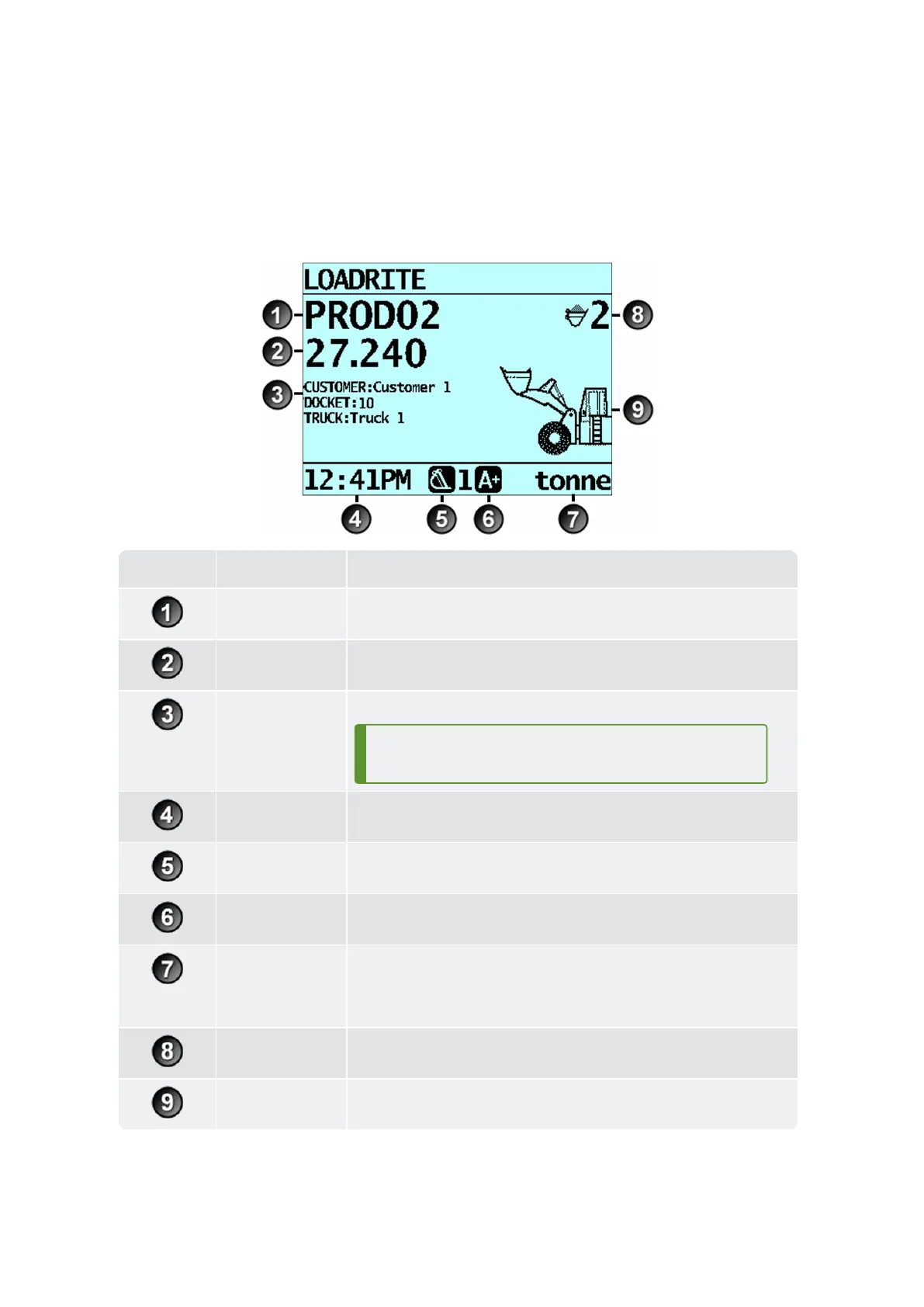
Component Description
Product Theproductbeingloaded.
Short total Thecurrentshorttotalofmaterialthathasbeenloaded.
Data Fields ThecurrentvaluesofeachCustomizableDataField.
TIP – Todisplaythecurrentvaluesof
all
datafields,use
eitherthe
Compact
or
Scroll
layout.
Clock Thecurrenttime.
Weighing
implement
Theweighingimplementbeingusedbytheloader.
Auto-add
Indicatesthatthe
Auto-add
functionalityisOn.
Unit of weight /
Pitch
n
Theunitofweightbeingused.TheShort totalisdisplayedinthis
unitofweight.
n
Theangelofpitch(front/backtilt)oftheloadermaybedisplayedifa
GroundSlopesensorisinstalled.
Bucket loads Thenumberofbucketloadsthathavebeenaddedtotheshorttotal.
Arm Graphic Agraphicrepresentingtheheightoftheliftedweight.



 To Next Page