5.0 Product Management
5.2 Advanced Data Options
5.2.1 Auto-target value look-up
TheLoadriteWeighingSystemcanbeconfiguredsothattargetweightsarestoredforeachtruck.Thetarget
weightsareconfiguredduringthesetupoftheLoadriteWeighingSystem.
Belowisanexampleofatruckandtargetlist.Data 2hasbeenconfiguredtostoretruckIDnumbersandData 3
tostorethecorrespondingtargetvalues.
Data 2: Truck Data 3: Target
DT123 150
DT124 150
DT125 150
DT344 300
DT345 300
5.2.1.1Viewandselecttargetweights
1.
Press .
The
DataMenu
willdisplay.
2.
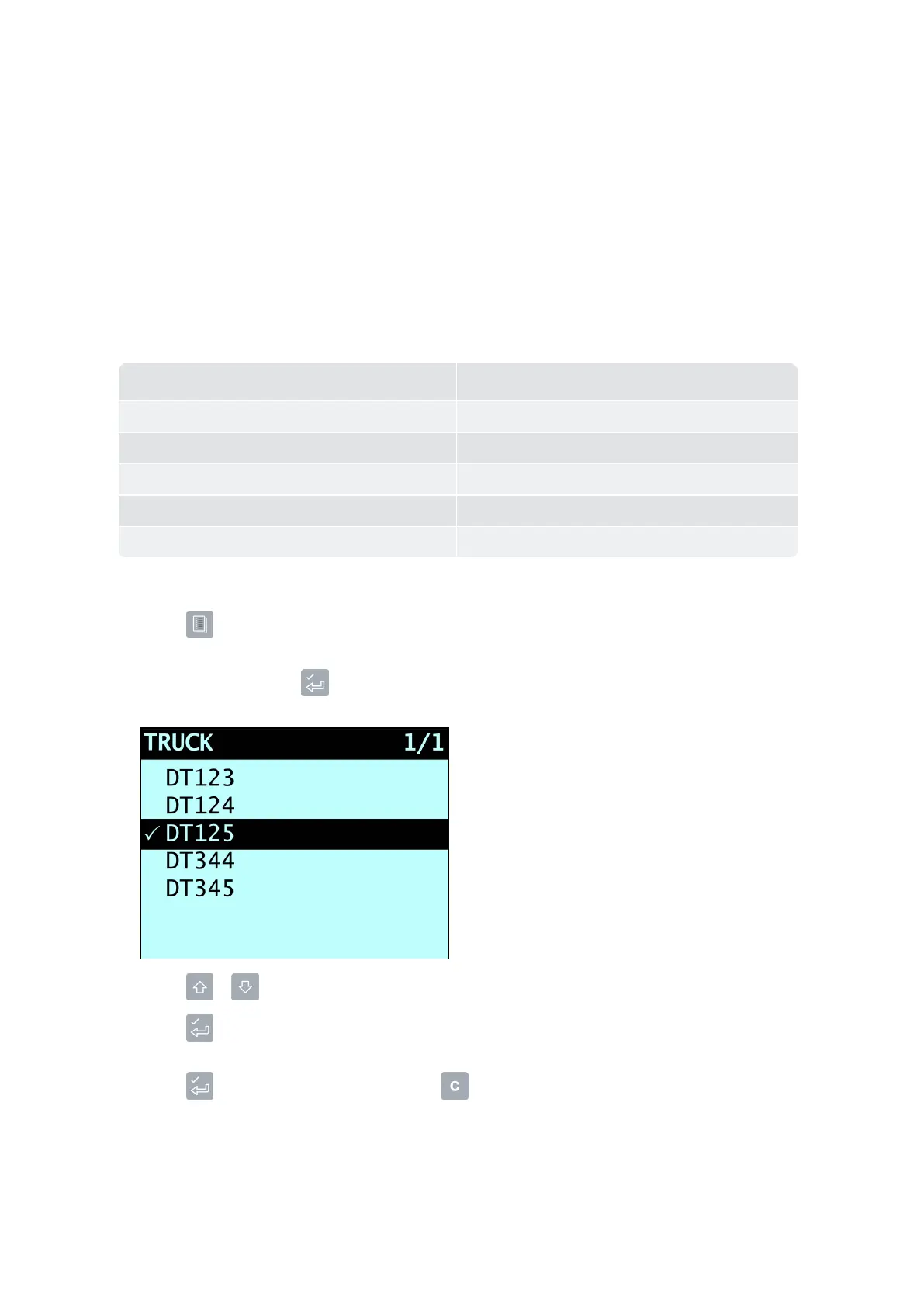
SelectTruck,thenpress .
The
Truck
screenwilldisplay.
3.
Press or toscrollupordownthelistoftrucksuntilthecorrecttruckisselected
4.
Press .
Thetargetweightswilldisplaywiththeauto-targetweightpre-selected.
5.
Press toconfirmthetargetweight,orpress toclearthetargetweightandenteranewtarget
weight.
The
Target
screenwilldisplay.
Loadrite L2180 loader scales | 37



 To Next Page