3.0 The day-to-day weighing process
3.7 How do I enter a reason for a delay?
DelayReasonEntry
functionality is only available if enabled during installation.
TheLoadriteIndicatorwillautomaticallydetectiftherehasbeenadelaytoweighinganddisplaythe
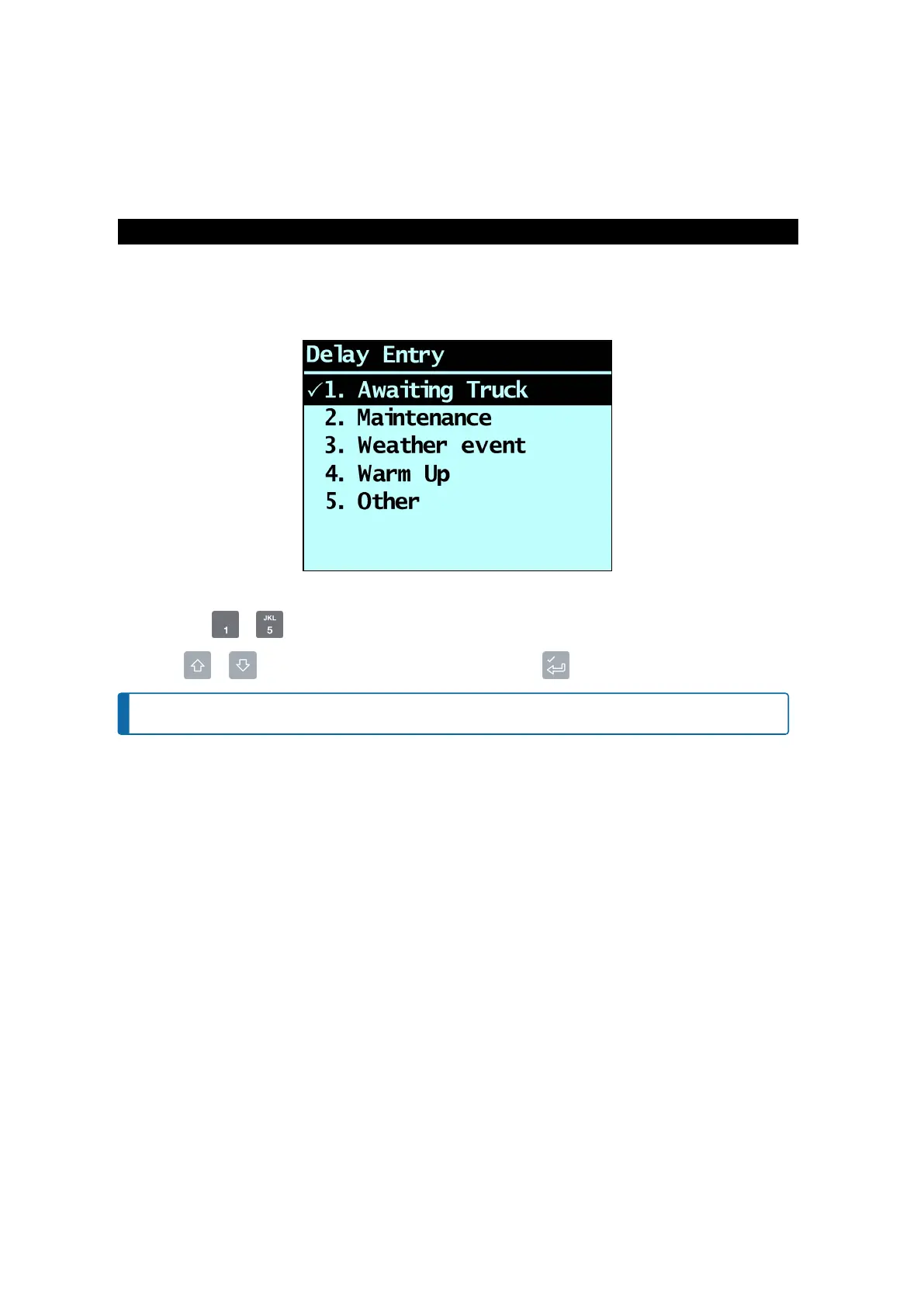
DelayEntry
screensothatyoucanselectthereasonforthedelay.Youcanalsomanuallyenterareasonviathe
PrintMenu
ifyouknowthatthereisgoingtobeadelaytoweighing.
ThereasonsforthesedelaysarerecordedandcanbeusedtogenerateareportusingLoadriteInsight.
Ifyouseethe
DelayEntry
screen,youneedtoenterareasonforthedelaybycompletingthefollowing:
n
Eitheruse to toselectthereasonforthedelay,OR
n
press or toscrollthroughthedelayreasons,thenpress toselectthereason.
NOTE – Ifareasonisnotselectedwithin10seconds,theOtheroptionwillbeautomaticallyselected.
ThedelaywillbesetandtheDelaymessagewilldisplayatthetopofthescreenuntilthenextbucketloadis
added.
Loadrite L2180 loader scales | 25



 To Next Page