Optical Backscatter Reflectometer 4600 11
User Guide
Setting up the OBR
Important
The instrument should always be fully assembled before
turning power on to any of its components.
To set up the OBR
2
1 Remove all the OBR components from the shipping containers and
verify that no components are missing. (See “Components List” on
page 7.)
2 For best performance, place the OBR on a stable surface, capable of
supporting the weight of the entire unit. For the weight and dimensions
of the unit, see Appendix A‚ “Specifications,” on page 213.
Important
Place the OBR away from walls or objects that will restrict
the air flow through the fan duct on the back of the unit.
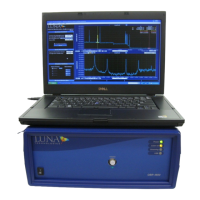
3 Unpack and set up the desktop or laptop PC according the
manufacturer’s instructions provided. If you purchased a desktop PC,
connect the monitor, keyboard, and mouse to the PC, using the cables
provided. For user-supplied PCs, see “Minimum PC Requirements” on
page 204.
Important
Do not turn on to the PC yet.
Do not connect the instrument to the PC until instructed
.
Do not place the laptop on top of the instrument.
4 If printouts are desired, connect a local printer to a printer port (parallel
or USB) on the PC using the proper cable for the printer, according to
the PC manufacturer instructions enclosed. For information on printing
from the OBR software, see “Printing Graphs” on page 76.


 To Next Page