248
[3] CHECKING/CLEANING/REPLACING AIR CLEANER
• Do not clean and replace the air cleaner when the engine is in rotation.
Such action may cause damage to the engine.
• When using the compressed air, watch out for dust scattering, which may cause bodily
accidents. Wear goggles, dust mask and other protective equipment.
[Inspection]
1. Open the right cover.
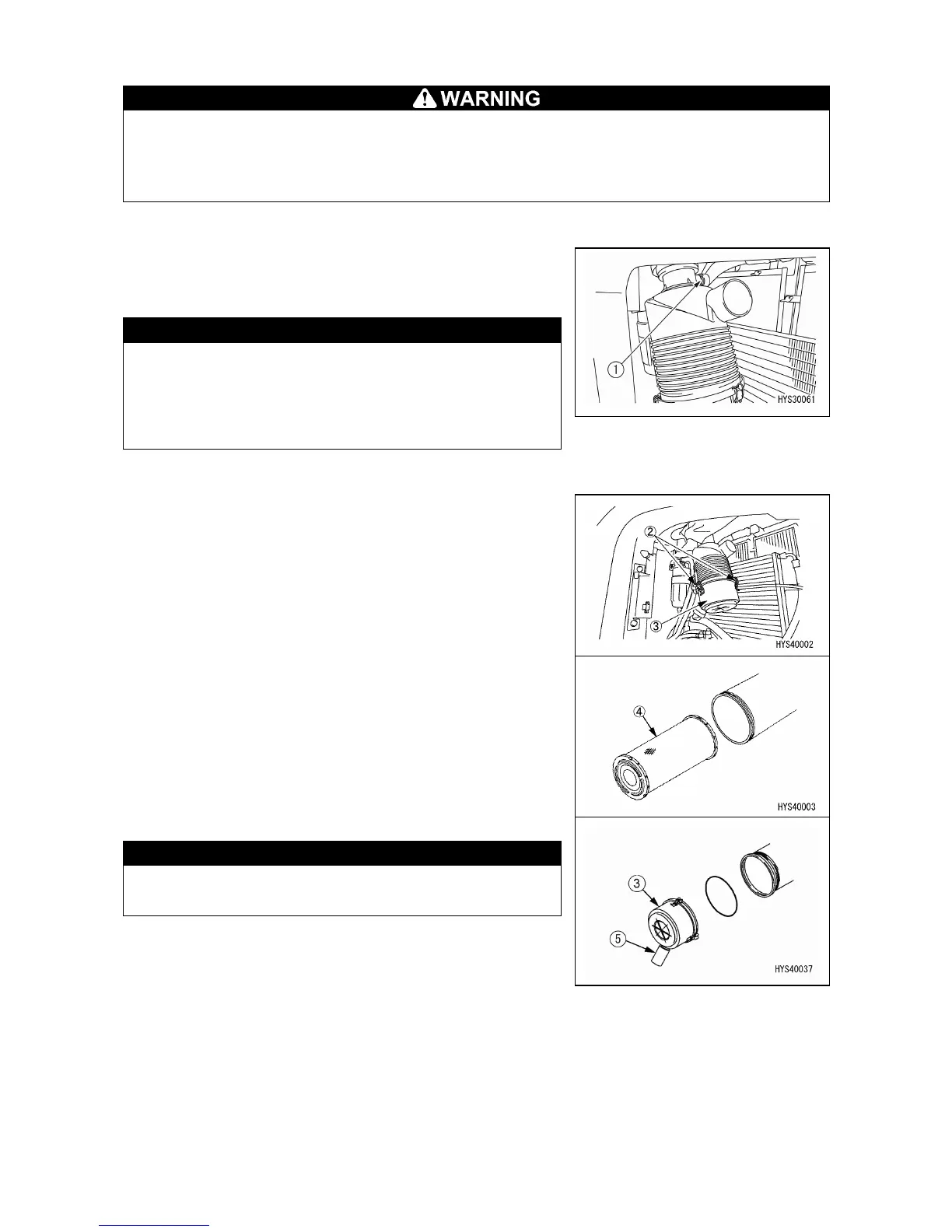
2. If the transparent window of dust indicator (1) shows a
red piston, clean the air cleaner element.
Until the transparent window of dust indicator (1)
shows a red piston, do not clean the air cleaner
If the element is frequently cleaned before the red
piston appears, the air cleaner fails to show its true
performance and its efficiency is spoiled.
[CLEANING/REPLACING THE ELEMENT]
1. Open the right cover.
2. Remove the clamps (2) (3 locations) of air cleaner and
take off the cover (3).
3. Take out the element (4).
4. Clean the inside of air cleaner body and the cover (3).
When cleaning the cover (3), do not remove the
vacuator valve (5).
5. Check the vacuator valve (5) for any degradation of
clogging.



 To Next Page