65
2.1.1 MONITOR BASIC ACTION AND DISPLAY
[1] REAR VIEW CAMERA SELECTOR SWITCH
When the rear view camera selector switch (1) is pressed
on the top screen, the camera image is displayed on the
monitor.
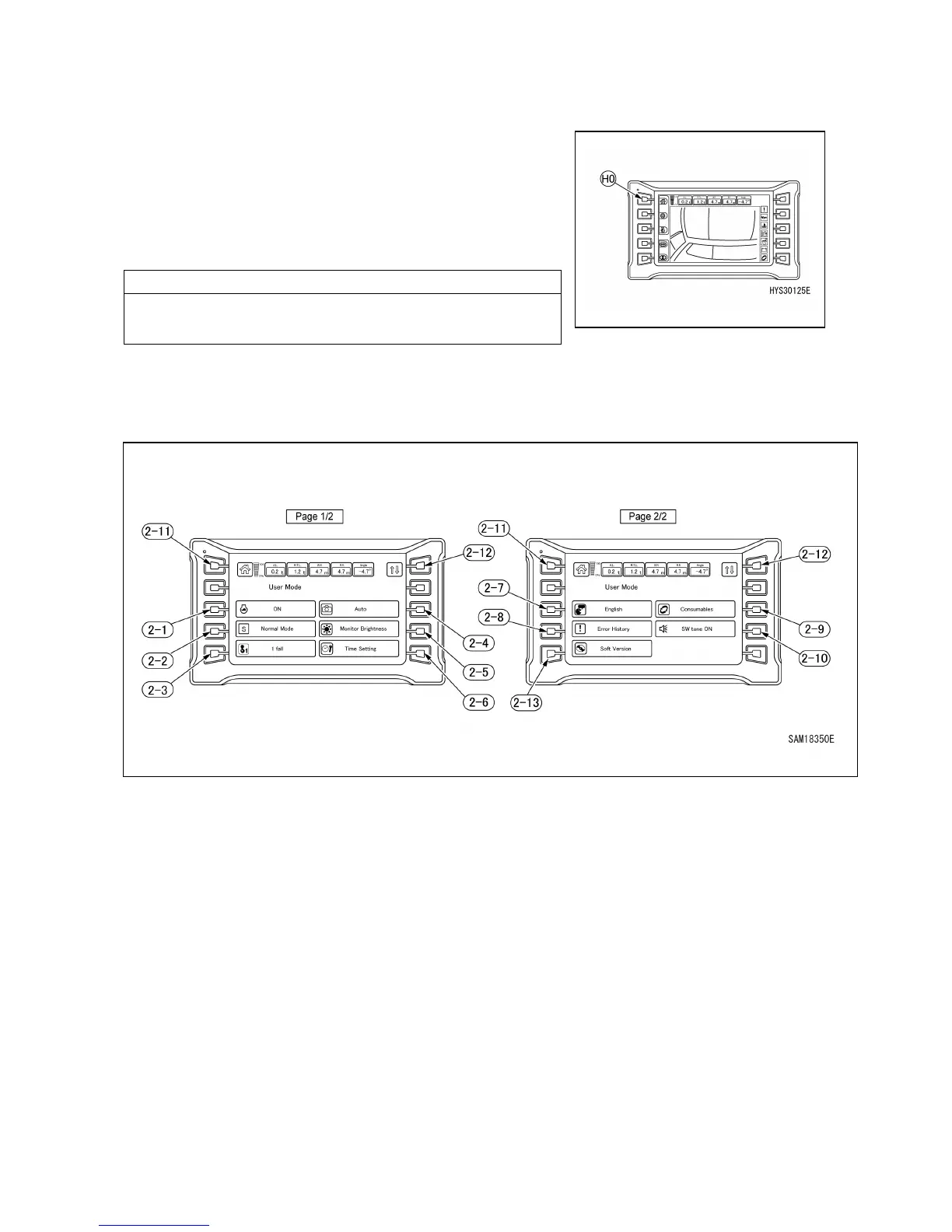
When the home switch (HO) is pressed, the screen returns to
the top screen.
If it is difficult to see the camera image, adjust the camera
angle.
[2] USER MODE SWITCH
When the user mode switch (2) is pressed on the top screen, the user mode is displayed.
(2-1) Auto deceleration ON/OFF change
(2-2) Working mode change
(2-3) Hook fall number change
(2-4) Rear-view camera auto ON/OFF
selector switch
(2-5) Monitor brightness adjustment
(2-6) Time setting screen
(2-7) Language setting
(2-8) Error history display
(2-9) Consumables display
(2-10) Switch operation sound ON/OFF change
(2-11) Home switch
(2-12) Display page change
(2-13) Software version check



 To Next Page