344
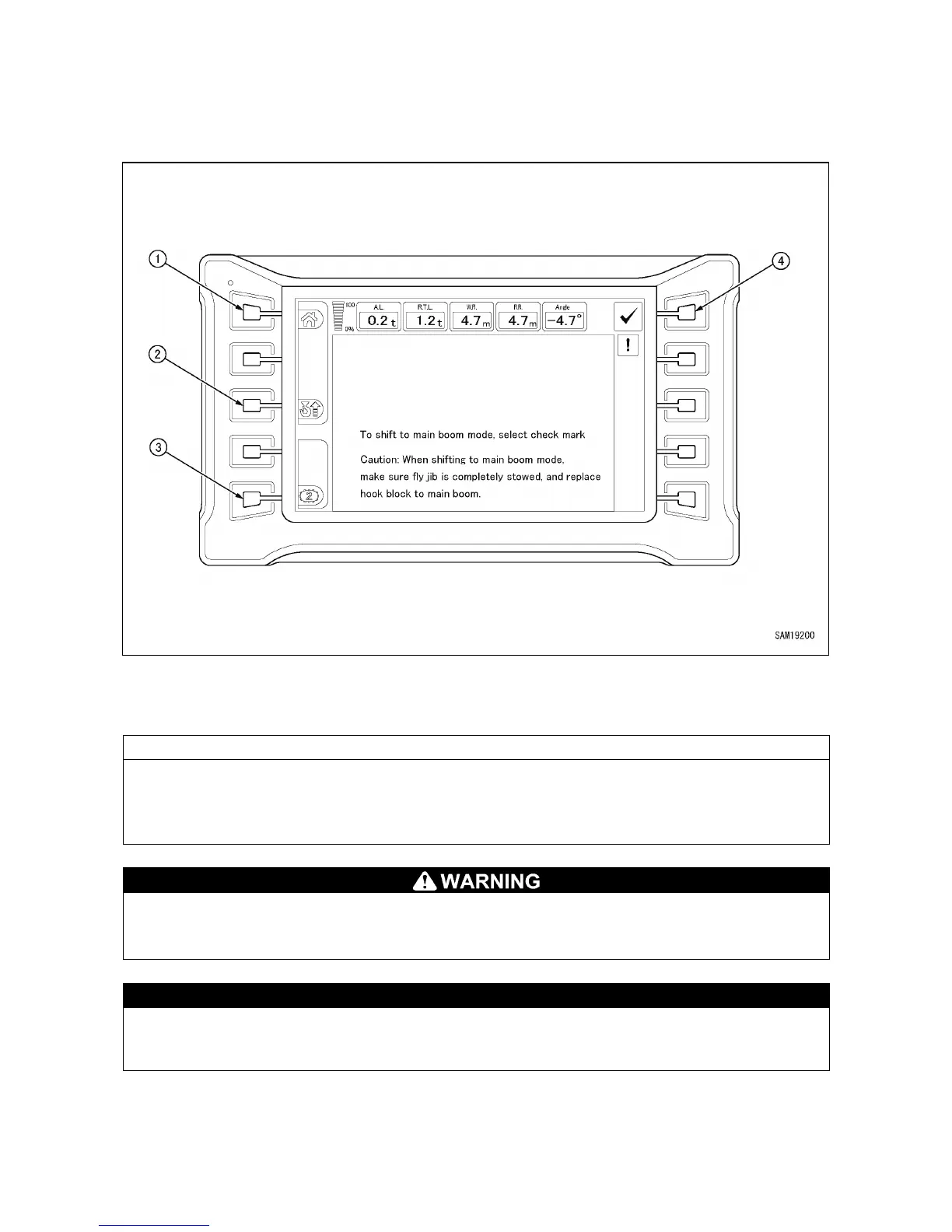
5.1.2 MONITOR DISPLAY WHEN FLY-JIB IS STOWED
When the Fly-jib is stowed just after it is used, the monitor changes to the following main boom work
selection screen.
(1)
Rear view camera selector switch
(2)
Hook stowage switch
(3)
Travel 1st speed/2nd speed selector switch
(4)
Check switch
When the Fly-jib is stowed, CAUTION is displayed on the monitor.
After checking that the Fly-jib is completely stowed and replacing the hook with the main boom, press
the check switch (4). The mode exits from the Fly-jib mode and the screen moves to the top screen of
the main boom mode.
Do not perform work in the main boom mode by pressing the check switch (4) when the Fly-jib
is not completely stowed. Otherwise, the boom or Fly-
jib can break or fall down, leading to a
serious personal accident such as death or serious injury.
The rear view camera selector switch (1), hook stowage switch (2) and travel 1st speed/2nd
speed selector switch (3) can be operated without pressing the check switch (4) for a case in
which the Fly-jib is temporarily stowed for the purpose of transportation, etc.



 To Next Page