36
5.4.1.3 Nameplate Information
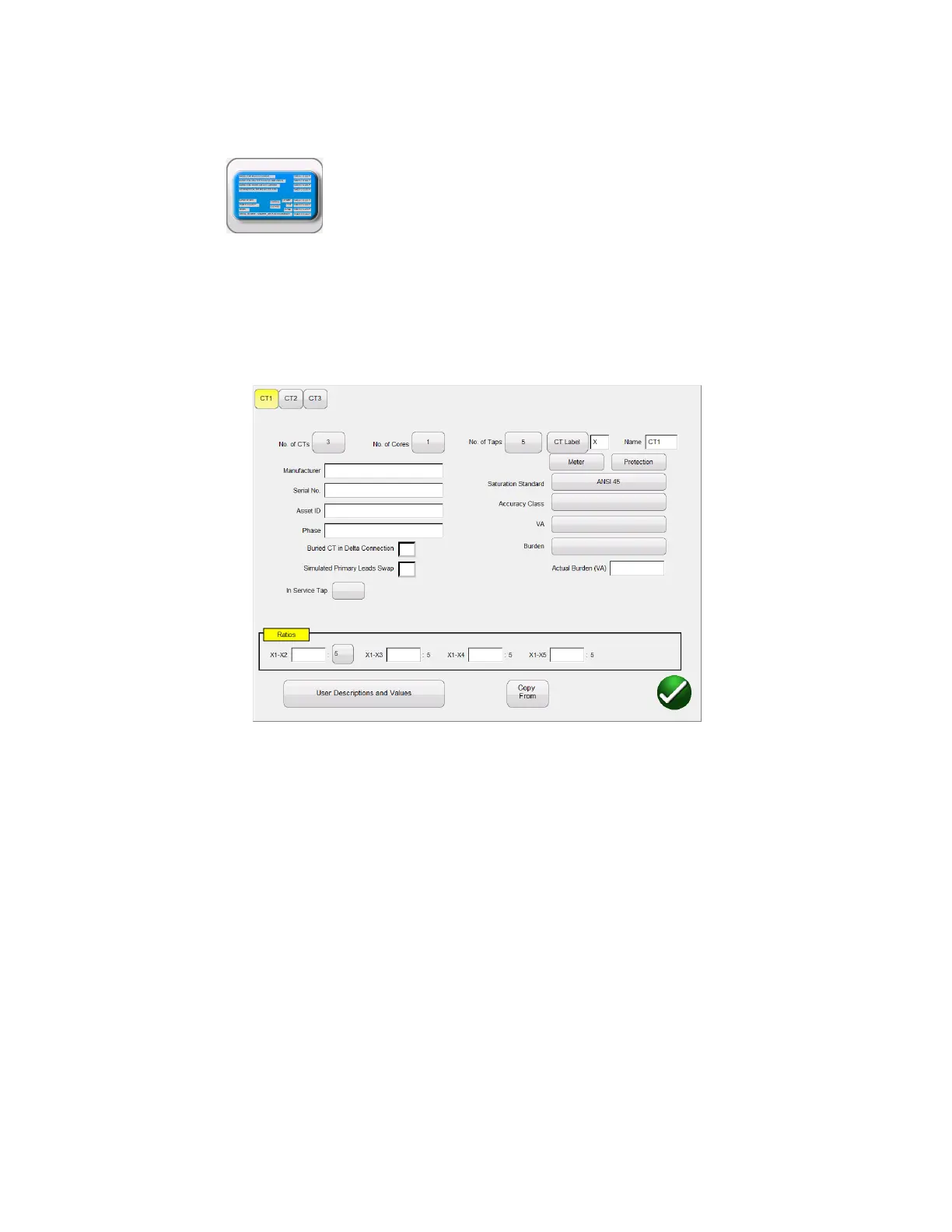
Selection of Name Plate Information, brings the user to the screen allowing the user
to input nameplate information. This screen will vary depending upon whether the MVCT is set for CT
Testing or VT Testing. If the user has selected to put multiple CTs into one report, each CT will have a
designation at the top of the dialog. The active CT will be high-lighted in yellow and the user can input
information about the CT by selecting the appropriate button or field:
Figure 14 Name Plate Data – CT Testing Mode
Nameplate page is used to fill out the Name plate data of CT under test.
Number of CTs: If controlling MVCT with Megger STVI then pp to 12 CT can be included within
one report. If controlling MVCT with PowerDB installed on PC then up to 18 CT can be included
in one report.
Number of Taps: CTs with up to 6 taps can be tested
CT Label: The user can change the label to any desired 2 characters. These characters will be
assigned to the tap designations
CT Name: The user can select up to 6 characters. These 6 characters will be combined
with the 2 CT Label characters to generate the CT name. For example in a file containing 3 CT,
the user might choose PhA, PhB, and PhC for the name and X, Y, Z for the different labels. This
would result in the 3 CT contained in the file being called PhA-X, PhB-Y, and PhC-Z
Manufacturer: By touching the screen in this location a keyboard will appear that
will allow the user to enter the manufacturer of the CT.



 To Next Page