EasyManua.ls Logo

Melco Bravo - Page 24

Melco Bravo
271 pages
Print Icon
To Next Page IconTo Next Page
To Previous Page IconTo Previous Page
Loading...
24 of 271
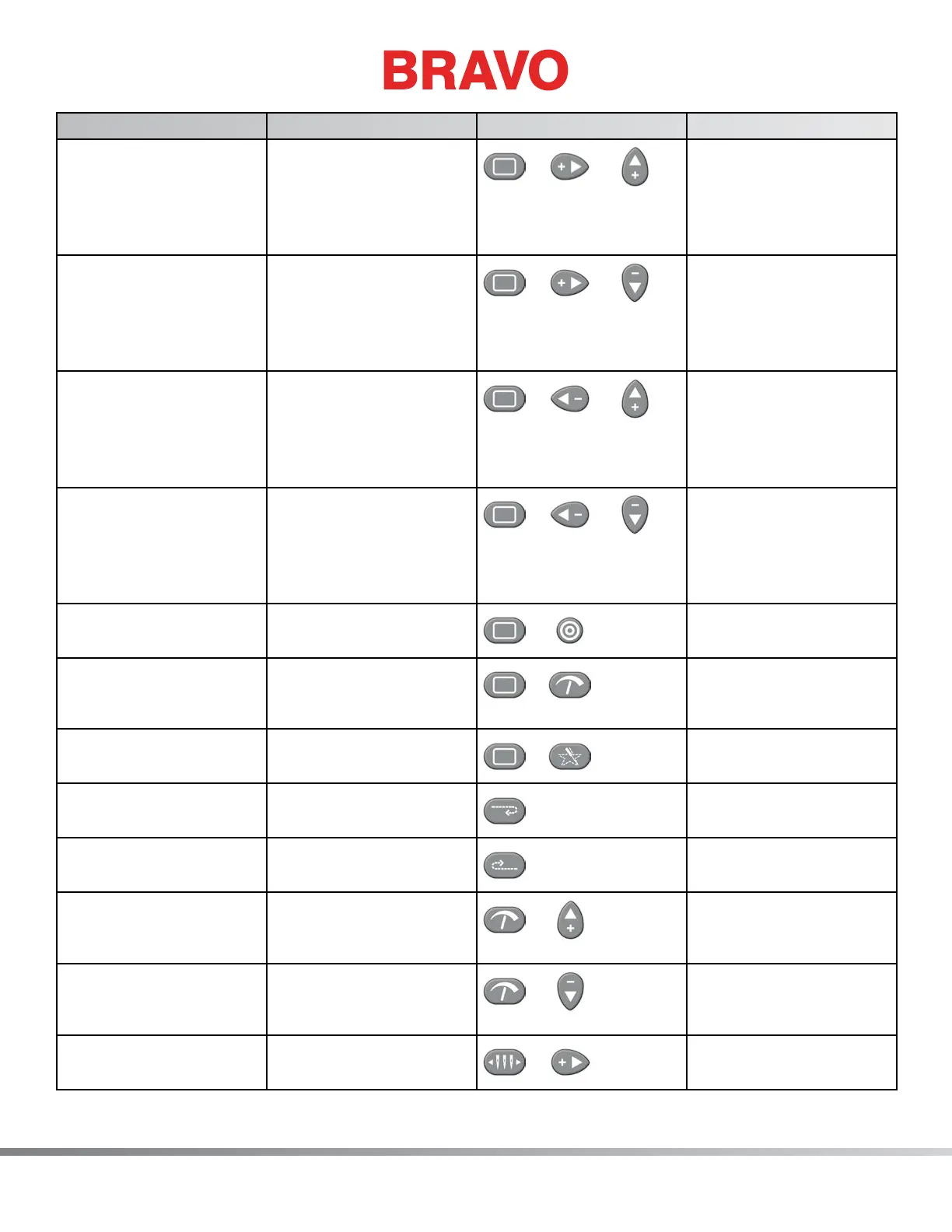
Function Press these key(s) Keypad Pictures Notes
To move the hoop down
and to the left (moves
needle position up and
to the right in relation to
the hoop)
Hoop + Right + Up
+
+
Always trace after
moving
To move the hoop up
and to the left (moves
needle position down
and to the right in rela-
tion to the hoop)
Hoop + Right + Down
+
+
Always trace after
moving
To move the hoop down
and to the right (moves
needle position up and
to the left in relation to
the hoop)
Hoop + Left + Up
+
+
Always trace after
moving
To move the hoop up
and to the right (moves
needle position down
and to the left in rela-
tion to the hoop)
Hoop + Left + Down
+
+
Always trace after
moving
To center the current
hoop
Hoop + Center
+
Center hoop before
beginning to sew
Clears and ignores
the “Trim Required”
message.
Hoop + Adjustment
+
This indicates to the
machine that no thread
is through the cloth.
To trace the design Hoop + Trace
+
Repeat to trace again
To frame back one stitch
at a time
Hold down the Frame
Back key
Press the stop key to
stop framing
To frame forward one
stitch at a time
Hold down the Frame
Forward key
Press the stop key to
stop framing
To increase the sewing
speed
Adjustment + Up Arrow
+
The speed will increase
50 spm each time
pressed
To decrease the sewing
speed
Adjustment + Down
Arrow
+
The speed will decrease
50 spm each time
pressed
To move the needlecase
to the right
Needlecase key + Right
Arrow
+
Table of Contents

Table of Contents

Related product manuals