MINI Hawk High Performance Imager User’s Manual 1-3
Quick Start
Step 2 — Connect the System
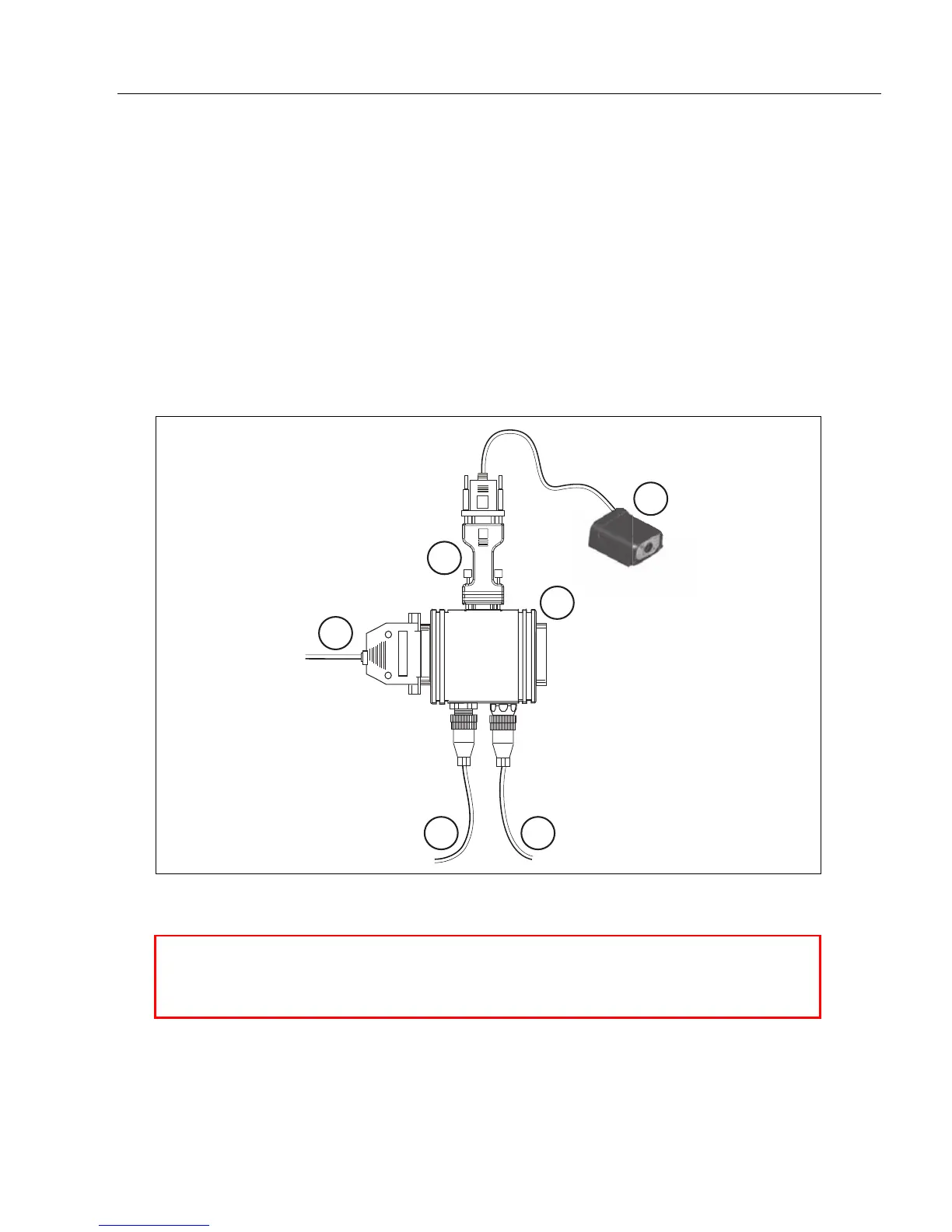
Connecting by RS-232/RS-422/RS-485
• Connect the imager (1) to the IB-131/IC-332 interface (2) and (3).
• Connect the host cable (6) to the host and to the host port on the IB-131 (3).
• Connect the object detector (5) to the IB-131 (3).
• Connect the power supply (4) to the IB-131 (3).
• Apply power to the imager.
Important:
If you are using a
USB
model, you must connect the device to the host computer
before
powering-on. Otherwise the unit will not be recognized as a USB device.
Scanner
Network
Host
1
2
3
6
4 5
Hardware Configuration
Caution: Be sure that all cables are connected BEFORE applying power
to the system. Always power down BEFORE disconnecting any cables.



 To Next Page