8-4 MINI Hawk High Performance Imager User’s Manual
Overview of Symbol Quality
Overview of Symbol Quality
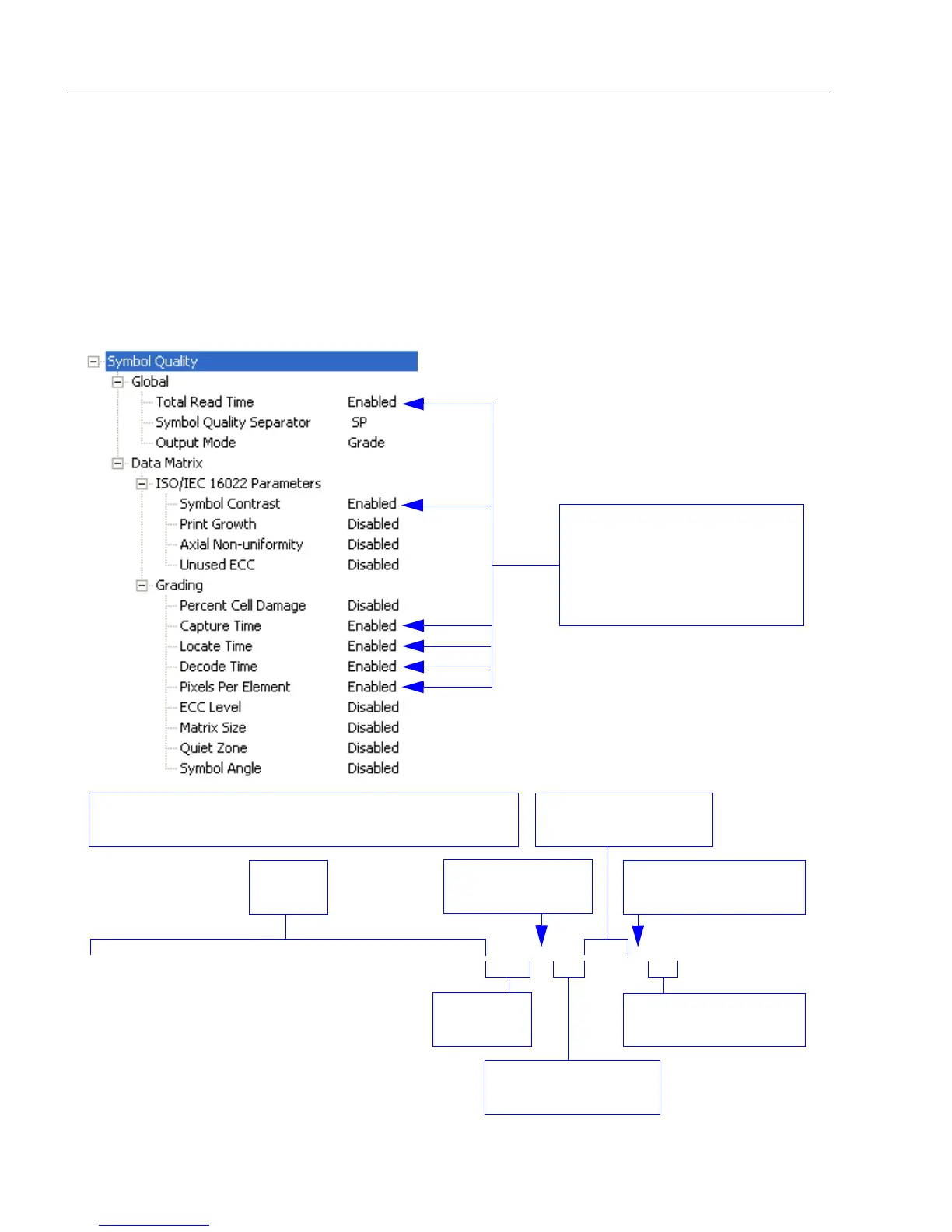
Information about symbol quality and timing can be appended to symbol data by enabling
specific evaluation parameters. The order in which these values are appended corresponds
directly to the order in which they appear in ESP‘s Symbol Quality tree control.
Symbol Quality parameters are separated into ISO/IEC 16022 Symbol Quality Output and
Microscan Symbol Quality Output.
Total Read Time, Symbol Quality Separator, and Output Mode are common to both
ISO/IEC 16022 and Microscan Grading Parameters.
The enabled Symbol
Quality parameters are
appended to symbol data
output in the order
that they
appear in the tree control.
0123456789abcdefghijklmnopqrstuv 256 A 30 210 3 17
Symbol
Data
Symbol Contrast
(ISO/IEC 16022)
Capture Time
(Microscan Grading)
Locate Time
(Microscan Grading)
Total
Read Time
Decode Time
(Microscan Grading)
Pixels Per Element
(Microscan Grading)
If you enable the outputs shown above, they will be returned
in this order:



 To Next Page