EasyManua.ls Logo

Microscan MINI Hawk - Dynamic Setup

Microscan MINI Hawk
372 pages
Print Icon
To Next Page IconTo Next Page
To Previous Page IconTo Previous Page
Loading...
MINI Hawk High Performance Imager User’s Manual 10-13
Camera and IP Setup
Dynamic Setup
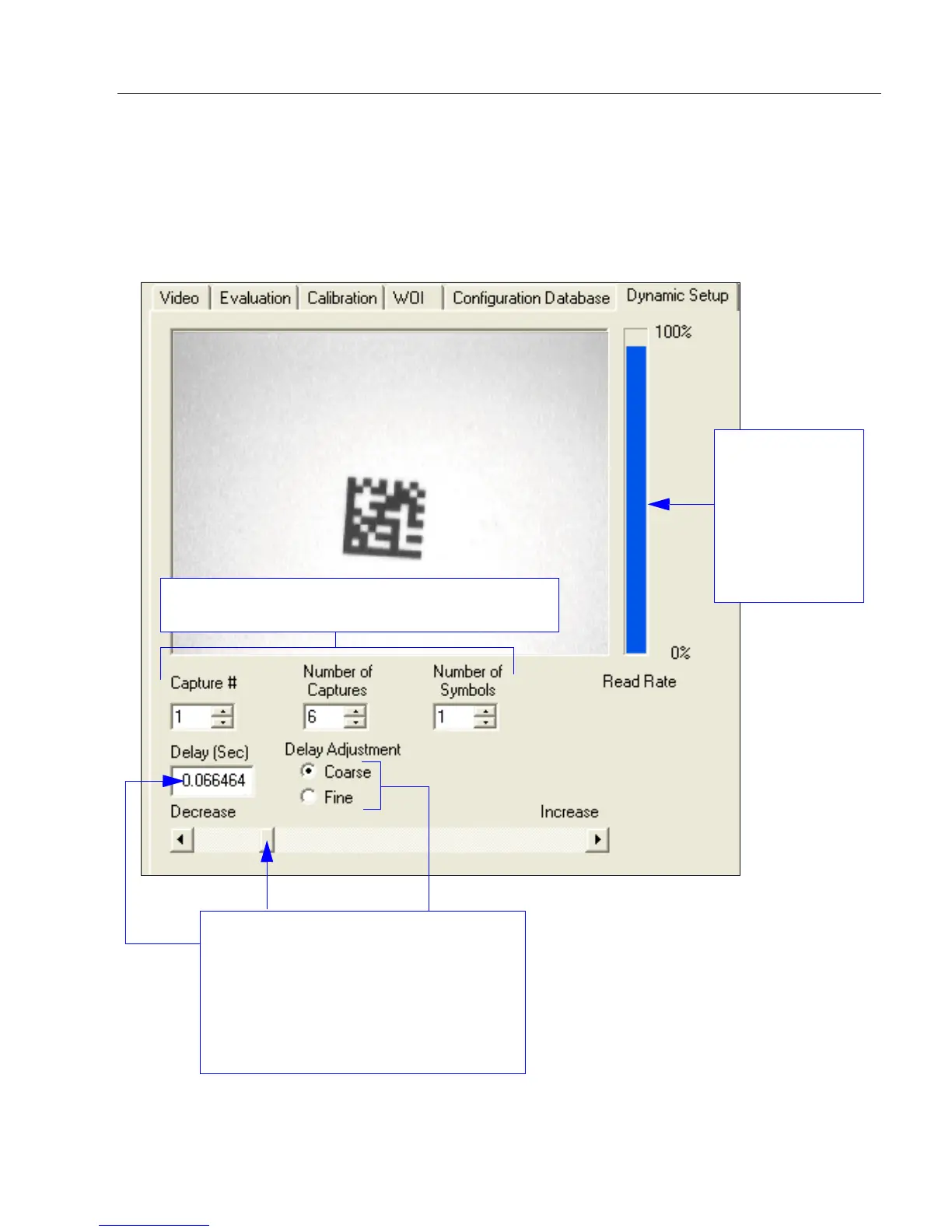
Dynamic Setup
is used to calculate image capture timing during a read cycle. Without proper
timing, the imager will not be able to decode all symbols in a read cycle. An external trigger is
used to activate image captures so the user can make timing adjustments as capture events
occur.
Read Rate is
represented
graphically in
real-time as the
user makes
adjustments to
the time delay
between image
captures.
The Delay Adjustment slider allows the
user extremely precise control of the time
delays between image captures in a read
cycle. Delay values are shown in seconds
in the field above the slider. The Coarse
and Fine Delay Adjustment options
determine whether larger or smaller
adjustment increments will be used.
The user can control Capture #, Number of Captures,
and Number of Symbols using these spin boxes.


Table of Contents

Other manuals for Microscan MINI Hawk

Related product manuals