14-4 MINI Hawk High Performance Imager User’s Manual
Format Assign
Format Assign
Symbol Number
Status
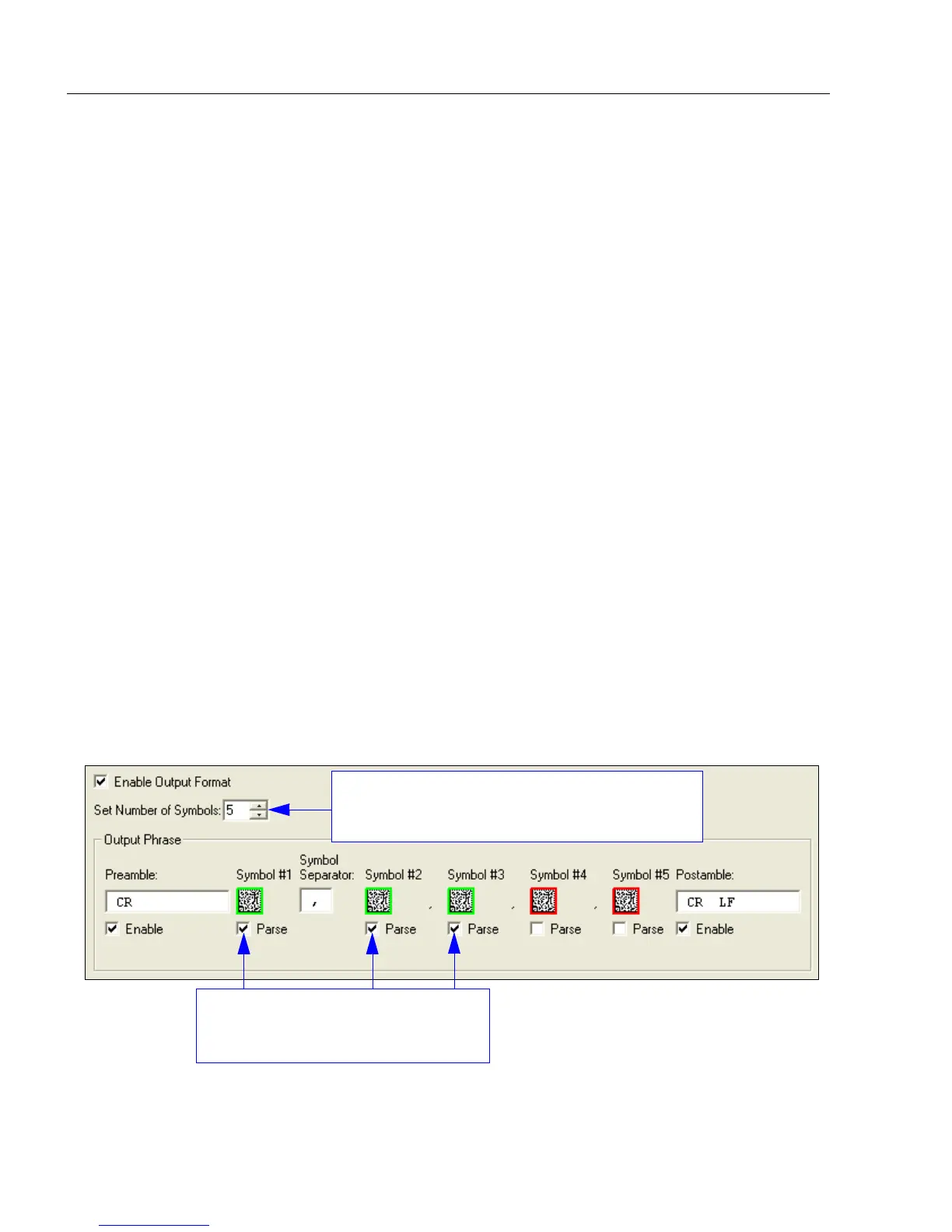
Format Assign by ESP
Definition: Symbol Number refers to the number of the symbol to which output formatting
will apply. For example, if you wish to enable user-defined formatting to
symbol # 2 in a multisymbol read cycle, you would send the command
<K742,2,1>.
Note that the number of symbols may exceed the format capabilities.
Serial Cmd: <K742,symbol number,status>
Options: 1 to 10
1 = Formatted output status for symbol # 1.
2 = Formatted output status for symbol # 2.
...
10 = Formatted output status for symbol # 10.
Definition: Status refers to the user-defined formatting of a selected symbol position in
the read cycle result. Note that there is also a global formatting “enable”
command that must be set for the formatting to be applied.
Serial Cmd: <K742,symbol number,status>
Default: Disabled
Options: 0 = Disabled 1 = Enabled (Assign parameters to specified symbol.)
Then check the Parse boxes beneath
the symbols that you wish to format
for user-defined output.
Use the Set Number of Symbols spin box to
determine the number of symbols to be included
in the output phrase.



 To Next Page