MINI Hawk High Performance Imager User’s Manual A-29
Appendices
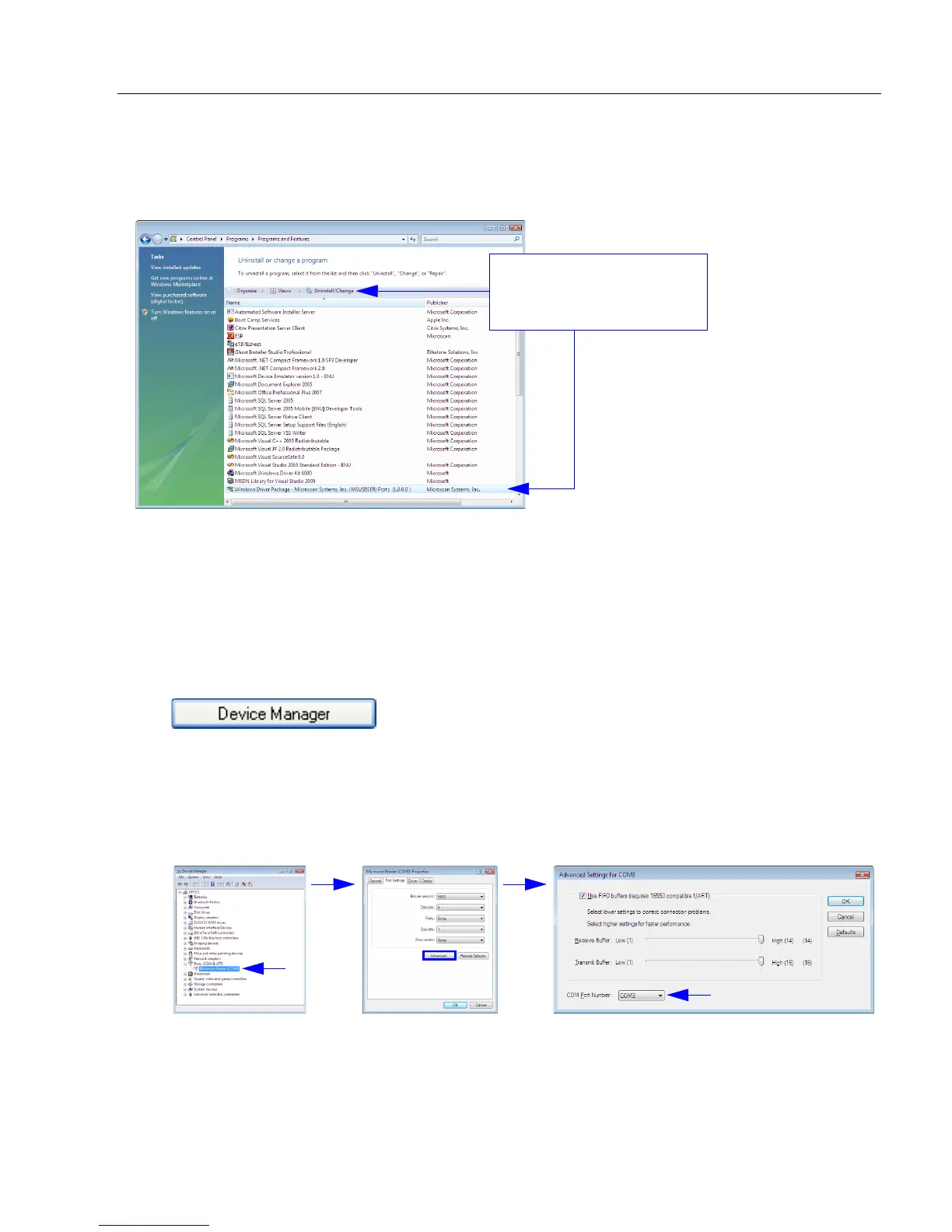
Uninstalling the USB-to-Serial Virtual COM Port Driver
Important: You must uninstall the USB-to-Serial Virtual COM Port Driver any time you
require high-speed USB connectivity (to upload images using EZ Trax, for example).
To use the Virtual COM Port again, follow the steps above to re-install the driver.
Changing the COM Port
Follow these steps to change the reader’s COM Port:
1. Right-click on My Computer in the Windows Start menu and select Properties.
2. Select the Hardware tab in the System Properties dialog and click the Device
Manager button.
3. Expand the Ports (COM & LPT) item on the Device Manager menu. Right-click on
Microscan Reader and select Properties.
4. Select the Port Settings tab in the Properties dialog and click the Advanced button.
5. Expand the COM Port Number menu on the Advanced Settings dialog and select
your new COM Port number.
You are now ready to begin using the new COM Port.
Find the driver on the list
of programs, select it, then
click Uninstall/Change.



 To Next Page